
Mastering React 19 Part 2: Server Components & Server Actions [Tutorial]


React 19 was a major milestone in the framework’s evolution. Two of the biggest achievements were the release of Server Components and Server Actions, the server-side aspect of React 19’s full-stack vision. It’s no exaggeration to say these features are a colossal game changer in how React developers will create full-stack code.
If you haven’t yet familiarized yourself with the client-side changes introduced in React 19, I covered them in part I of this series. In part II, we’re going to explore Server Components and Server Actions using a simple Next.js app – because, according to the React Team, Next.js’ implementation of Server Components most closely aligns with React’s direction as a full-stack UI framework.
Table Of Contents
- What Exactly Are React 19 Server Components?
- Async Server Components and Data Fetching
- Integrating Client Components in React 19 and Next.js
- Mixing React Server and Client Components
- Server Actions: Mutating Server-Side Data Without an API
- Potential Challenges with Server Actions and Server Components
- Upgrading to Next 15 and React 19
- Wrapping Up: React 19 Server Components and Server Actions
My goal in this article is to explore and answer some questions that are foundational to the latest React release:
- What exactly are Server Components and async Server Components?
- How do Server Components interact with Client Components?
- What are Server Actions, and how are they used in React 19?
To explore these questions, we’ll use our simple example app to demonstrate:
- How to implement server components to streamline data fetching.
- How Client Components can use Server Actions to mutate data on the server more cleanly, avoiding the need for useEffect or exposing APIs to the front-end.
- Explore the limitations and considerations of Server Components and Server Actions to get a balanced perspective.
By the end of this piece, you’ll have a clear understanding of these concepts and be able to decide whether now is the time to embrace full-stack React, recognize situations where this approach might not fit, and identify potential risks to keep in mind.
With that, let’s dig in!
What Exactly Are React 19 Server Components?
At their core, React 19 Server Components are just components that render HTML entirely on the server. Think of them as a way to build a UI that never sends JavaScript to the client for execution—only the rendered output.

We’ll start with the most basic example. In my Next.js app I created a simple home page. It could easily be a client-side component:
1 export default function Home() {2 console.log("this should only output on the server");3 return (4 <>5 <h1>Home Page</h1>6 <p>This is a Server Component</p>7 </>8 );9 }
It looks like this:
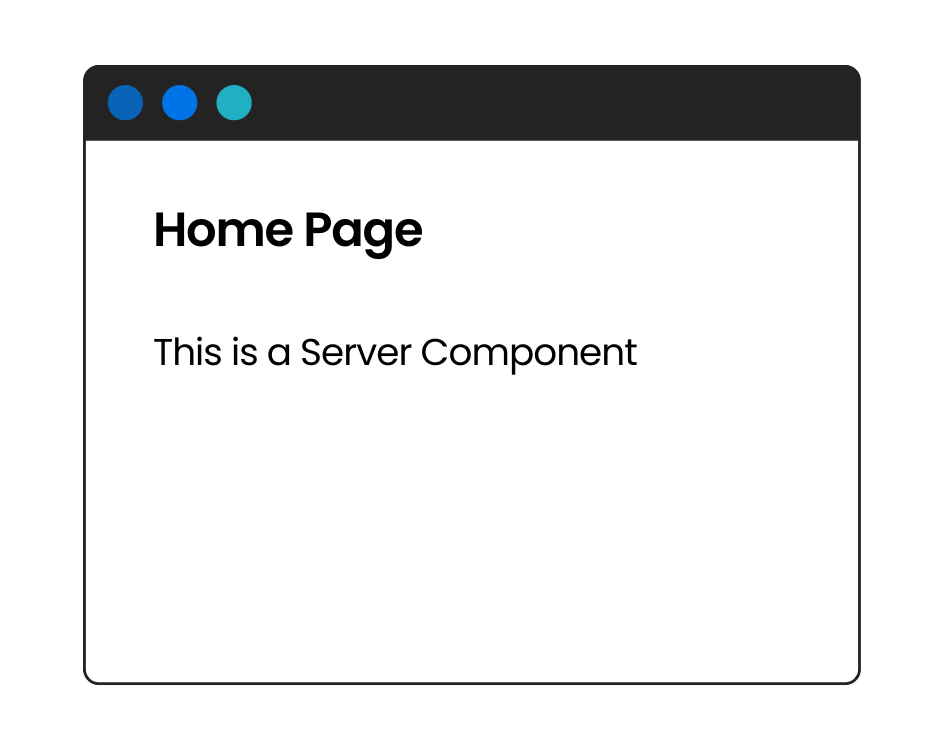
So, what makes it a Server Component? By default, all components in Next.js 15 are Server Components. This is taken care of automatically by the Next.js bundler and App Router.
Server components only run Javascript on the server side. That means if we fire up our Next.js dev environment and navigate to the home page (“/”), we’ll see this in our terminal:

Clearly, our console.log code is only executing on the server. In the browser console, we see nothing:

At their core, Server Components are all about running JavaScript exclusively on the server. In fact, in this type of component, JavaScript might not even be necessary—here, we’re simply outputting to the server’s console as an example.
Server Components operate within the constraints of the server environment, meaning hooks, browser APIs, and objects like window are unavailable because they don’t exist on the server. It’s similar to working in Node.js rather than JavaScript in the browser, which defines both the constraints and opportunities.
In the next section, we’ll look at how Server Components fetch data directly on the server and deliver it efficiently to the client, all while achieving a zero-JavaScript bundle size on the client side. Their primary role is simple: to generate and send HTML to the client—nothing more.

Async Server Components and Data Fetching
Server Components can be asynchronous functions, and this is where things get really interesting. For example, they can fetch data from a database or third-party API and preprocess it using resource-intensive libraries (e.g., converting Markdown to HTML). Despite this complexity, the end result remains the same as simpler scenarios: the client receives only the rendered HTML.
Databound components are particularly suited to async functions, as they often need to await data before rendering it.
In Part I of our exploration of React 19, we looked at editing a user bio on a site. A simple component might display the current bio with a link to edit it:
1 import { prisma } from "@/lib/prisma";2 import Link from "next/link";34 async function CurrentBio() {5 const userId = 1;6 await new Promise((resolve) => setTimeout(resolve, 1000));7 const user = await prisma.user.findUnique({8 where: {9 id: userId,10 },11 });12 return (13 <>14 <p>{user.bio}</p>15 <Link href={"/bio/edit"}>Edit your bio</Link>16 </>17 );18 }19 export default CurrentBio;
Note: On line 5, I’ve hard-coded the userId for simplicity in this demo. In a real application, this value would typically be provided through authentication middleware.
In this example, on line 7, I’m using Prisma, a database ORM. And look how easy this is from the server side! I’m doing something I didn’t even realize I’d been longing to do—writing data-fetching React code with async/await syntax. It’s simple, it’s clear, and honestly, it’s pretty [expletive] great!
Here’s what we see in the browser:
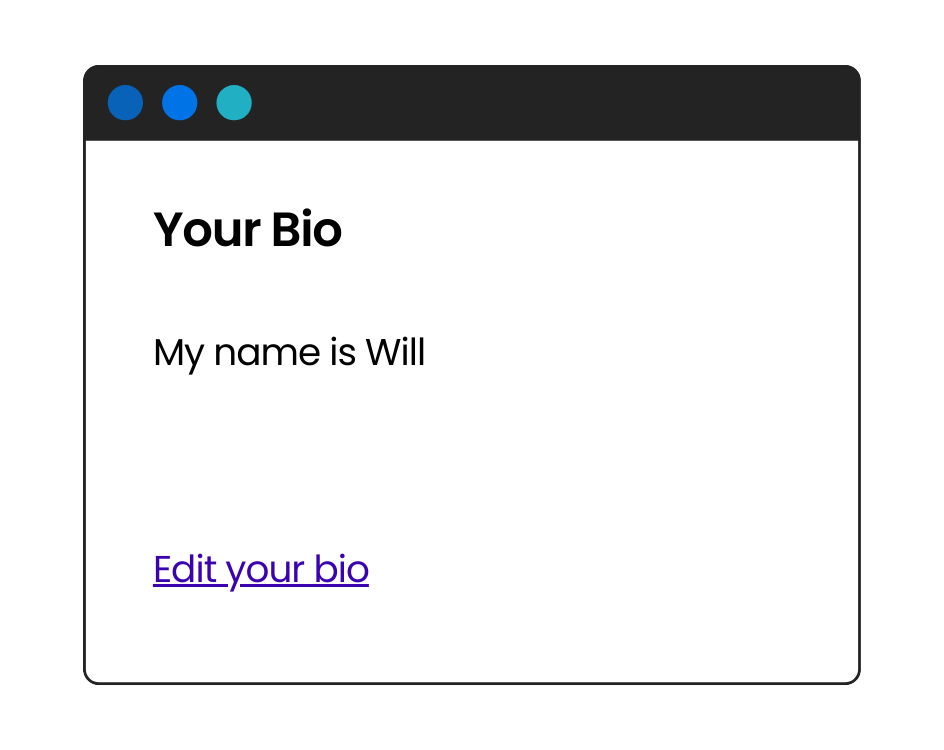
One major advantage is that the client never receives details about how the data was queried. It doesn’t know I’m using Prisma, nor does it reveal any SQL, Prisma model information, or object keys used in the query. The client only gets the rendered HTML—in this case, the bio text wrapped in a <p> tag.
This is both fascinating and crucial. For instance, if you’re querying a third-party API on the server, it’s even easier to keep API keys secure. Of course, if I were making the request from the client, I’d use secure endpoints, but it’s reassuring to know that nothing sensitive can be exposed in the client’s browser dev tools or downloaded bundles!
Suspense with Server Components
In this example, all we’re doing is fetching the user’s record and displaying it. You might have noticed that on line 6, I added a 1-second await delay to simulate a busy server. This is intentional because I want to show you something cool—how the /bio page handles displaying this component:
1 import CurrentBio from "@/components/CurrentBio";2 import { Suspense } from "react";3 export default function Bio() {4 return (5 <>6 <h1>Your Bio</h1>7 <Suspense fallback={"loading..."}>8 <CurrentBio />9 </Suspense>10 </>11 );12 }
Notice that we’re using a <Suspense> component on line 7. Both our <CurrentBio /> and <Bio /> page components are Server Components, and they would render fine without <Suspense> by simply waiting before sending anything to the client. What <Suspense> does, however, is send the page immediately with the fallback content displayed.

Once the promises for <CurrentBio /> are resolved, React and Next.js stream in the results. This streaming is fully managed by React and Next.js—no separate requests are made, unlike what we’d expect in a client-side <Suspense> scenario using useEffect for data fetching.
In this case, the results are also cached by Next.js. Until the database result is invalidated, no unnecessary database calls are made to fetch the record. While many APIs also cache GET requests, it’s fantastic that Next.js handles this for us out of the box.
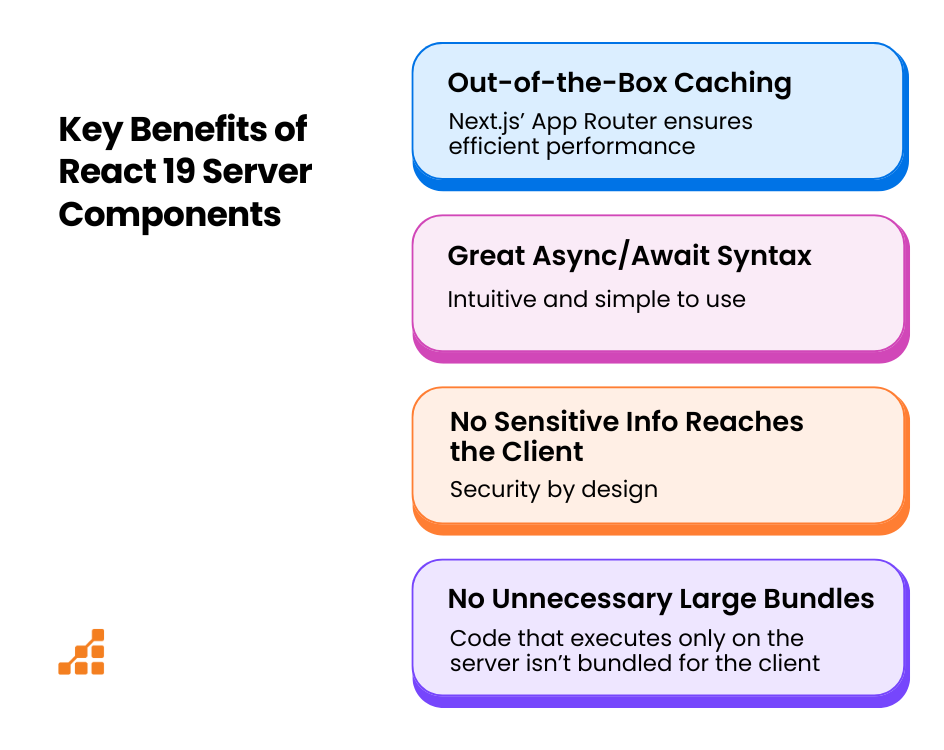
In summary, there are four key advantages:
- Great async/await syntax: Intuitive and simple to use.
- No unnecessary large bundles: Code that executes only on the server isn’t bundled for the client.
- No sensitive info reaches the client: Security by design.
- Out-of-the-box caching: Next.js’ App Router ensures efficient performance.
Integrating Client Components in React 19 and Next.js
Client Components are the functional components we’ve always been familiar with—they use hooks, log to the client console, and interact with browser APIs like localStorage. In React 19 and Next.js 15, these components are specifically used for interactivity and local state management.
Since all components in Next.js are Server Components by default, we need to add the “use client” directive to tell the Next.js bundler that a component is intended to run on the client rather than the server.
Let’s revisit our simple homepage example. Here’s a straightforward Client Component that tracks the number of clicks, incrementing the state value with each click:
1 "use client";2 import { useState } from "react";34 export default function HomeClient() {5 const [clicks, setClicks] = useState(0);6 return (7 <button8 onClick={() => {9 setClicks(clicks + 1);10 }}11 >12 Click Me ({clicks})13 </button>14 );15 }
If we don’t include that “use client” directive, we’ll see this:
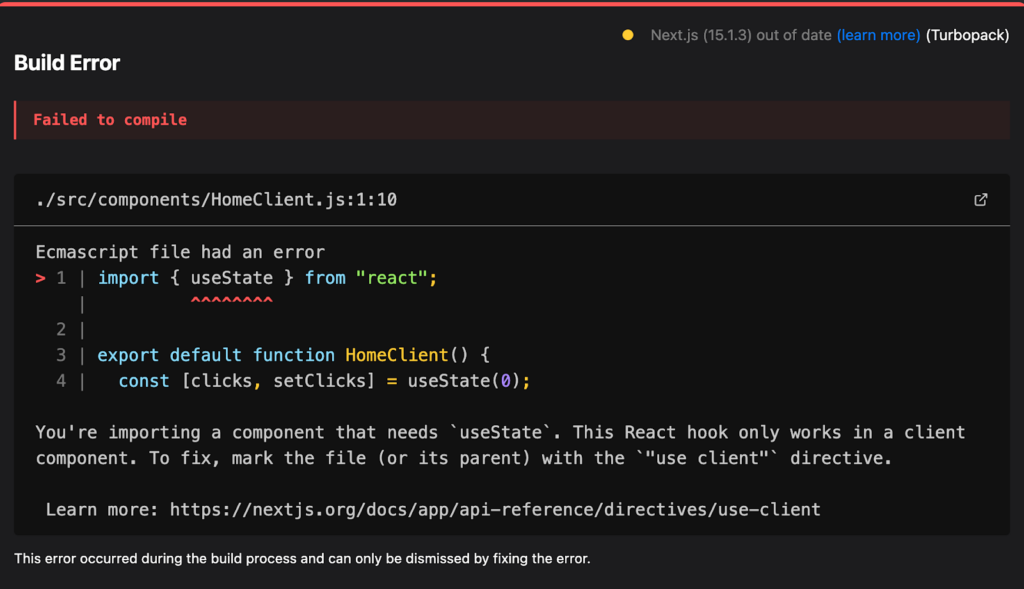
That’s because client-side JavaScript, including React hooks, doesn’t run on the server. Server Components have no concept of lifecycle or re-rendering on state changes because they don’t maintain state. However, as long as we mark the file or function with “use client”, we can use all the React hook functionality and browser APIs we’re accustomed to.
Integrating a Client Component is straightforward. Simply include it in our Page.js file—for example, in the Home component that renders the / route for the app’s homepage:
1 import HomeClient from "@/components/HomeClient";2 export default function Home() {3 console.log("this should only output on the server");4 return (5 <>6 <h1>Home Page</h1>7 <p>This is a Server Component</p>8 <h4>Below is a Client Component:</h4>9 <HomeClient />10 </>11 );12 }
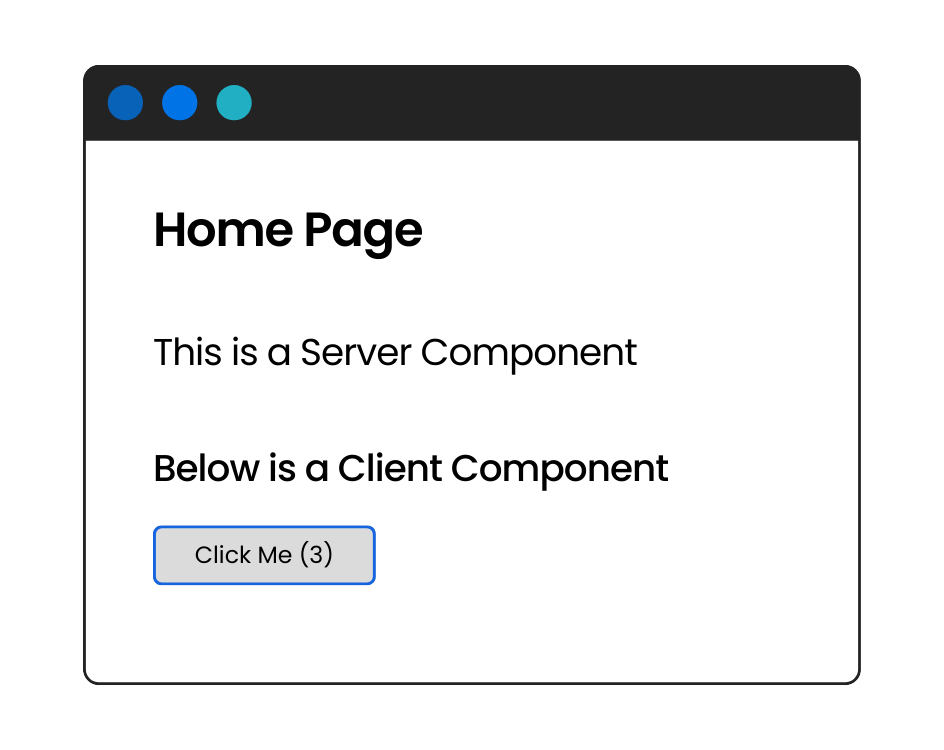
Embedding client components within Server Components is as simple as integrating them. Next.js and React will take care of bundling and streaming the server and client components into the app component tree.
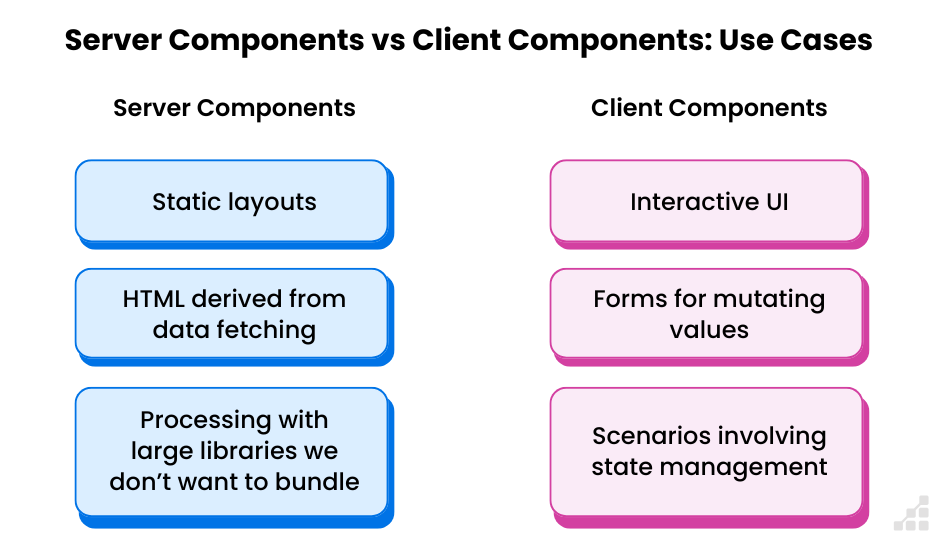
Mixing React Server and Client Components
Embedding Client Components within a Server Component is straightforward, as we’ve seen. But what about embedding a Server Component within a Client Component?
The basic rule is this: Once a component is marked as client-side with the “use client” directive, all of its children will run on the client—even if the imported child is a Server Component.
Errors with Async Server Components in Client Components
What happens if we try to embed an async Server Component within a Client Component? According to one blog, the primary issue is the potential exposure of an API key on the client. However, I found their explanation unclear—it didn’t seem like they actually tested this scenario.
Here’s what happened when I tried embedding an async Server Component as a child of a Client Component:

So it just doesn’t work. period.
Passing Server Components to Client Components
So, how can we pass a Server Component to a Client Component? It turns out we can embed a Server Component within a Client Component, but to keep it functioning as a Server Component, we need to either pass it as a child or pass its data to the Client Component via props.
For example, let’s say we want to display the current bio of a user using a Server Component, but we also want to allow editing. How can we fetch the current bio, display it, and use the useState hook to control an editable field such as a <textarea>?The solution is to use a Server Component to fetch the data and then let the Client Component handle displaying and editing it. Here’s how we might implement this for our /bio/edit route:
1 import EditBio from "@/components/EditBio";2 import { getBio } from "@/actions/userActions";3 import { Suspense } from "react";45 async function EditUI() {6 const userId = 1;7 await new Promise((resolve) => setTimeout(resolve, 1000));8 const user = await getBio(userId);9 return (10 <>11 <EditBio user={user} />12 </>13 );14 }1516 function EditBioPage() {17 return (18 <Suspense fallback={"Loading...."}>19 <EditUI />20 </Suspense>21 );22 }23 export default EditBioPage;
So what’s going on here? In our /bio/edit route, the Page.js file declares the <EditBioPage /> component. Inside this, I’ve embedded a Server Component <EditUI /> that fetches the user’s data (with a simulated 1-second delay) and passes it as a prop to the <EditBio /> Client Component, all wrapped within a <Suspense> component.
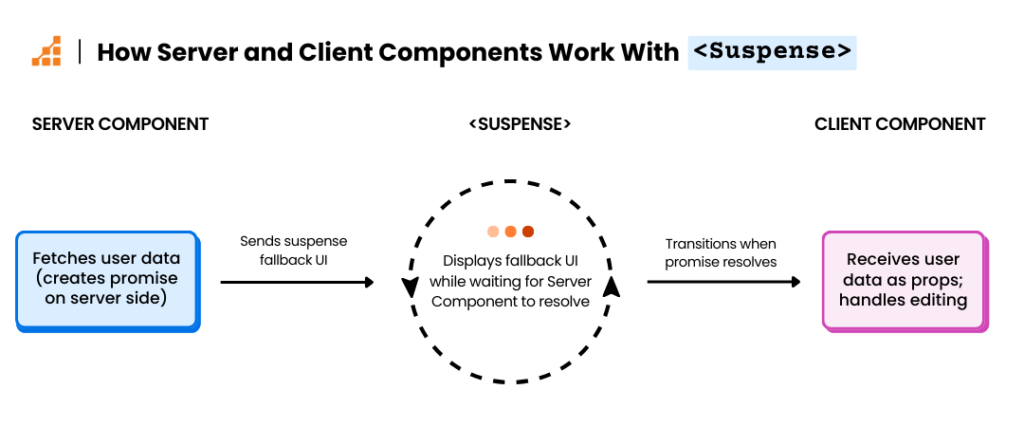
Here’s how it works:
- The Server Component creates its promise to fetch the user data.
- The server then sends the <Suspense> component with its fallback UI for the client to display.
- When the promise resolves on the server the data is then streamed to the Client Component, which then can properly render the data and hydrate the UI
Now, let’s take a look at the Client Component:
1 "use client";2 import { updateBio } from "@/actions/userActions";3 import { useActionState, useOptimistic, useState } from "react";4 function EditBio({ user }) {5 const [bio, setBio] = useState(user.bio);6 const [optimisticBio, setOptimistic] = useOptimistic(user.bio);7 [...]89 return (10 <>11 <h1>Edit Bio</h1>12 <h4>Current Bio:</h4>13 {optimisticBio}14 <form action={formAction} className={"flex flex-col"}>15 <textarea16 value={bio}17 onChange={(e) => {18 setBio(e.target.value);19 }}20 />21 [...]22 </form>23 </>24 );25 }26 export default EditBio;
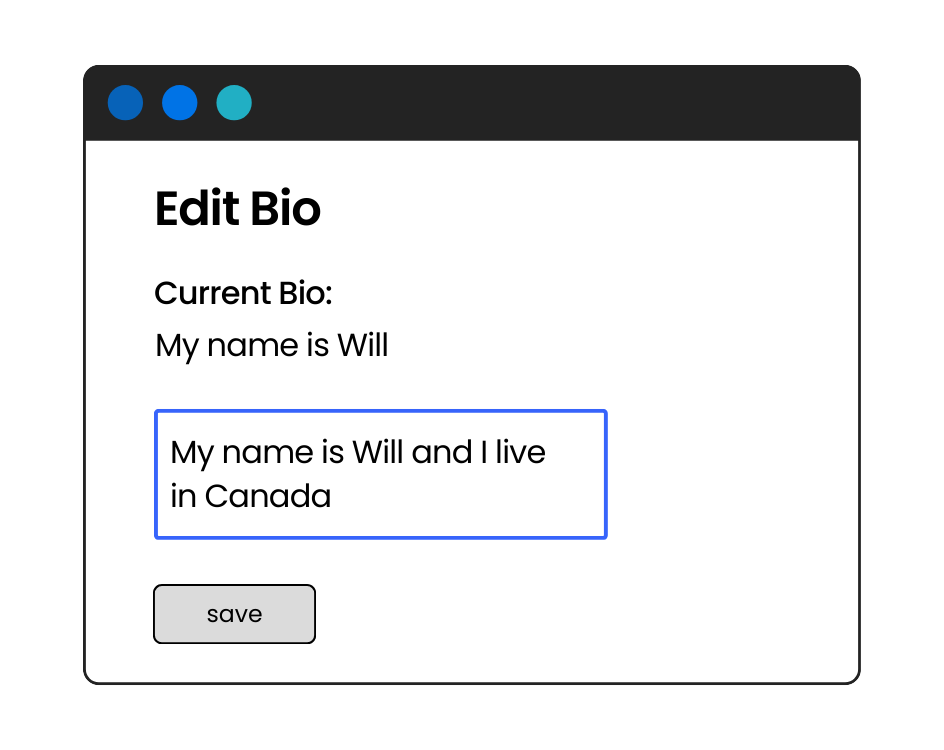
Our Client Component isn’t drastically different from example 4 in my previous React 19 article. The key difference is how the state constants—bio (for managing a controlled <textarea>) and optimisticBio (for use during form submission)—get their initial data. Instead of fetching it directly, they receive user data from a parent Server Component, which passes the data to a child component marked with the “use client” directive.
Whether you pass the entire Server Component as a child or just its data as props to the child component, the result is the same. The reason this works is that the EditUI Server Component is imported in a file defining Server Components, so it remains a Server Component. It runs server-side, fetches the data, and passes it to the client child component.
This approach doesn’t break any rules—Server Components render first on the server, and their data is then passed to the client.
To summarize:
- Import the data-fetching component from within another Server Component that contains the Client Component.
- Pass either the Server Component or its data into the client child component.
Server Actions: Mutating Server-Side Data Without an API
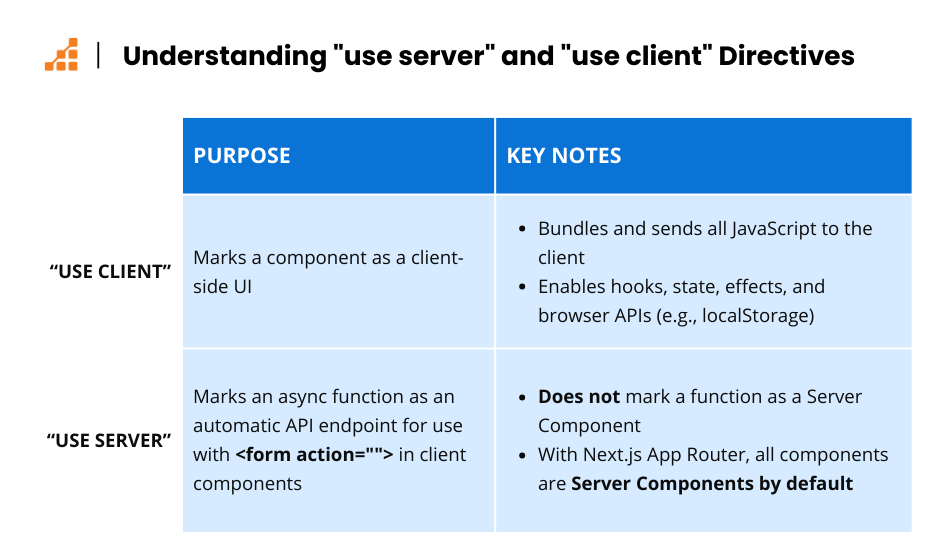
What exactly are Server Actions? They’re asynchronous functions marked with the “use server” directive, either at the file level or within the component function. When marked, they become server-side functions that can be directly consumed by Client Components—without the need to expose an API endpoint or route.
Server Actions are commonly used in client-side <form> elements to mutate data, such as saving an edited bio in this example.It’s important to note that Server Actions are not the same as Server Components. While Server Components return JSX that is rendered as HTML on the client, Server Actions return plaintext in the response body. This could be a JSON object, a simple text message, or any other server-generated response.
Let’s take a look at the full code for our <EditBio/> component:
1 "use client";2 import { updateBio } from "@/actions/userActions";3 import { useActionState, useOptimistic, useState } from "react";4 function EditBio({ user }) {5 const [bio, setBio] = useState(user.bio);6 const [optimisticBio, setOptimistic] = useOptimistic(user.bio);7 const saveBio = async () => {8 setOptimistic(bio);9 try {10 await updateBio(bio);11 } catch (e) {12 //return the error if there is one13 return "There was an error saving.";14 }15 };16 const [error, formAction, isPending] = useActionState(saveBio,17 null);1819 return (20 <>21 <h1>Edit Bio</h1>22 <h4>Current Bio:</h4>23 {optimisticBio}24 <form action={formAction} className={"flex flex-col"}>25 <textarea26 value={bio}27 onChange={(e) => {28 setBio(e.target.value);29 }}30 />31 {error && <div className={"error"}>{error}</div>}32 <button disabled={isPending}>{isPending ? "saving" :33 "save"}</button>34 </form>35 </>36 );37 }38 export default EditBio;
In this example, we’re using useActionState (line 16) which refers to the inline async function saveBio. This allows us to set the <form>’s action (line 24) to an async function—similar to how we might handle data in a purely client-side useEffect-type component.
On line 10 of saveBio, we invoke the updateBio async function. This is our Server Action. We simply imported it from userActions.js. This file contains async functions that fetch or mutate user data. Let’s take a look at its contents:
1 "use server";2 import { prisma } from "@/lib/prisma";3 import { revalidatePath } from "next/cache";45 export async function getBio(userId) {6 return prisma.user.findUnique({7 where: {8 id: userId,9 },10 });11 }12 export async function updateBio(bio) {13 const userId = 1;14 await prisma.user.update({15 where: {16 id: userId,17 },18 data: {19 bio: bio,20 },21 });2223 revalidatePath("/bio/edit");2425 }
The first thing to notice is the directive on line 1: “use server”. This is what makes the magic happen! It tells Next.js and React that every function in this file should run exclusively on the server, never on the client.
So, when we click the “save” button in our <EditBio /> component, the inline async handler references a method from this file. Because of the “use server” directive, React and Next.js automatically create a reference to that function and make a POST request to the server, directly invoking it.
Revalidate Path
Take a look at line 23 of our Server Action. Initially, when I ran the code without that line and clicked the “save” button, the current bio kept reverting to its old value no matter what I did. It was puzzling, but after digging into the Next.js documentation on data fetching, I realized the issue: Next.js caches data by default. To account for the data mutation, I needed to explicitly clear the cache.
By calling revalidatePath(“/bio/edit”), I was able to fix the issue. Now, after the updateBio call, the component re-renders with the updated value for the current bio, and the UI behaves as expected.
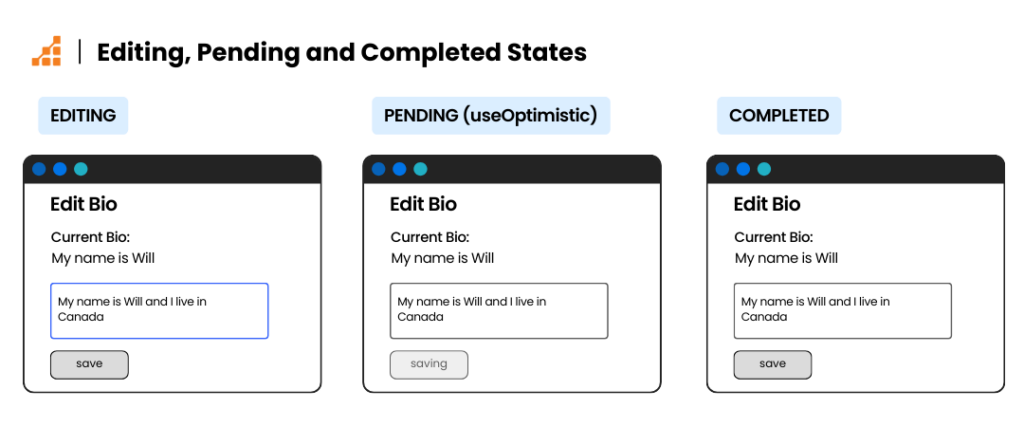
The UI works exactly as it should:
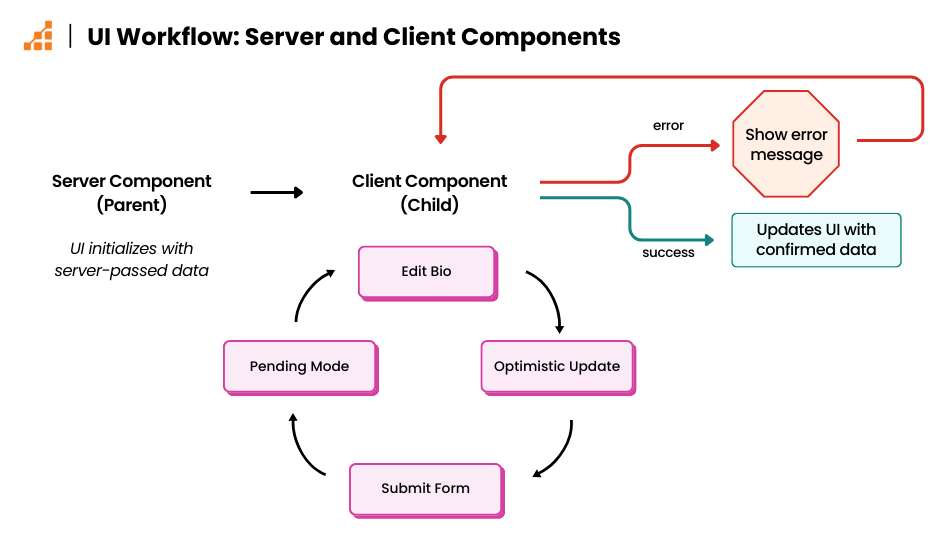
- The UI loads with data passed from a Server Component parent.
- Hooks are initialized with this data.
- The bio is edited using state and submitted optimistically.
- The form enters a pending mode during submission.
- The form action handler calls a Server Action to handle the mutation.
- Any errors are displayed if they occur.
And all of this happens without creating or exposing an API endpoint! For me, this is one of the niftiest features in React 19 and Next.js 15.
I think I might be in love… in a full-stack kind of way.
Potential Challenges with Server Actions and Server Components
Server Actions
Let’s start with Server Actions, since I’m currently in a honeymoon phase with how fun and easy they are to use in a client-side <form>. But I came across a warning in this video. It got me thinking: while calling a Server Action to mutate our bio is incredibly straightforward, it’s not inherently more secure than traditional methods.
The video demonstrates how, by inspecting the network tab in Chrome DevTools, you can see:
- The POST URL.
- The server action hash that identifies the function.
- The data and keys sent in the request.
This means someone could potentially intercept the call, change the userId, and modify another user’s bio—definitely not something you want!
The takeaway is clear: while Server Actions let you bypass writing APIs, you need to treat them with the same level of security as any server-side API call. Here are some essential practices:
- Authenticate the user: Verify their credentials and confirm they have permission to access the Action.
- Validate POST variables: Restrict access based on user roles. For example, ensure users can only modify their own profiles and not others’.
In short, use the same common sense and security measures you would for any server-side call to keep your code and database safe!
Existing APIs and Server Components/Actions
Imagine you’re considering revamping the front-end of your application but already have an API in place. Perhaps this API is written in Node.js, making a seamless transition a possibility. It could also be the case that you may need to refactor some of your code. How would you approach this situation?
Now, what if your API is built in a framework like PHP Laravel with full authentication? Maybe your React app is served on the home route but isn’t very efficient—data calls are handled on the client side using useEffect.
These scenarios require careful consideration of your project’s current architecture and whether converting to a JavaScript-based back-end is worthwhile.
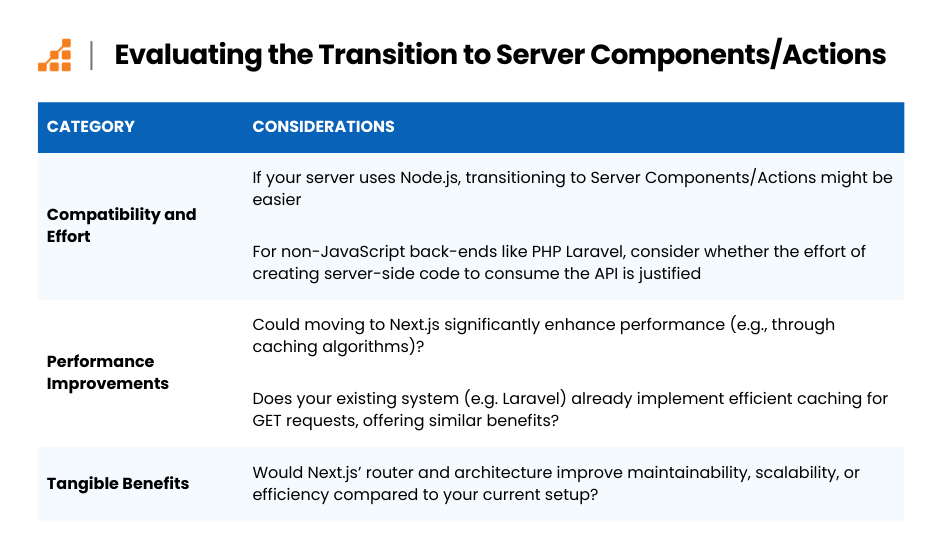
Here are some questions to guide your decision-making:
- Compatibility and Effort:
- If your server is already built with Node.js, transitioning to Server Components/Actions might be more seamless.
- For non-JavaScript back-ends, like PHP Laravel, is the added effort of creating Server-Side code to consume the API justified?
- Performance Improvements:
- Would moving to Next.js significantly enhance performance, perhaps through features like its caching algorithms?
- Does your existing system, such as PHP Laravel, already implement caching for GET requests in a way that offers similar benefits?
- Tangible Benefits:
- Would Next.js’ router and architecture provide noticeable gains in maintainability, scalability, or efficiency compared to your current setup?
Ultimately, these decisions depend on the specifics of your project and your long-term goals. Transitioning to Server Components/Actions can unlock powerful features, but it’s essential to weigh the potential benefits against the cost of refactoring.
Other Front-Ends….
Imagine you’re working on a project that consumes an API shared across multiple platforms, such as iOS and Android apps. Would it make sense to use Server Components/Actions for the web view?
The answer depends on your existing architecture. Let’s consider a scenario where you’re starting fresh: you don’t have an existing API, and your goal is to create web, iOS, and Android front-ends with a Node.js back-end.
One potential approach is using React Native within an Expo app. Expo is actively working on supporting React 19, similar to how React 19 and Next.js are optimized for web-based React. While the implementation of Server Components/Actions in Expo is not fully complete, progress is being made, including support for an Expo router.
However, if your project already has multiple front-end codebases or React Native isn’t a good fit for your app, you’ll need to weigh your options. Ask yourself:
- Is an amortized refactor worth it? Refactoring your code to align with Server Components/Actions may provide long-term benefits, but consider the cost and effort required to maintain compatibility with other platforms.
- Does your current stack meet your needs? If your architecture works well across platforms, it might not be worth overhauling just to implement the latest features.
Ultimately, the decision hinges on your project’s goals, the compatibility of your existing stack, and whether the benefits of Server Components/Actions justify the investment.
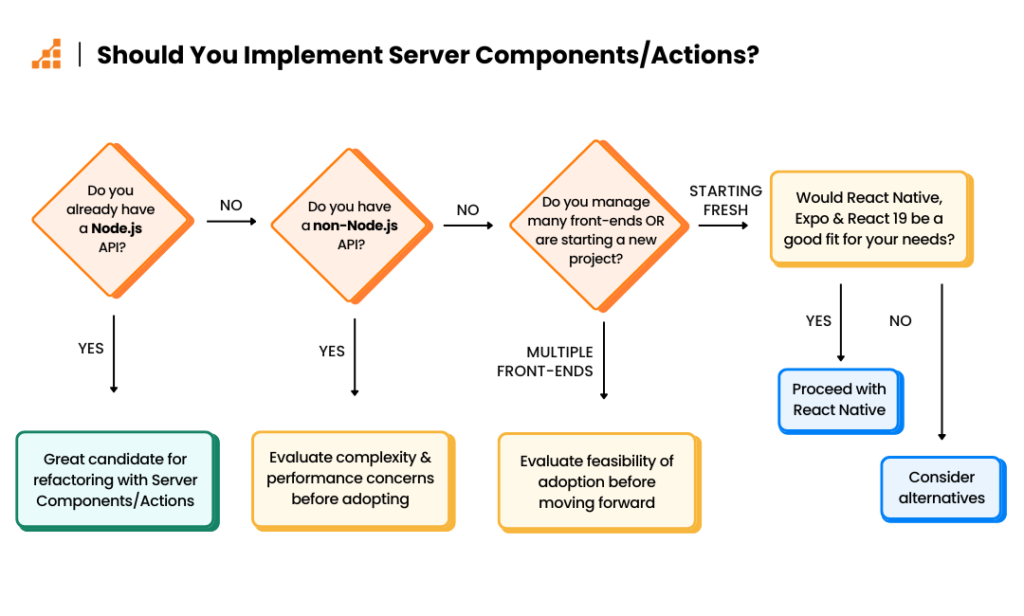
Key Questions to Consider
When evaluating whether to implement Server Components/Actions, ask yourself these questions:
- Do you already have an existing Node.js API?
- If yes, it’s a great candidate for refactoring to integrate with Server Components/Actions.
- How many other client implementations currently use this front-end?
- Do you have an existing non-Node.js API?
- Would it make sense to wrap this API in Server Functions/Components that pass calls to the existing API?
- What potential issues could arise with this approach? For example, does it introduce unnecessary complexity or performance concerns?
- Are you managing multiple front-ends or starting fresh?
- If starting a new project to serve web, iOS, and Android, would React Native be a good fit for your needs?
- Does React Native’s integration with Expo and its evolving support for React 19 align with your goals?
These questions can help you evaluate the feasibility and benefits of adopting Server Components/Actions for your specific use case.
Upgrading to Next 15 and React 19
For me, Next.js 15 is the only version I’ve personally created projects with, though I’ve worked on older Next.js projects using the Page Router. As a result, the upgrade process isn’t something I need to navigate. But what if you already have a Next.js 14 app and need to upgrade?
In Part I of this article series, we discussed upgrading to React 19 and how the React team partnered with codemod.com to create scripts for handling breaking changes and deprecations. Vercel has done the same for Next.js. Here’s the official Next.js Upgrade Guide.
While I haven’t tested it myself, here’s the general process based on my understanding:
- Open a terminal in the directory of your Next.js 14 app.
- Run the following command:
1npx @next/codemod@canary upgrade latest
*This command applies codemods for both Next.js and React 19.
You might notice the @canary flag in the codemod command. The guide recommends continuing to use it, as updates to the codemod are ongoing, even though Next.js 15 and React 19 are now stable.
The guide also highlights several breaking changes, as Next.js transitions many APIs to async/await. For now, it appears that synchronous versions will still be supported as a temporary workaround.
Do you have a Next.js 14 project? Let us know in the comments how your upgrade experience goes!
Wrapping Up: React 19 Server Components and Server Actions
In this article, we’ve delved into two game-changing features of React 19: Server Components and Server Actions.
We’ve explored how Server Components, including standard layout components and data-fetching async components, simplify our code. These components send only HTML or props to the client, eliminating the need for effects, safeguarding server-side secrets, and avoiding the declaration of exposed API routes.
We also integrated classic Client Components, noting the importance of marking them with “use client” in Next.js. Additionally, we discovered how Server Actions—async functions marked with “use server”—make server-side data mutations seamless and efficient.
Finally, we stepped back to reflect on whether adopting React 19’s features is the right architectural choice for your projects. We hope this guide has provided the insights you need to make informed decisions.
Speculating About the Future of React
Let’s end on a forward-looking note. Currently, there’s a clear distinction between Server Components and Client Components. But where might this be heading? I predict that in future versions, async components will be able to run on the client, with await calls acting as the boundary between server and client execution. After the final await, the resulting data or HTML could seamlessly transition into a Client Component. These “hybrid components,” combining server and client logic, could take center stage, easily embedded in <Suspense>.
Of course, pure Server and Client Components will still exist, but hybrid components could redefine the way we build React applications.
Let’s see if I’m right! Do you have your own predictions or ideas about where React is heading? Drop a comment and share your thoughts—we’d love to hear them!
About the Author
Will Eizlini has been working as a web developer since the late 1990s. Will over the years has preferred to work with early phase startups because of the excitement and energy in those organizations. His current expertise is with React development, and a variety of back end solutions. Will enjoys sharing his unique perspective in the technical articles he writes.