
AI Will Not Replace QA Engineers. It Will Change Which Ones Get Hired.


Every now and then I interview QA engineers for client projects. QA means Quality Assurance, the work of checking that software behaves correctly before users see it. In the last year, the same question has come from both sides. Clients ask: “Can AI replace our test automation engineers?” Engineers ask: “Should I learn an AI testing tool, or keep getting better at Playwright?”
My answer to both is the same. AI testing tools are real and useful. But claims that AI will eliminate the need for QA engineers overstate what these tools can do. What is changing is which skill matters most. It is no longer only “can you write a test.” It is judgment: knowing what to test, what not to test, when AI tools can give you an advantage, and how to tell when a test is lying to you.
In this article I compare the three paths teams are taking today: AI-native testing tools, frameworks built by hand with Playwright or Cypress, and a middle path where engineers write the code but use AI assistants to go faster. I explain what each path does well, what it costs, and what it means for your career. The practical choice depends on your product’s complexity, your team’s skills, and how much control you need over the tests. I run the technical interviews for QA roles at Scalable Path, so I see what clients ask for and what engineers actually know.
Table Of Contents
Three paths, one decision
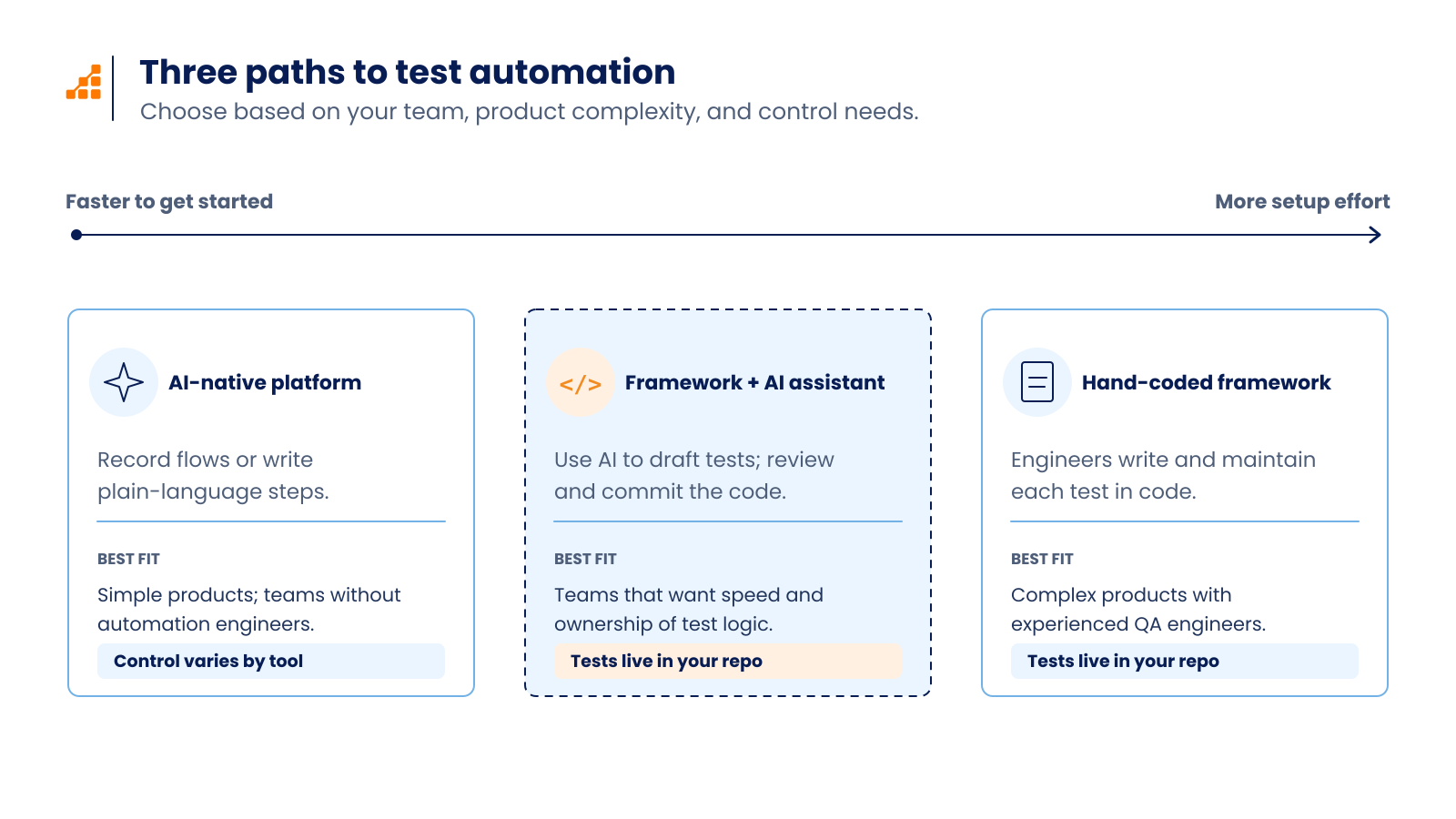
When a team decides how to automate its tests today, it is choosing between three paths.
AI-Native Testing Tools
The first path is AI-native testing tools. These are low-code or no-code platforms. You do not write test code. You record a flow, or you describe it in plain English, and the tool builds and runs the test. They make three main promises. Self-healing: when the page changes, the tool finds the element again on its own. Natural language test creation: you write “click the login button” instead of a selector. Autonomous test generation: an AI agent explores your application and proposes tests. Examples include mabl, Testim, testRigor, and Functionize. Applitools focuses on visual testing.
Building with Playwright of Cypress
The second path is a framework your team builds with Playwright or Cypress. Both are open-source libraries. Your engineers write the tests as code, and the code lives in your repository next to the application. Playwright and Cypress are not the same thing. Playwright is made by Microsoft. It controls the browser from the outside, runs on Chromium, Firefox and WebKit, and supports TypeScript, Python, Java and .NET. Cypress runs inside the browser and supports JavaScript and TypeScript only. Its interactive runner is very good for watching a test step by step. In my interviews, most clients ask for Playwright now. I think the main reason is that it is easier to set up.
The Middle Path
And the third path is in the middle. Engineers still write code using Playwright or Cypress, but they use an AI coding assistant such as Claude Code, Cursor or GitHub Copilot to write and maintain the tests faster. The frameworks have also added AI of their own. Playwright ships with Test Agents: a planner that explores the app and writes a test plan, a generator that turns the plan into test files, and a healer that runs failing tests and proposes fixes. Cypress has cy.prompt, a command that turns plain English steps into real Cypress code you can view, export and commit.
The real difference between the three paths is not the amount of AI. It is who owns the test logic and where it lives. This decides what happens when things break. So let us look at what the AI-native tools can and cannot do.
What AI testing tools do well today, and where they still fail
The AI-native tools are not fake. They solve real problems for some teams, and it is worth being clear about which problems they solve.
They are fast to start. A team with no automation engineers can have tests running in days. Manual testers and product owners can create tests without learning a programming language. Self-healing handles small changes in the user interface (UI): a renamed CSS class, a button that moved to a different part of the form. Visual comparison catches layout bugs that a code assertion would never see, like a button that is still on the page but hidden behind a banner. For simple, stable flows like login, forms and the main checkout flow where everything goes right, these tools work.
The problems start when the application is not simple.
Self-healing can heal into the wrong element. The tool scores the elements on the page and picks the closest match to the one that disappeared. Sometimes the closest match is the wrong one. The test clicks it, nothing fails, and the test stays green, which means it passes. A passing test that checks nothing is worse than a failing test, because nobody looks at it.
Complex state is hard. Test data setup, authentication, multiple tabs, iframes, drag and drop, file uploads and custom components are exactly the things that break in the demo. The same plain English step can also behave differently from one run to the next, because the tool interprets your words each time. When a test fails, you debug inside the vendor’s interface, not in your own code with your own logs. Cost grows with the number of tests and runs. And when you want to leave, the exported tests are often not clean code you can run somewhere else.
We tried a couple of these tools internally at Scalable Path last year. The main problem was not that they were bad. It was that they were rigid. There was a lot happening behind the tool that we could not see or change. Some tests we could not get to run at all. We ended up doing things the way the tool wanted, not the way we wanted. Our lead wanted to try them for a good reason: he wanted to speed up the automation process. But this was before AI coding assistants became fast enough to solve the same problem while keeping the code in our hands.
So the tools do well when the product is simple and the team has no engineers. They struggle when the product is complex and the team wants control. That trade is about ownership, and ownership deserves its own section.
What you lose when you give up the code
When a team chooses a no-code tool, it is not only choosing a tool. It may be giving up some control over how its tests are stored, reviewed, and debugged. That has a price, and the price shows up at the worst moment.
The first thing you lose is debugging. When a test breaks (and tests always break) you need to read the logic and step through it. In a code-based framework you open the test, read the locator, check the assertion, run it in debug mode and look at the trace. In a no-code tool you look at whatever the vendor shows you.
You lose version control. Code-based tests live in Git next to the application code. They share branches, pull request reviews and history. When a feature changes, the test changes in the same pull request. Some vendor tools offer Git or CI integrations, but teams should check whether tests can be reviewed and maintained in their existing workflow.
You lose continuous integration (CI) on your terms. CI is the system that runs your tests automatically on every change, for example GitHub Actions or GitLab CI. With code you control how and where tests run, in your containers, against your environments. With a vendor tool you get what the integration offers.
You lose reuse. Page objects, fixtures, helper functions and shared login state are how a test suite stays small as it grows. You lose portability, because leaving the vendor means rewriting everything. You lose trust, because it is hard to verify what the tool actually checked. And over time the team loses skill, which makes it harder to hire and harder to grow.
To be fair, for a small team with no engineers and a simple product, a vendor tool can still be the right call. The loss is real, but so is the gain. The mistake is not choosing the tool. The mistake is choosing it without knowing what you gave up.
The opposite mistake has a cost too.
What you lose when you write everything by hand
Some engineers hear all of this and conclude that the safe path is to write every line by hand and keep AI out of the repository. I understand the instinct. It is still a mistake.
You lose time on repeated work. Locators, page objects, test data builders and assertions follow patterns. An AI assistant can draft them in seconds. Writing every repeated pattern by hand does not, by itself, make the suite more rigorous.
You lose time on maintenance, because every UI change means someone updates locators by hand. You lose coverage, because the sprint ends before the tests do. You lose onboarding speed, because every new team member has to learn every custom helper without help.
And you lose a hiring signal. Some of the clients I work with are open to AI. They see it as one more tool that makes the work faster. They do not ask for a specific AI product, but they do ask candidates how they use AI in their work. An engineer who refuses all AI tools does not look careful. They look inflexible.
Pride in hand-written code is not a strategy. The strategy is to keep the code and add the assistant.
The middle path: Playwright plus an AI assistant
This is the path some of the clients I work with are taking, and it is the one I use myself.
A normal working day looks like this. You describe the flow you want to test. The assistant drafts the test using your existing page objects and fixtures. You run it. You read it. You fix what is wrong. You commit it. The code is yours, in your repository, reviewed like any other code.
The frameworks now support this directly. Playwright Test Agents work through MCP, the Model Context Protocol, a standard way for an AI model to use tools. The agent opens a real browser, reads the real page structure and writes locators based on what is there, not on a guess. The output is standard TypeScript test files. Cypress cy.prompt generates Cypress commands from plain English steps, and you can see and export the code. It requires a Cypress Cloud account.
I use Claude Code. When it writes a test that looks right but is wrong, the cause is almost always the same: it did not have enough context. This usually happens when I am lazy. I give it a short instruction and let it fill in the gaps, and it fills them with assumptions about my workflow that are not true. The fix is simple. Be specific. Give it the page object, the fixture and an example test. And tell it to ask questions when something is unclear instead of guessing.
I remember one interview clearly. The candidate was using Claude Code, which is a good sign. But he had one session open in VS Code and another in the Claude desktop app, both pointed at the same folder. He asked one session for something, then asked the other session for something else. He did not read what Claude was asking him, and he read even less of what Claude was writing. After a while there were two similar projects inside the same folder. He asked one session to find a file and it could not, because the other session had written it somewhere else. When I asked why he had two projects in one folder, he could not answer. He had not noticed. The tool was fine. The problem was that nobody was in control.
That is why my interview exercise is not about typing speed. When the client is open to AI, I ask candidates to build a framework from scratch: a data-driven login test (one test that runs against many sets of users and passwords), reporting with screenshots on failure, a CI workflow, and a couple of test cases. In my experience, this exercise can take about a day without AI and around thirty minutes with a familiar assistant. But I am not timing them. I ask them to describe what they are doing and why they accept or reject what the assistant gives them. The candidates who get hired are the ones who can explain every decision.
A few rules make the middle path work:
- Give the assistant real context: a page object, a fixture and an example test from your project.
- Read every line before you run it. If you do not understand something, ask the assistant to explain it.
- Review every assertion. “Is visible” is rarely enough. Check that the assertion proves the outcome the user needs, such as an order saved successfully, rather than only a confirmation message appearing.
- Never merge a test you have not seen fail. Break the feature on purpose and confirm the test fails.
- Ban hard waits in code review.
The middle path gives you speed without giving up ownership. It is also where the demand is.
What clients ask for right now
Everything in this section is what I see in job requests and interviews. It is not market data.
Playwright with TypeScript is the most common request. In the last couple of years Playwright has grown in popularity over Cypress, and I think the easier setup is a big part of it. Clients also ask for CI experience, usually GitHub Actions and Docker, and for API testing alongside UI testing.
Clients are open to AI, but they do not ask for a specific tool. They want to know how you work with whatever you use.
I see less demand for engineers who only know Selenium, only know record-and-playback tools, or put certifications first. What separates strong candidates is not the tool list on the resume. It is whether they can explain why a test failed, decide what not to automate, and read and understand the application code they are testing. Clients also look for candidates who understand the project’s infrastructure and can make testing decisions that fit the way the system is built and operated. They value people who think outside the box, bring creativity to their work, and use AI to their advantage without giving up their own judgment. AI also makes it quicker to try ideas and compare solutions, provided the engineer checks the results.
So if that is what clients want, what should you learn?
How to think about your own skills
The first thing is not a tool. It is judgment.
Judgment means deciding what deserves a test and what does not. Not every button needs an end-to-end test, the kind that drives a real browser through a full user flow. Some things are better covered by a unit test, an API test, or nothing at all. Judgment also means knowing when a passing test is lying. Here is a common example. A checkout test fills the form, clicks “Pay” and asserts that a confirmation message is visible. A developer changes the backend and orders stop being saved. The confirmation message still appears, because the front end shows it before the server answers. The test stays green for weeks while orders are lost. The test was checking the wrong thing. An engineer with judgment would also verify that the order was saved, through the API or database, rather than rely on the message alone.
The second thing is Playwright. It is the framework clients are asking for now, and it is worth learning deeply, not just enough to pass an interview. That means locators by role and label instead of CSS selectors, fixtures for setup and shared state, the trace viewer for debugging, parallel workers, saved login state so you do not log in on every test, and network mocking.
The third thing is an AI assistant. Learn one well. Learn how to give it context, how to review its output, and what its failure modes are. The interview I described above was not a failure of Claude Code. It was a failure to read.
The fourth thing is the basics that survive every tool change. Page Object Model, so that page details live in one place and tests stay readable. Separating test data from test logic. Keeping tests independent so they can run in any order and in parallel. Avoiding hard waits. Understanding HTTP and APIs. Knowing Git and CI well enough to set up a pipeline alone. If you come from Selenium and Java, Playwright does not use Selenium’s Page Factory. Page objects organize locators and actions; Playwright fixtures handle setup and provide them to tests.
And keep learning. This field moves fast. Playwright is the tool of the moment. Something else will be the tool of the moment in a few years. The engineers who stay employed are the ones who keep reading.
If you want to show all of this, put a Playwright project on GitHub. Add a short README that explains where the assistant helped you and where you had to correct it. That tells an interviewer more than any certification.
One more thing many engineers will face: being asked for an opinion when the team evaluates a tool.
Questions to raise when your team evaluates a tool
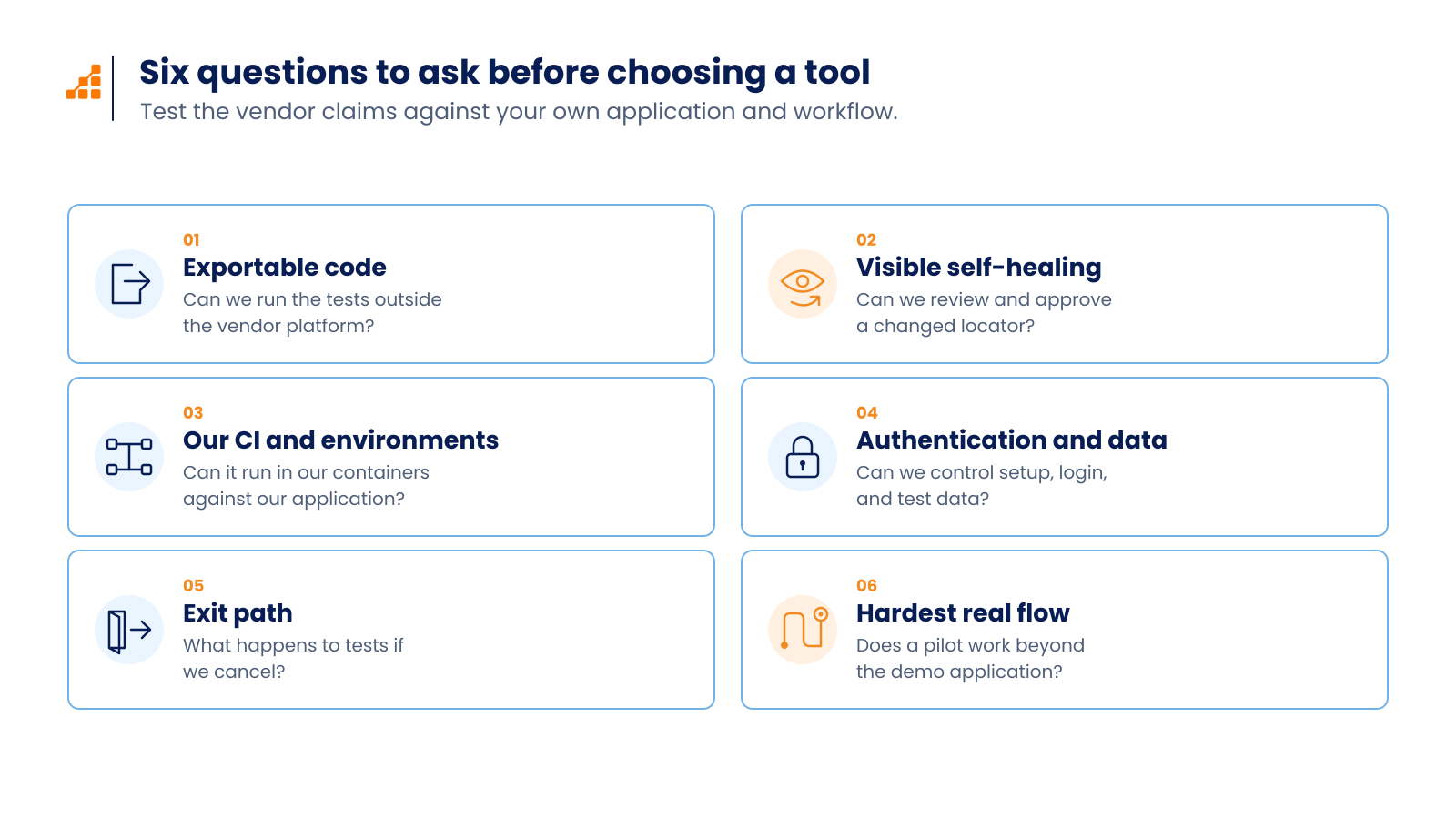
Clients often ask their QA engineers for an opinion before buying an AI testing tool. This is your chance to be useful. Here are the questions worth raising:
Can we export the tests as runnable code? In which language and framework?
When a test self-heals, can we see what changed and approve or reject it?
Does it run in our CI, in our containers, against our own environments?
How does it handle authentication and test data?
What happens to our tests if we cancel?
Can we run a trial on our hardest flow, not on the demo application?
If the answers are vague, the tool will feel rigid the moment your application does something the demo did not.
Choosing the right testing tools and skills for the AI era
The question is not “AI tools or Playwright.” The question is what you own and what you understand. AI-native tools are a good fit for teams with no automation engineers and simple, stable products. Hand-written frameworks are a good fit for complex products where tests must live with the application code. The middle path, Playwright plus an AI assistant, is where most of the clients I work with are heading, and it is where the hiring demand is.
For your own career, that points to three things. Learn Playwright deeply, including TypeScript, fixtures and the trace viewer, because that is what clients are asking for right now. Learn to use an AI assistant well: give it context, read every line it writes, and never merge a test you have not seen fail. And practice judgment. Decide what deserves a test, what does not, and how you will know when a passing test is hiding a bug. Tools will keep changing every few months. The engineer who can read the code, question the output and explain the risk will still have work. When things break, and they always break, that is the person the team calls.