
A Developer’s Review of 3 Popular AI Agents: ChatDev, SWE-Agent & Devin

Artificial Intelligence has been shaking up nearly every industry, and software development is no exception. Companies are constantly looking to optimize their processes and reduce costs, and this is where the promise of integrating AI into the daily routine of software developers shines the brightest.
These tools not only boost developer productivity but also transform what we know about software development and its stages.
Table Of Contents
- The Rise of AI in Software Development: From 1943 to Today
- Current AI Tools and Technologies for Development
- Benefits and Challenges of Using AI Agents
- The Main Event: Comparing AI Agents ChatDev, SWE-Agent, and Devin
- ChatDev
- Devin AI
- SWE-Agent
- Final Thoughts on AI Agents
- About the author: Guilherme Assemany
Imagine a world where bug fixing, code generation, and even sprint planning are done automatically and accurately. Does that sound too futuristic? It might, but this is the reality that many AI agents are proposing to bring into the present. Despite the excitement, however, adopting these agents comes with its own set of challenges and fundamental questions.
For me, the main questions are:
- How effective are these AI dev agents, really?
- Is it worth investing in them right now?
- How do they compare to one another?
In this article, my goal is to dive into the world of AI agents for software development. We’ll provide an overview of these tools at large, discussing their capabilities, benefits, and challenges. Finally, we’ll provide a detailed analysis of three popular tools: ChatDev, SWE-Agent, and Devin. So, if you want to understand how artificial intelligence is reshaping the way we develop software, keep reading!

The Rise of AI in Software Development: From 1943 to Today
The origins of artificial intelligence can be traced back to 1943, when Warren McCulloch and Walter Pitts created the first computational model for neural networks. At the time, “artificial intelligence” – a term that is overwhelmingly popular today – wasn’t used; however, this is still credited as the very foundation of AI.

In the 1990s, the first coding assistants emerged: this included tools like IntelliSense, which helped developers write code faster and with fewer errors.
Starting in the mid-2010s, the use of machine learning and natural language processing (NLP) began to gain traction, allowing development tools to become smarter and more helpful in suggesting autocompletions, identifying areas for improvement in the code, and spotting potential bugs.
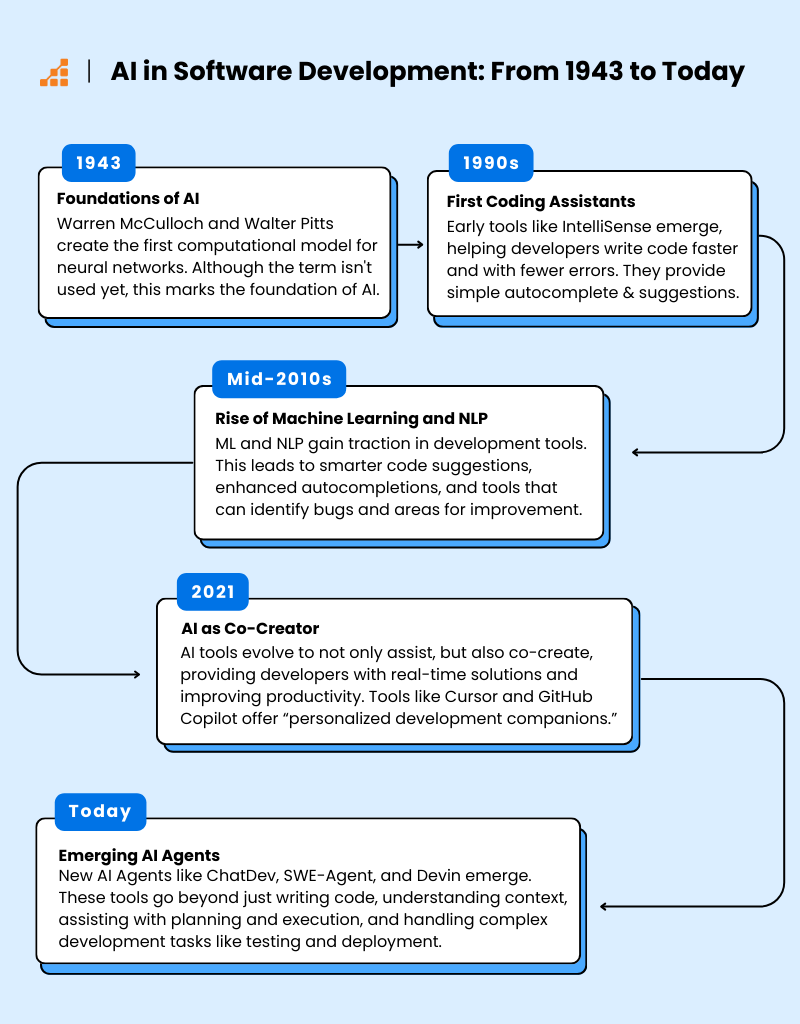
Today, we are in an era where AI not only assists us, but also has the potential to co-create and suggest real-time solutions, elevating the developer’s role to a new level of productivity and efficiency.
Current AI Tools and Technologies for Development
Tools like Cursor and GitHub Copilot, which use OpenAI Codex technology, are being widely adopted to autocomplete, suggest code, and serve as personalized development companions. Other platforms, like Tabnine and Replit Ghostwriter, offer personalized assistants that adapt to the user’s coding style and provide context-aware project information.

In addition, new AI Agents are emerging that represent a new category of tools designed not just to write code, but to interact with the developer, understand project context, provide detailed suggestions, and even assist with planning, executing more complex tasks, and testing. These tools, which are the focus of this article, include ChatDev, SWE-Agent, and Devin.
Benefits and Challenges of Using AI Agents
The benefits of AI agents in software development are well discussed: increased productivity, fewer errors, and a more streamlined workflow. Developers can focus on more strategic tasks, leaving repetitive, tedious, or low-value tasks to AI. Additionally, these agents can act as virtual mentors, helping junior developers learn good coding practices, much like a productive pair programming session with a more experienced developer would.
However, there are significant challenges. The adoption of AI agents raises a plethora of concerns, including:
- An over-reliance on technology,
- Privacy and data security issues,
- Ensuring that the suggestions made by the agents are genuinely useful and do not compromise the quality of the software produced.
Indeed, these points alone, if discussed in depth, could merit an entire article. So, I won’t delve too deeply into these more philosophical issues for now. Instead, let’s explore Dev AI Agents.
Today’s AI Agents: What Can They Really Do?
AI agents are being used for a variety of tasks in software development, from writing and refactoring code to automated testing and even detecting vulnerabilities caused by poor development practices. Many companies are adopting these tools to improve team collaboration, accelerate delivery times, and reduce operational costs.
The promise of radically transforming the development workflow has stirred significant excitement in the tech community. The potential for continuous collaboration between humans and machines, where AI is not just a tool but a true coding partner, is driving interest and investment in this field. This vision of a more efficient and collaborative future is what fuels the enthusiasm surrounding these innovations.
The Main Event: Comparing AI Agents ChatDev, SWE-Agent, and Devin
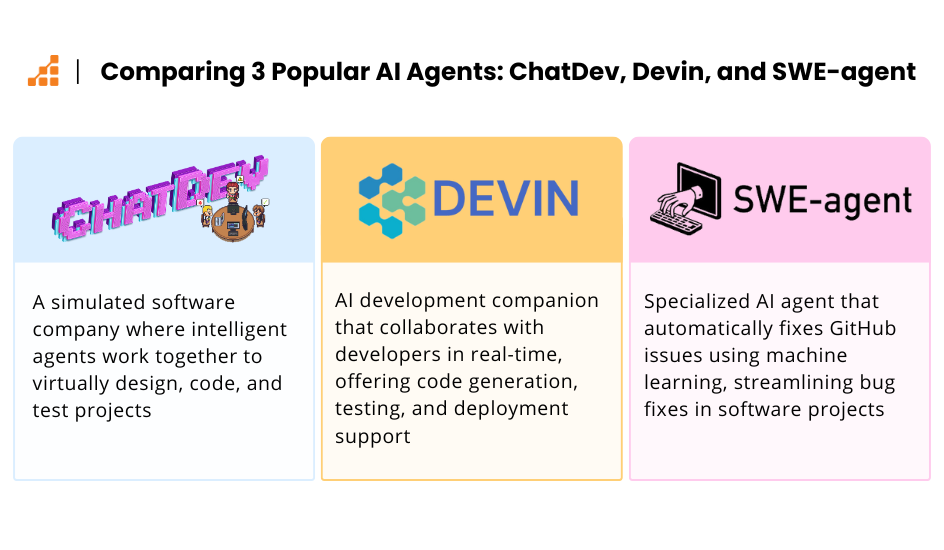
I want to take a closer look at three AI agents for developers: ChatDev, SWE-Agent, and Devin AI. The goal here isn’t to directly compare these tools to declare a winner, mainly because, as you’ll see, they don’t all have the same focus or even the same implementation approach.
By the end of this text, my aim is for you to have a clearer understanding of these agents and a good starting point to explore which ones might make the most sense for your daily reality — and, of course, to decide if it’s worth investing your time in them now.
ChatDev
Introduction to ChatDev
Developed by OPEN BMB (Open Lab for Big Model Base), ChatDev is one of the most intriguing AI agents I’ve encountered. The idea is to simulate a software company operated by various intelligent agents, each playing different roles within the organization. These agents include positions like CEO, Chief Product Officer (CPO), Chief Technology Officer (CTO), programmer, reviewer, tester, and art designer. And of course, all these agents work together to bring your idea to life.
Each agent is responsible for specific tasks such as design, coding, testing, and documentation, creating an automated and cohesive workflow. The functionality of ChatDev is accompanied by a charming interface, which uses pixel-style drawings to visualize this virtual company.
For now, using ChatDev is free, but you will need to integrate it with the OpenAI API, so you’ll have to provide an API key. ChatDev on GitHub boasts nearly 25,000 stars, making it one of the standout AI agents in the field.

First Impressions: ChatDev
There are two ways to test ChatDev: via the web and via the terminal. For the web option, you need permission from the company, so if you’re eager to use it, I recommend following the instructions available in the project’s repository — it’s quite quick and simple.
I tested this tool through the terminal, and I won’t go over the installation steps since they are already well documented in the repo.
Once configured, the first step is to run a command to provide your instructions to our “virtual company.”
I’ll ask the AI to help me create a to-do application using AlpineJS. I won’t specify the framework version to see how it handles that aspect as well. The prompt will be as follows:
Create a to-do list application using Alpine.js that allows users to add new to-do items through an input field and either pressing “Enter” or clicking an “Add” button, enabling deletion of individual to-do items by providing a “Delete” button next to each item, marking to-do items as completed by including a checkbox or similar mechanism that updates the item’s status visually upon selection, and implementing a filter feature to switch between showing all items or only those not yet completed. The app should update dynamically, reflecting changes instantly without requiring a page refresh, and should be built entirely with Alpine.js to handle all these functionalities.
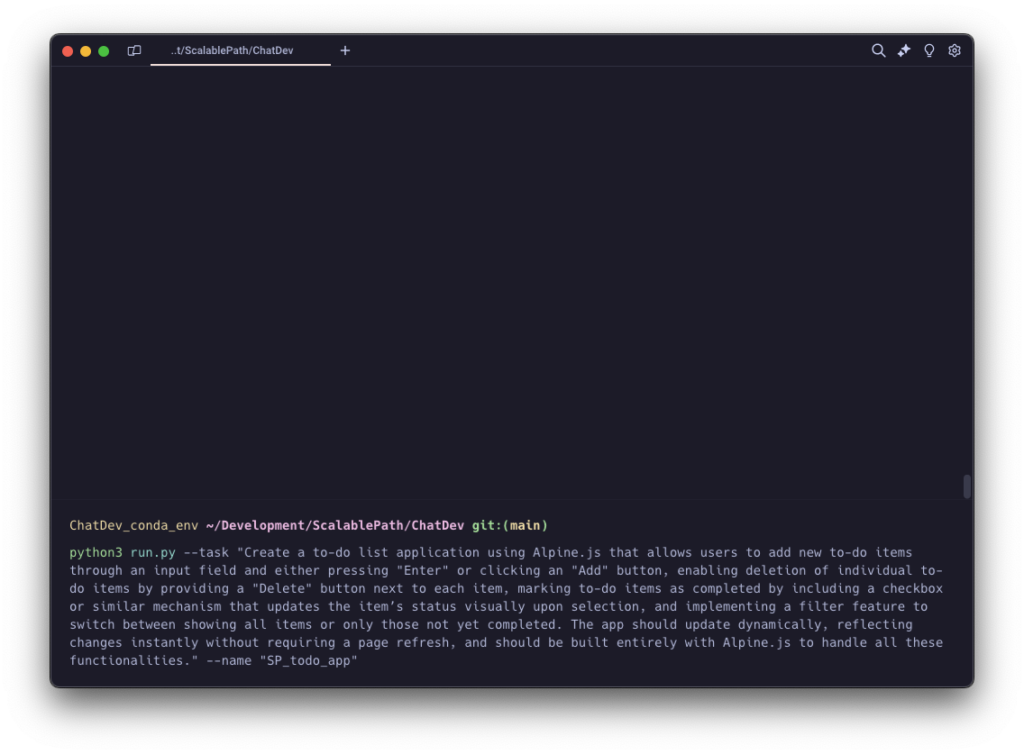
After executing this command, you’ll see a bunch of information streaming through your terminal. It’s a bit challenging to keep up with everything in this view, and personally, I found it a bit frustrating at this point, especially if you like to know the details of what’s happening.
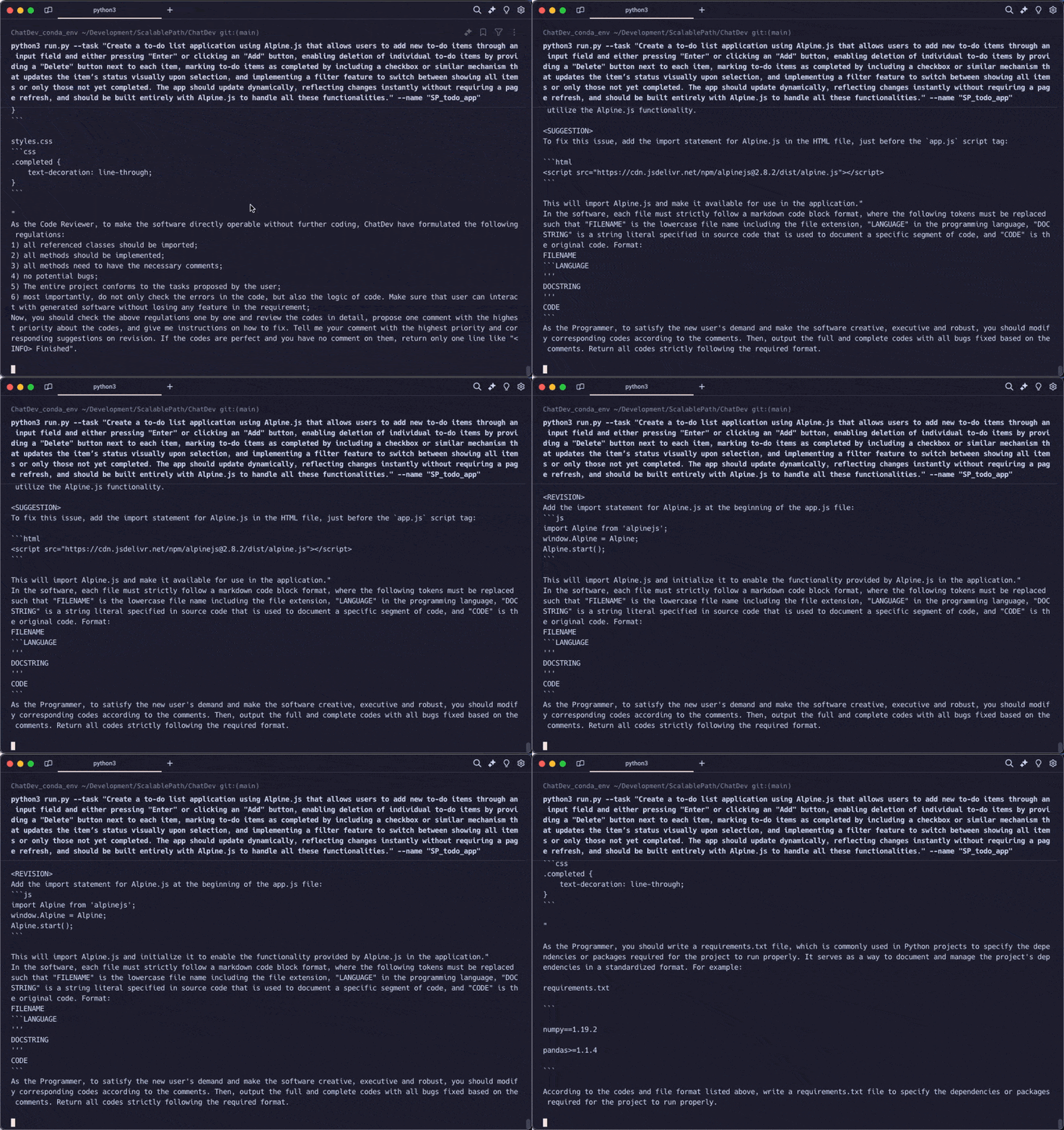
But if you’re like me, there’s some good news: there’s a mini web application that allows you to “replay” every action, so you can see exactly what steps are taken to create your software. We’ll talk more about that in a moment, but first, I want to comment on the final result that’s displayed in the terminal:
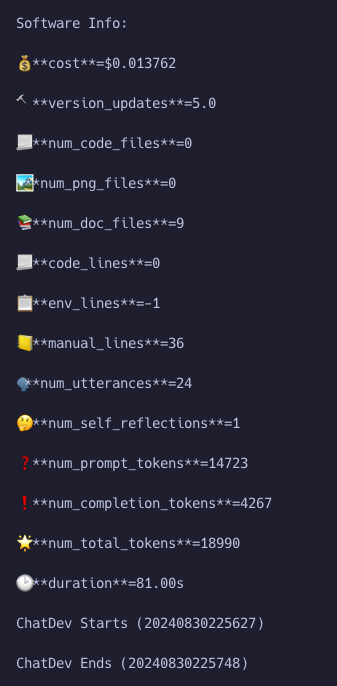
I genuinely found it quite impressive how ChatDev summarizes what has been built. You get insights into the real cost of producing the software (keeping in mind the cost due to the OpenAI API key), the number of files, lines of code, lines of documentation, total duration, and even the number of tokens used.
It’s true that some of the parameters seem to have glitches — for example, in this case, it reported 0 lines of code, when in reality, combining the HTML, JS, and CSS, we have around 100 lines.
Reviewing the Application
Now it’s time to check out the product that was created. Since our application is basically a web page, there’s no need for any configuration or environment setup — just open the main file in your browser.
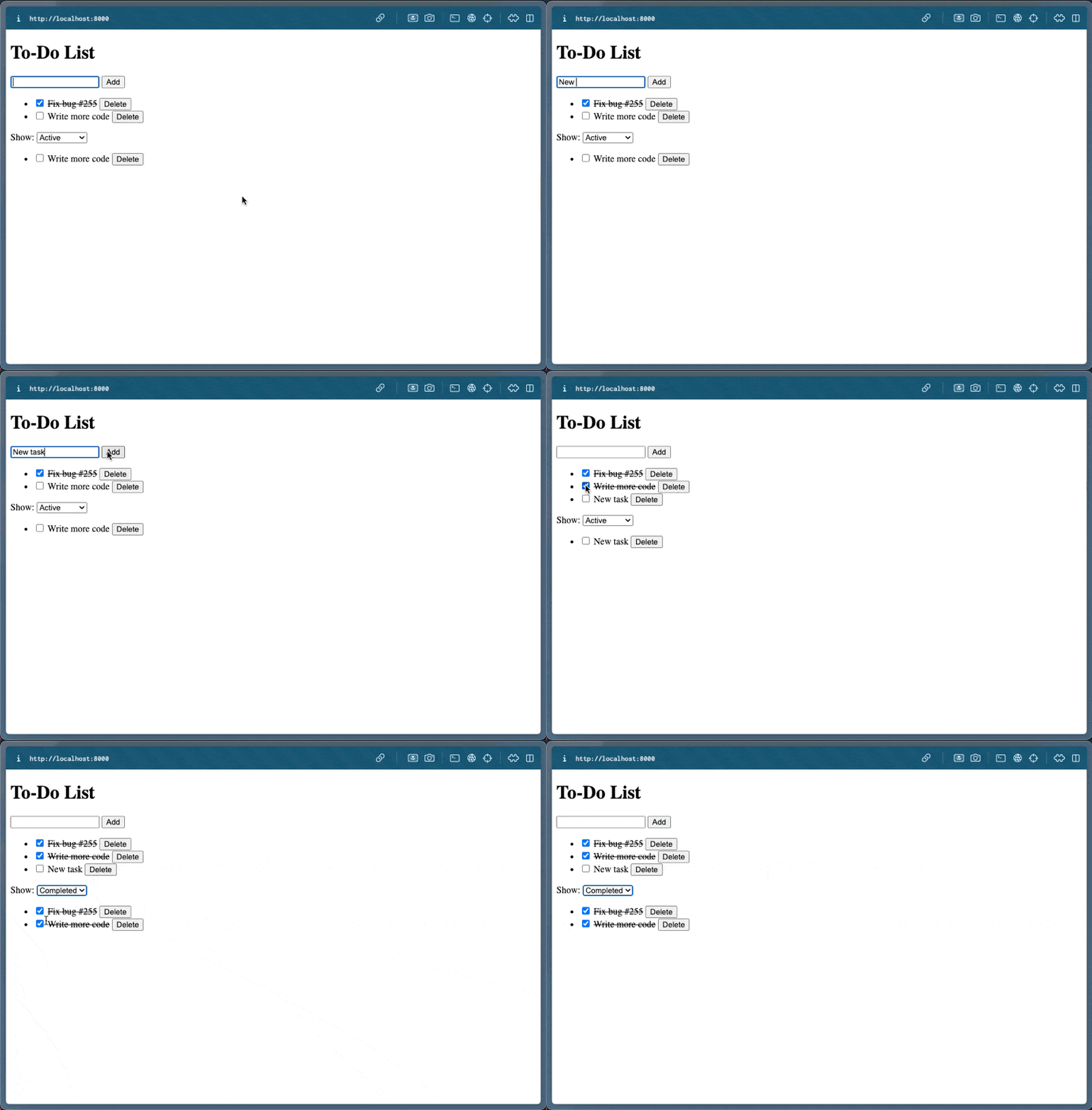
The generated app works quite well — you can add, delete, and mark to-dos as completed. Additionally, there’s a filtering feature. For some reason, ChatDev created the filter in a different view, which is why we see a “duplicated” list. Perhaps my prompt wasn’t specific enough.
Visually, the application is very basic, but that’s not an issue; the prompt didn’t mention anything about making the app look nice, just about the functionalities and using Alpine.js.
One thing that caught my attention is that the version of Alpine.js used was 2.8, not the latest version, which at the time of this writing is @3.14.1.
Overall, the result was well-written code — simple and straight to the point. But what I liked most was the manual.md file, which contains instructions for running and understanding the app’s functionalities. Of course, for a to-do list, this might not be necessary for most users, but imagine the power of this in a larger application! Creating documentation becomes a much simpler task.
Inside the Process
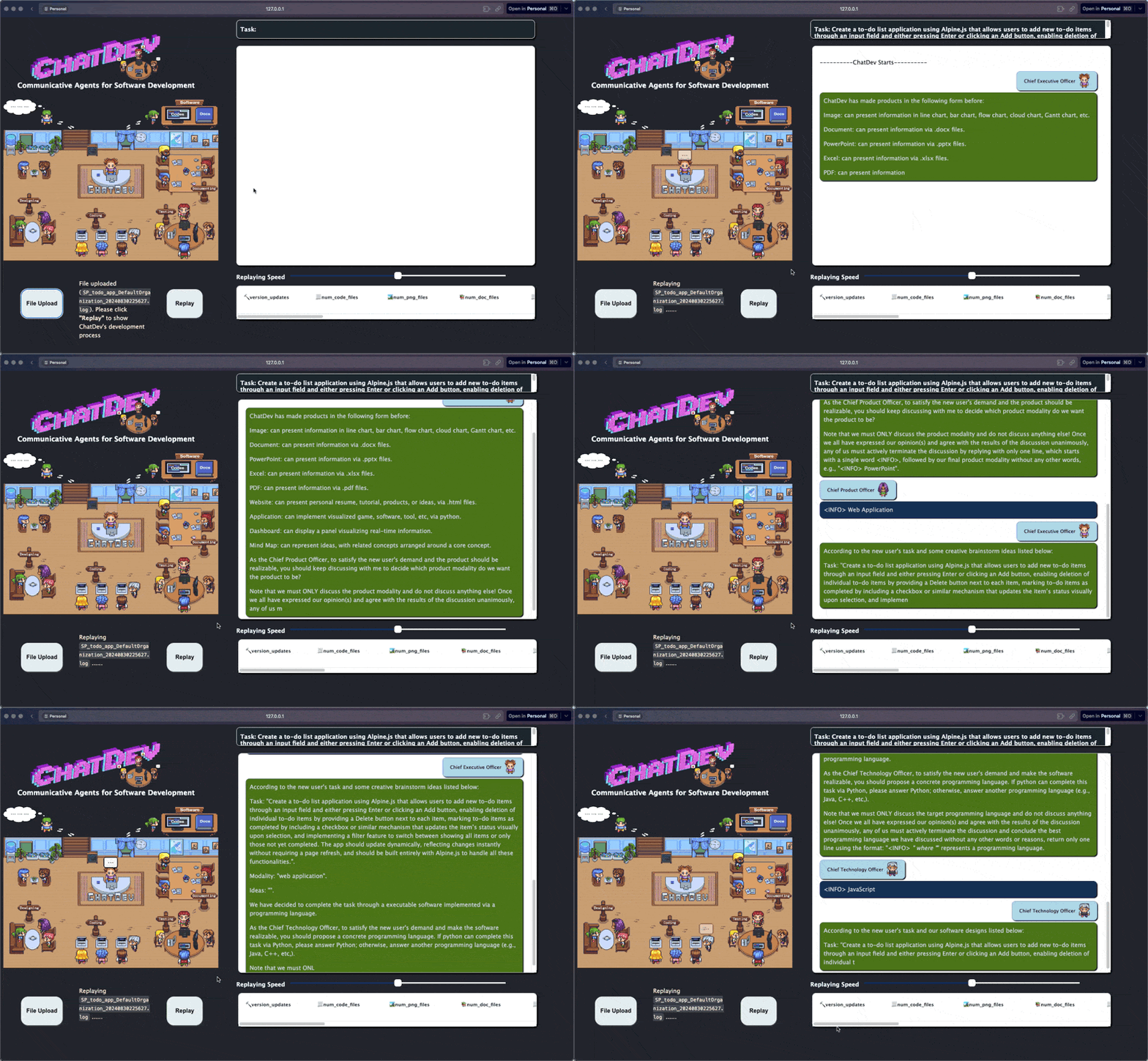
Remember I mentioned the “Replay” feature for the project-building process? This is possible through a web interface specifically designed for that. In my environment, I ran the command python3 visualizer/app.py, and I quickly accessed this tool. Along with the generated project, you’ll always have a LOG file, and this file is what you use to replay the process.
ChatDev Wrap-Up
ChatDev is a tool that is quite easy to use if you have some background in development. With the standard usage, you can’t actually interact with your virtual company to refine instructions; for that, you need some additional setup. Another feature I missed is the ability to extend or edit already completed projects.
In its current stage, it is certainly an interesting tool that can help you quickly create certain functionalities or proofs of concept.
What I liked the most was how straightforward it is to get started with the tool, as well as the comprehensive documentation provided. I think ChatDev is a promising tool that is definitely worth keeping an eye on. Additionally, it’s kind of fun to see it in action and get an idea of how each agent collaborates with each other assuming their roles in the company.
Devin AI
Introduction to Devin AI
Devin AI is marketed as “the world’s first AI software engineer.” It’s an innovative AI agent designed for collaborative development, offering a community-centered approach where developers can share tips, best practices, and even AI-generated code snippets, fostering a learning and collaboration environment.
First Impressions
When I wrote this article, Devin was free to try – all I had to do was request access through a form to gain access to their web interface.
In December 2024, however, Cognition (the team behind Devin) made the AI Agent generally available, with plans starting at $500/month. It’s a bummer for any solo developers that want to test it out, though the paid plan does give your entire team access. It also meant that Devin is now capable of integrating with your team’s GitHub and Slack.
Currently, Devin is only available via a web application. You’ll have access to an interface similar to ChatGPT, but more specialized, with features such as a dedicated terminal for your project, a browser to view web applications (if applicable), and even a code editor so you can build your application alongside Devin.
To create a better basis for comparison, I’ll use the exact same prompt I gave to ChatDev earlier.
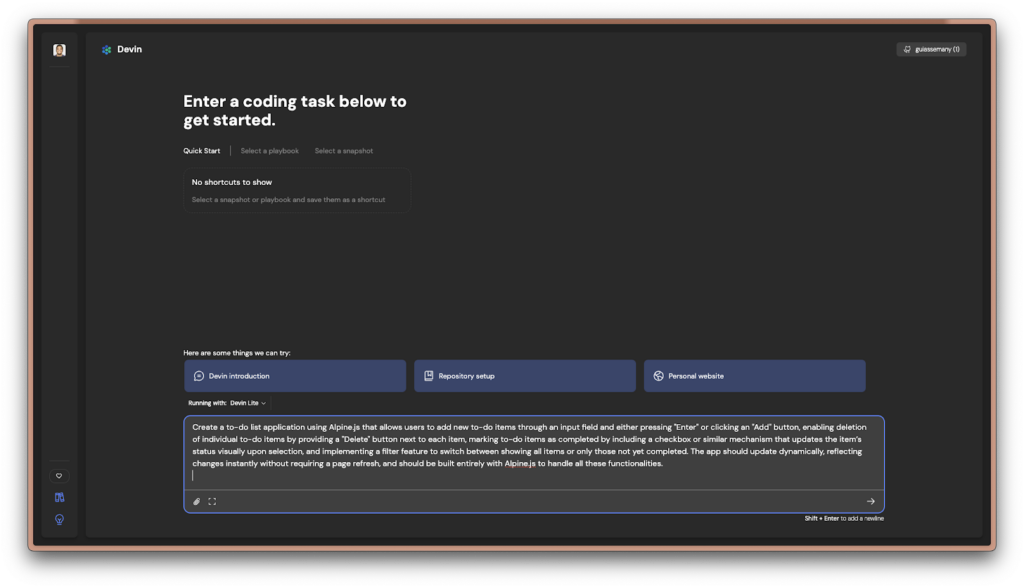
As you might have noticed, Devin’s initial interface feels quite similar to ChatGPT’s — it looks like just a space to enter your prompt and wait for the output, right? However, once Devin starts working on your project, it becomes clear that it offers much more than that, and this is one of my favorite aspects of Devin.
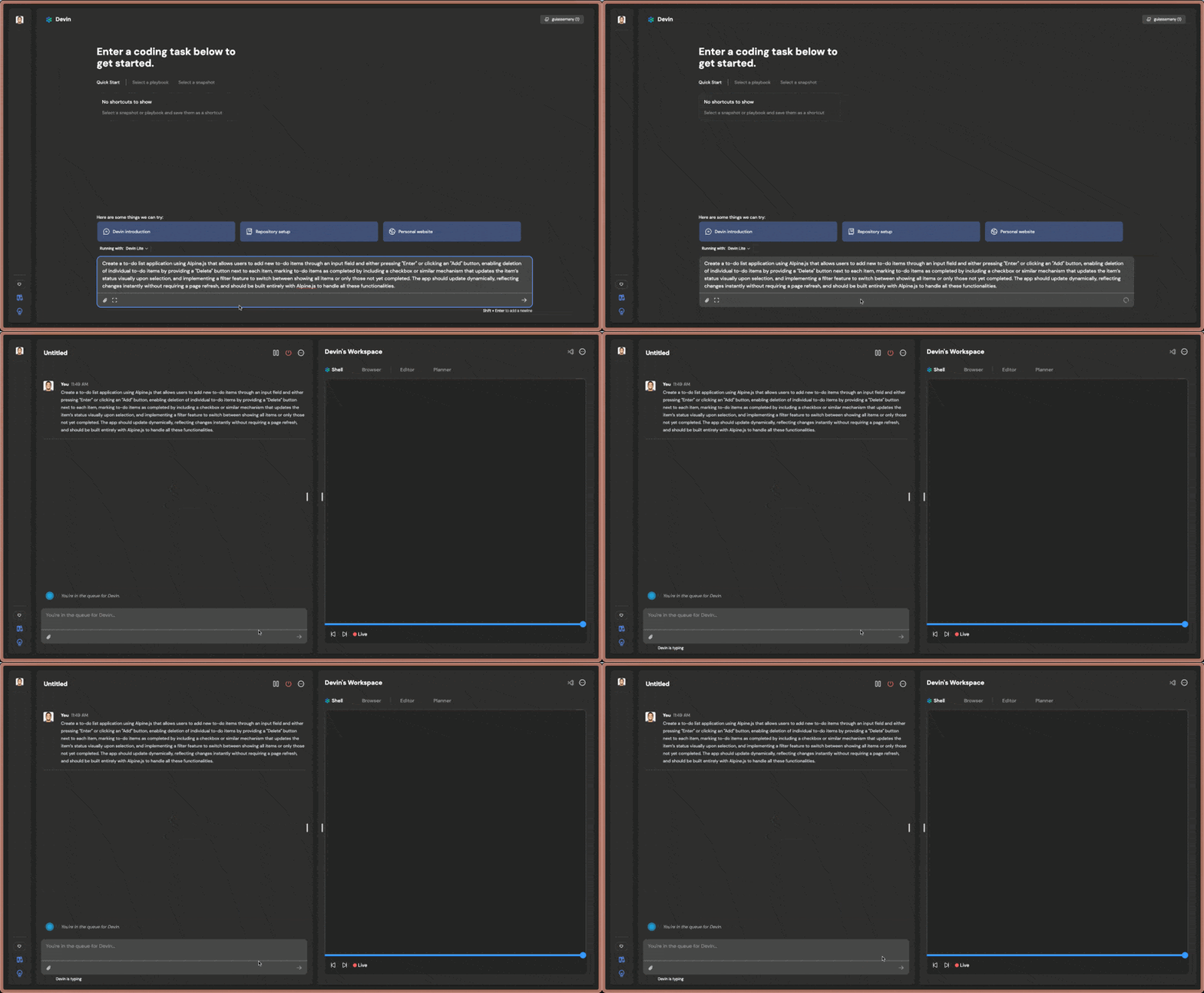
As soon as Devin begins working, you’ll notice some options appear in the interface.
You have four main views:
- Shell
- Browser
- Editor (An online VSCode where you can actually edit the code and keep iterating with Devin to build your final product)
- Planner (Which explains each step defined to break down the feature you’ve requested)
The best part is that you can follow along in real time with what Devin is doing. If, at any point, you add more information to the prompt, Devin will take that into account and adjust its work accordingly.
The potential of this tool is simply fantastic.
Reviewing the Application
The speed at which the application is generated isn’t as fast as with ChatDev, considering that there is currently a queue for processes to run, so it might take some time until everything is ready. However, even though it’s a bit slower, this application took only 7 minutes from the first prompt to deployment on Netlify (all done solely by Devin). Yes, you read that right — Devin even took care of deploying the application and provided me with a URL so I could access it from anywhere.
The generated application had a minor issue with how AlpineJS was included and didn’t work correctly at first. Devin had to run a few tests to find the proper way to include AlpineJS. After some time without success, I decided to step in and instructed Devin on how to include it correctly:
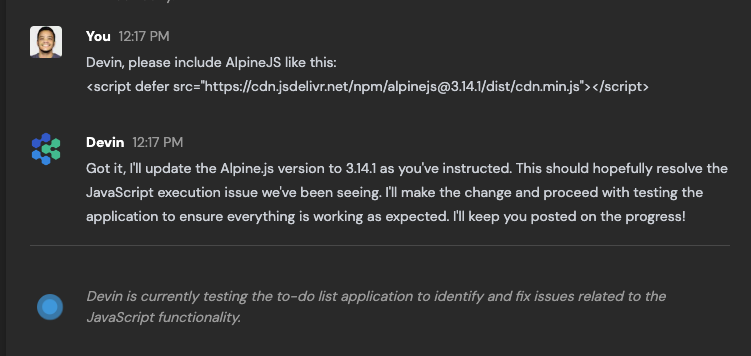
After that, Devin was able to continue and test the application within its own browser.
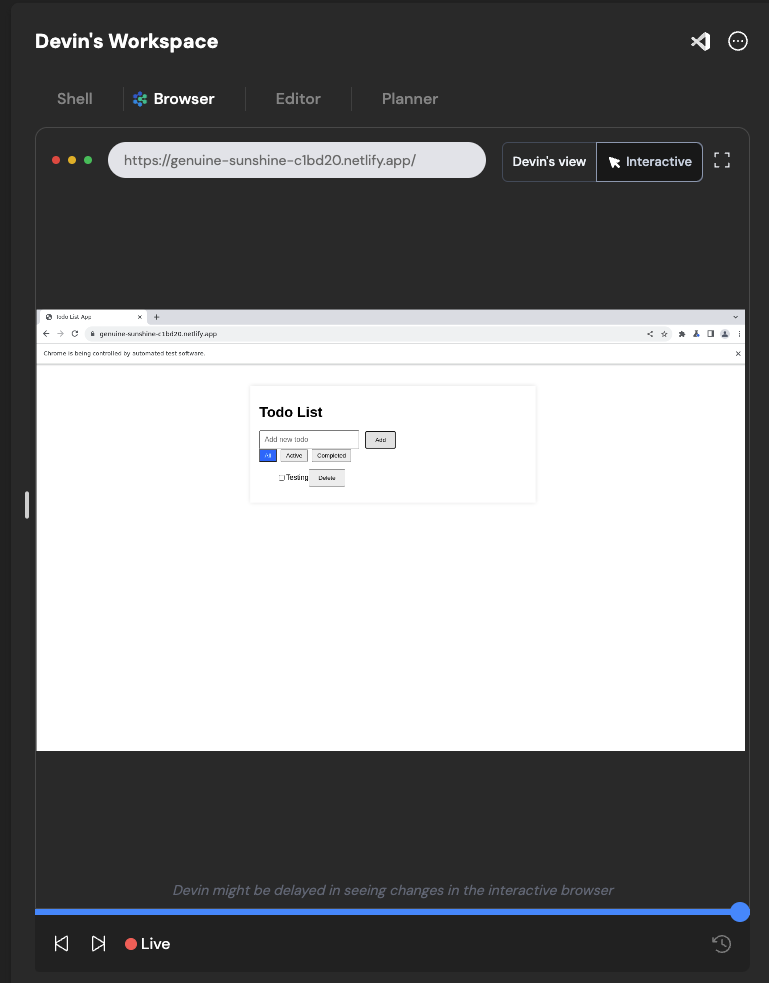
The experience of building an application with Devin is fantastic. Being able to observe each step and interact directly with the agent is truly exciting.
And here is how our application turned out in the end:

Despite the initial error in including AlpineJS, Devin did try to use the latest version (3.x), unlike ChatDev, which used version 2.x.
Regarding the final application and code, I believe Devin did a better job of understanding the prompt and creating a more well-thought-out application. Even the layout, although basic, is more acceptable than what was generated by ChatDev.
You can probably tell how excited I am about Devin, right?
Inside the Process
With ChatDev, there is a “Replay” mechanism for the project-building process. Comparatively, Devin allows you to follow along live with the shell, editor, and browser. I know I’ve mentioned this before, but I think it’s essential to highlight how cool this is because it enables a human-machine interaction very similar to what you would experience if you were coding alongside another developer.
Moreover, there is a slider, much like a live stream video, which you can rewind at any time to see what was happening.
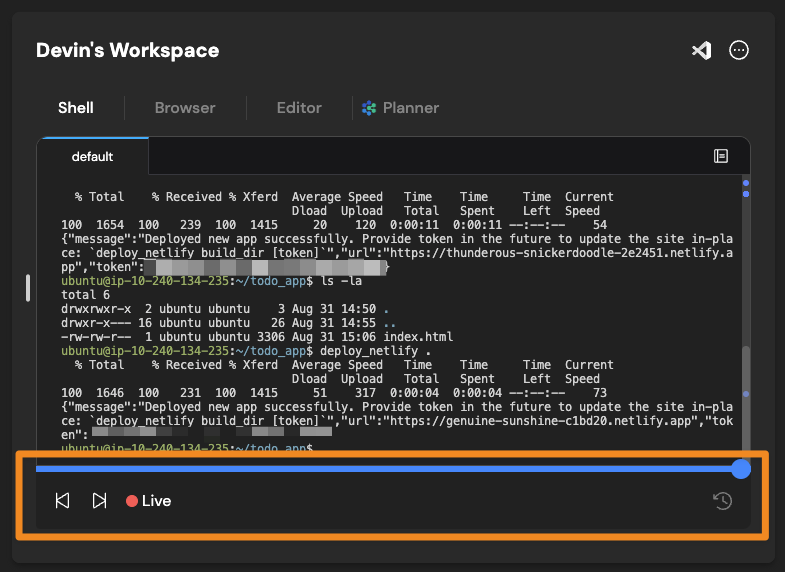
However, since it is relatively new, there are still areas that could be improved, particularly in terms of integration with other popular development tools.
Devin Wrap-Up
Devin is fantastic. It genuinely gives you the feeling of having a programming buddy with you from start to deployment. Additionally, you can connect it to your GitHub to set up repositories, teach Devin about specific technologies or libraries, modify the code it writes in real-time, and more.
However, it’s worth noting that we’re dealing with something relatively new. So, there are still some gaps in terms of integration with other services and technologies.
I can see myself spending some hours on a daily basis and using Devin to create some proof-of-concepts and even some small applications. I think it’s the most promising AI Agent so far, from the experience of using it to the actual results.
SWE-Agent
Introduction to SWE-Agent
SWE-Agent is an AI agent specialized in software engineering, created by researchers at Princeton University. Unlike tools focused on creating software, this one is geared more towards bug fixing through GitHub issues.
To better define the tool, here’s exactly how the creators describe it:
“SWE-agent takes a GitHub issue and tries to automatically fix it, using GPT-4, or your LM of choice. It solves 12.47% of bugs in the SWE-bench evaluation set and takes just 1 minute to run.”
In other words, unlike ChatDev and Devin, you wouldn’t provide a prompt asking SWE-Agent to create an application. Instead, you give it a GitHub issue, and the promise is that SWE-Agent will do its best to resolve it.
This is an open-source agent, so it is likely to grow more over time. On GitHub, its repository has already gathered around 14,000 stars since its launch 5 months ago.
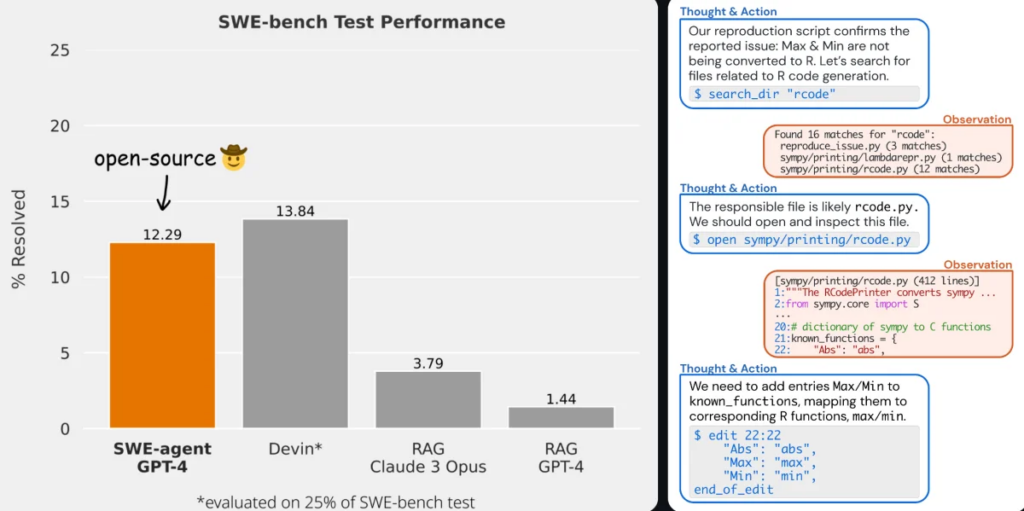
One of the most impressive things is that the agent’s evaluation score is 12.29% in the SWE Bench test, an automated benchmark for software engineering systems consisting of GitHub issues and pull requests. In this regard, SWE-Agent isn’t far behind Devin.
First Impressions
SWE-Agent is free to use, but you need to provide an API key for one of the available services:
You only need to provide the keys for the services you plan to use.
You can use SWE-Agent via the command line, but the tool also offers a web interface similar to what we’ve seen with Devin, although it is a bit simpler. To make it easier to share what I’ve explored in this article, I will use the web interface.
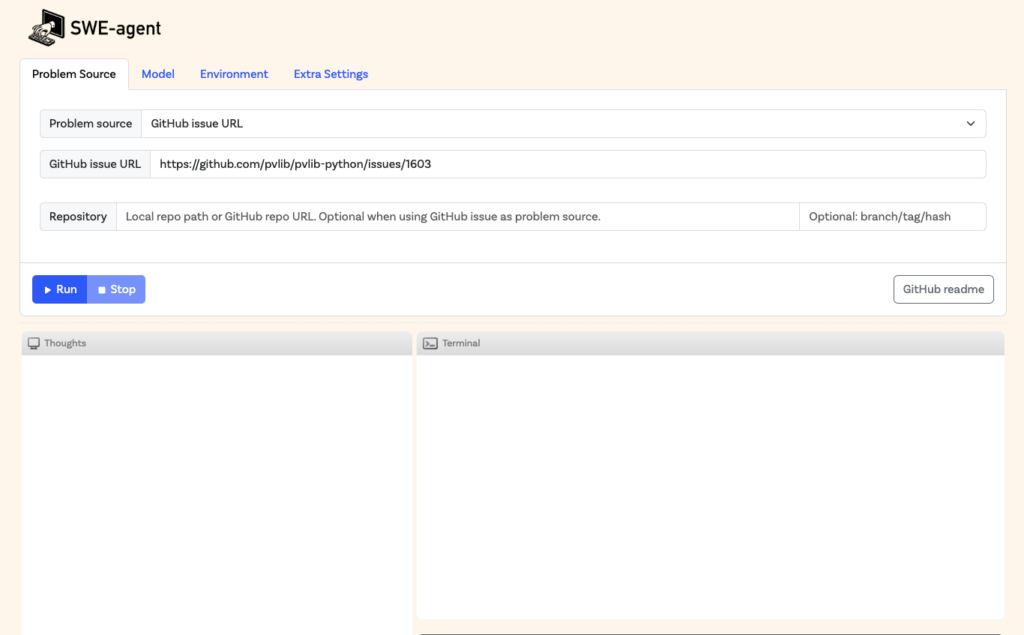
As you can see, SWE-Agent is very focused on the specific problem it aims to solve. You provide the URL of the GitHub issue (and if it’s a private repository, you’ll also need to provide your GitHub API key). Additionally, you can configure the model and some environment settings for SWE.
As I mentioned earlier, SWE-Agent is not designed to function like an agent such as Devin, so using a similar prompt wouldn’t make much sense. To test the tool, I used a link to an issue from the documentation itself, which is provided as a test case.
Inside the Process
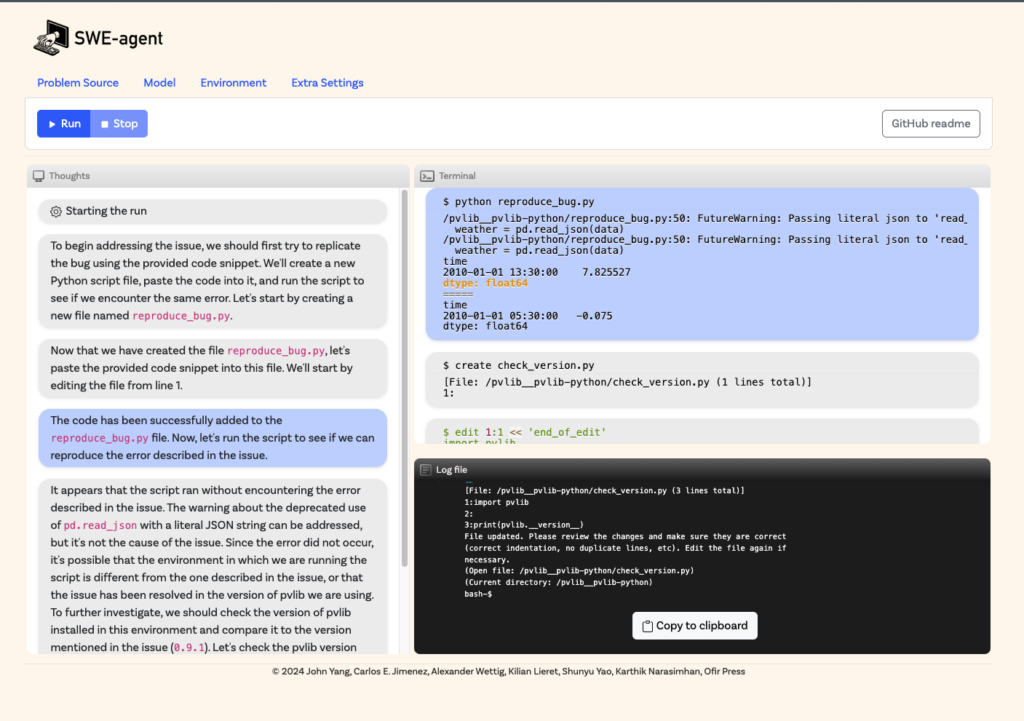
Like the other two, you can follow SWE-Agent as it works to solve the bug. You can observe the tool’s “thought process,” where it considers different aspects of the issue and determines the best way to fix the bug. Additionally, there is a terminal view where it actually runs tests and commands to arrive at the solution, along with a LOG, which provides a complete record of all actions.
When thinking about command-line usage, you can automate SWE-Agent to automatically fetch issues from a repository and attempt to resolve them. Imagine having an agent that works 24/7 to fix problems in your application — pretty cool, right?
SWE-Agent Wrap-Up
SWE-Agent has enormous potential, and I believe that in time, tools like this will become standard for automating parts of the software development process, whether by reviewing issues or even conducting code reviews to prevent bugs from reaching production.
In my opinion, there is still a way to go before tools like this are widely adopted by most companies, but the results so far are certainly impressive.
Final Thoughts on AI Agents
Over the past few decades, AI has begun to significantly influence how software is built. AI Dev Agents, the focus of this article, are a relatively new innovation that aims to relieve developers of repetitive, manual tasks. Each has their strengths and limitations, but all of them are pushing the boundaries and changing the way we think about building and improving software, and this is valuable in itself.
Autocomplete tools like GitHub Copilot, Tabnine, and CodeWhisperer have proven themselves incredibly effective for coders, helping them to be more productive in their day-to-day work. But it’s clear that coding agents like ChatDev, SWE-Agent, and Devin still have a long way to go before they’re ready to be widely adopted for real-world tasks. Their potential is clear, but they’re not yet reliable enough for complex, mission-critical workflows.
Future Perspectives of AI in Software Development
For me, one big question still remains: are AI agents truly the future of software development? I don’t think the answer is straightforward.
There’s a lot of hype around AI agents. Admittedly, their promise to help developers write code faster and with fewer errors is enticing. And the rapid evolution of AI, such as ML and NLP, means AI agents are becoming more sophisticated and better able to understand project contexts and developers’ needs.
However, there are still significant challenges. Over-reliance on AI – be it dev agents or otherwise – may lead to complacency, where developers blindly trust AI suggestions without questioning their validity. Moreover, privacy and data security remain critical concerns, especially when AI tools have access to sensitive or proprietary code. There is also the issue of bias in algorithms, which can result in automated decisions that may not align with best practices.
Ultimately, I believe it will take some time before the more complex solutions generated by these agents are reliable enough for companies to incorporate them into their core dev processes.
What Does the Future Hold?
The short-term future of AI in software development will likely be a hybrid one — a collaboration between humans and machines, where each brings its unique strengths to the table.
AI will continue to evolve to provide more contextual and personalized support, but the role of human developers will remain essential to validate, guide, and use creativity to solve complex problems.
Rather than replacing developers, AI agents will extend their capabilities, enabling them to achieve new levels of innovation and productivity.
So, while it is safe to say that AI agents have a growing and important role in the future of software development, it is equally important to recognize that they are not a magic solution.
They are powerful tools that, when used wisely and strategically, can significantly transform how software is created. However, the key to the future lies in a balanced and intelligent collaboration between human developers and their AI counterparts.
About the author: Guilherme Assemany
Guilherme Assemany is a Full-Stack Software Engineer with over 15 years of experience. He’s currently the CTO of ADDSALES, as well as a Technical Interviewer at Scalable Path. Guilherme loves to work with the TALL stack (Tailwind, Alpine, Laravel, Livewire), Node.js, and Python for AI-related tasks. He thrives when experimenting with new technologies and techniques to solve complex problems.