
The Cloud Is Just Someone Else’s Computer: Cloud Cost Optimization Beyond AWS

In tech, we often talk about “the cloud” like it’s a single, inevitable destination. But at its core, the cloud is just someone else’s computer. For more than a decade, choosing whose computer to use felt simple: AWS.
At Scalable Path, we’ve relied on AWS since 2011. Honestly, we still do in places. It’s hard to beat the convenience of servers, databases, firewalls, monitoring, and easy scaling living behind one unified console.
But convenience has a price. Over time, that price becomes “gravity”, introducing complexity, hidden costs, and the risk of significant overcharging.
So, we decided to challenge that gravity. Even with a spreadsheet to keep us honest, the results surprised us: we found a path to roughly 80% lower hosting costs, a ~5-month payback period, and a 3-4x jump in raw performance on comparable workloads.
This isn’t an anti-AWS rant. It’s a reminder that “default” is rarely the cheapest option forever.
Table Of Contents
- Why “Big Cloud” Can Mean “Big Bite-Back”
- The Decision to Migrate: An Apples-to-Apples Comparison (and Why We Chose Hetzner)
- Defining the Timeline: How Long Would It Take to Migrate from AWS to Hetzner?
- Smaller Cloud Providers You Can Experiment With
- Migrating from AWS to Hetzner: Modernizing While Migrating
- Conclusion: Is It Time to Revisit Your Defaults?
Why “Big Cloud” Can Mean “Big Bite-Back”
AWS is a wonderful product and a “marvel of engineering”. It’s also designed to make it easy to stay. The ecosystem is vast, services are tightly integrated, and many “one-click” features are engineered to keep you building deeper inside the platform.
That’s not evil. It’s a business strategy. The risk is what happens when your architecture evolves into a web of AWS-specific assumptions and billing line-items you didn’t realize you agreed to.
But simplicity also comes with a hidden cost: misconfiguration. The easier something is to turn on, the easier it is to turn on the wrong thing.
A Small Example: T Instances and “Simple” CPU Bursting
AWS has T-class instances. They look like a deal: you pay less for a baseline CPU and get “burst” performance when you need it.
But then you have a CPU credits bucket, a credit basically allows your CPU to go to 100% of the physical underlying CPU, and your instance has a baseline for the type you picked, but there’s a catch: every instance launch starts with the bucket zeroed, and it accumulates as your instance is live and doesn’t use that much CPU, sounds simple, right?
The issue begins when your deployment process replaces instances. Every new instance starts with its credit bucket effectively reset. If your deploy happens during a traffic spike, you can end up with brand new instances that can’t burst when you need them most.
But AWS has a “solution”: enable “CPU unlimited mode”, which lets you burst beyond your earned credits, and then you pay for it via an extra billing line item (“CPU surplus usage”). Suddenly, the cheap instance isn’t cheap anymore.
Of course, using a T class instance is not something we should do in a production environment; you should be using another instance type that has “sustained” CPU, but then you can see yourself in a huge instance classes table trying to pick the best for your application, CPU? Memory? Network speed? The list goes on.
Storage? You pay for that too; there’s no “included in your monthly pricing” storage. Network? Good luck discovering your network egress price.
Another thing that no one discusses when using these managed services is how difficult it can be to migrate when you need to leave or experiment with similar technology.
A Quick Story: “Try It and Roll Back”
I have an example from an old project I worked on: it was back when MySQL was 5.7, and MariaDB wasn’t a big thing yet. A company launched a “super-speedy and reliable” MySQL alternative, called Percona Server. They were built on MySQL 5, so the whole migration process was straightforward as we managed our database servers. We experimented with Percona, saw it failed in some areas of our application, and decided not to go with it.
But if we had been locked into a managed database service, we would be entirely dependent on the platform’s supported engines and the platform’s tooling, so “try it and roll back” becomes a much bigger commitment.
So, my point is not that managed services are bad. It’s that they’re sticky. When you buy convenience, you also buy constraints.
The Decision to Migrate: An Apples-to-Apples Comparison (and Why We Chose Hetzner)
Our goal wasn’t just to save a few dollars. It was to justify the engineering effort of a meaningful move.
We conducted a rigorous side-by-side comparison between AWS (and its instance and compute savings) and several providers that have real adoption, decent reliability reputations, and data centers that match our needs. We looked at providers like DigitalOcean, Vultr, OVH, and Hetzner.
We didn’t even account for “cleaning up” our infrastructure initially; we simply quoted the same specs we had on AWS. After a lot of digging into pricing pages, “rediscovering” our infra, using AWS’s own calculator, exploring the AWS Compute Savings, and Instance Savings plans (both 1 year, no-upfront).
We ultimately chose Hetzner for a few reasons:
- A strong reputation in Europe.
- A datacenter in Oregon (matching our primary AWS region).
- A lot of included bandwidth, an average of 25TB of network bandwidth per instance included in its price – a huge contrast to AWS’s egress fees.
Making It Apples-to-Apples Across Providers
While creating our spreadsheet, we also tracked the CPU and memory we would receive, since it’s hard to maintain a consistent CPU-to-memory ratio across providers. We picked the ones that were closer to our current specs (in our case, memory had a higher weight than CPU).
For example, where in AWS we would have a 2 CPU / 8GB of RAM, in Hetzner we picked a 4 CPU / 8GB of RAM, as for storage, in AWS you pay per EBS volume GB, as for the other providers you usually receive some storage with the price you pay monthly, so, to make it “Apples-to-Apples”, we calculated the storage as the basis of the instance type + an extra volume adding the missing disk space we had on AWS.
For example, where in AWS we would use a t3a.large with 2 CPU / 8GB of RAM + a 120GB EBS volume, in Digital Ocean, the 4 CPU / 8GB of RAM came bundled with a 160 GB disk, on the other hand, OVH had a 2 CPU / 8GB of RAM, that came bundled with a 50GB disk, so I added an extra 70 GB disk attached the instance to do the math.
Annual Cloud Cost Comparison
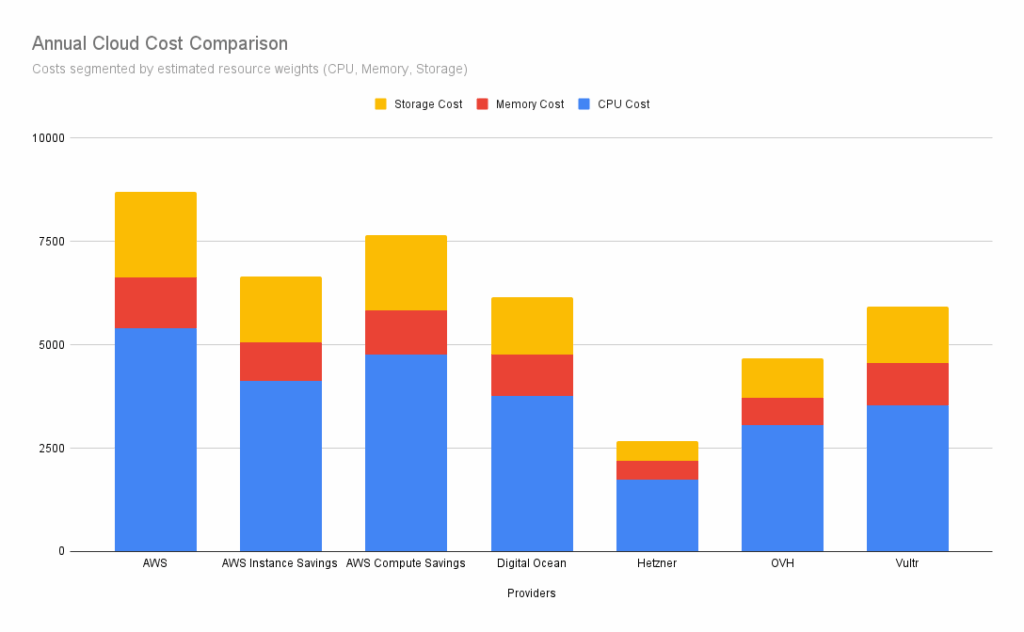
Once we gathered pricing across providers with a USA and Canada presence, the spreadsheet summarized:
- Total CPU cores across all instances,
- Total RAM size
- Total disk size (remember, some providers offered more GB “for free”)
- Average monthly price per unit (CPU, memory, disk)
To keep things simple, we didn’t include AWS egress fees (as they’re too variable), nor CPU-burst, S3 storage, and other line-items that add a lot to the AWS bill.
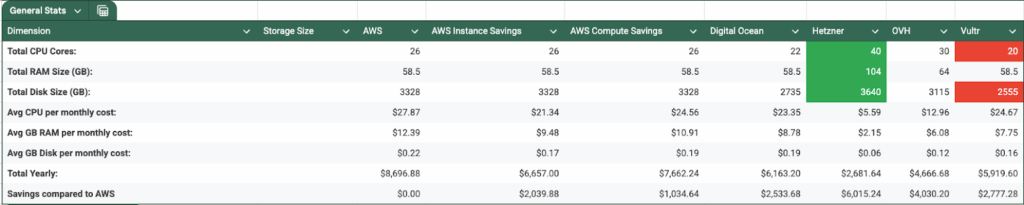
With that data in front of us, it was easy to choose Hetzner. In our scenario, for about 30% of the price we were paying on AWS, we could get roughly:
- 53% more CPU,
- 77% more RAM
- ~10% more disk
At this point, we ran some CPU benchmarks to validate that we weren’t trading cost for slower performance. The results surprised us again: Hetzner would consistently perform ~4x better than the AWS counterpart.
Defining the Timeline: How Long Would It Take to Migrate from AWS to Hetzner?
With an overview of our current infrastructure, we did some rough planning and came up with 80 person-hours of migration time (spoiler alert: it took less), with savings we were about to achieve, that would make our payback time 5 months.
But remember, this was assuming we would be doing an “infra parity”, at the end, when migrating, we were able to join a couple of services in the same machine (as we now have machines with more CPU).
So, at the end, we had an 80% savings compared to AWS, and a slightly lower payback time.
Before Diving into Migration: Why Should You Revisit Your Cloud Strategies?
I get it, AWS has been the “de facto” cloud provider everyone relies on, and there are a lot of professionals out there who are versed in AWS. They provide a huge list of services “out-of-the-box” which you can spin with a click of two buttons, you have thousands of answered questions on Reddit, and so on.
But, at the end of the day, AWS (like every cloud provider) can be reduced to three pillars:
- Compute
- Network
- Storage
Everything they offer runs on these three pillars.
So, if that’s the case, does your application/project really need to be running on AWS?
Reliability Myths and Reality Checks
In the past, we would use as an excuse: “AWS is safe, they run the whole internet, they have a 99.99999999999% uptime guarantee (that’s a made-up number, of course)”, but given the last frequent outages we had in 2025, and which keep happening in 2026, is this still the case?
Another question you might have is: Is my application so unstable that I can’t have at least the predictable workloads running in a different, cheaper provider, and use the “scalability” that the big 3 provide to the occasional spikes in usage?
If You Want “Big Cloud Safety”, Price the Other Big Clouds Too
But I get it, you don’t trust smaller providers, you are too scared that something will happen, then, if that’s the case, why not experiment with Azure or Google Cloud?
Nowadays, the three big ones have basically the same managed-services offering, need scalable storage (S3-like)? All of them have that. Need a managed MySQL or PostgreSQL service? All of them have that. ElasticSearch? All of them. MongoDB? All of them. And the list goes on.
With that in mind, if you really want to “play safe”, why not quote your current infrastructure in the other two big clouds? You might be able to secure a better deal with their sales team and even arrange some sort of migration help, depending on how big the infrastructure you are migrating from is.
Reducing Vendor Lock-In Can Be a Migration Win by Itself
Reevaluating your current cloud choice also brings another opportunity to the table:
- You can migrate parts of your infrastructure to reduce your “vendor lock-in”
- Access regions you don’t have access to in AWS (even though most of them have overlapping regions, there’s always that US-central, or UK-west)
- Prevent cases of one region going down and bringing all other regions with them (which would break your whole recovery plan)
- Meet regulatory requirements that call for multi-provider or multi-region setups
Smaller Cloud Providers You Can Experiment With
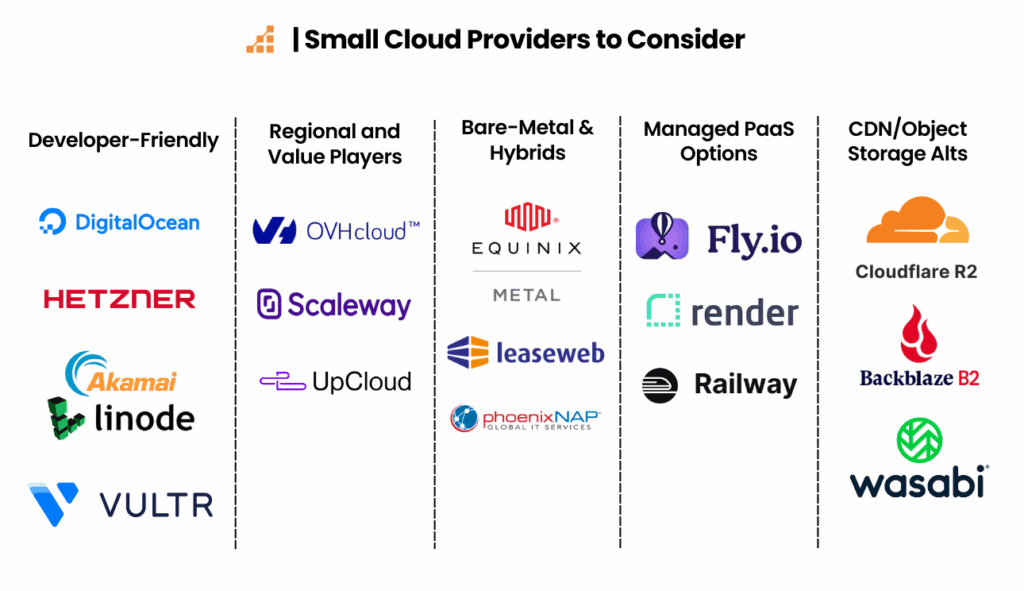
If you’re open to giving smaller providers a chance, here are some to consider:
Developer-Friendly Clouds
DigitalOcean
Founded in 2011, a classic choice for a simple VPS (Droplet) backed by a KVM hypervisor. Note: They currently offer $200 in free credits (with a 60-day limit) for new accounts, and their Hatch program provides up to $5,000 in funding for early-stage startups.
Hetzner
A German provider famous for high-performance bare metal and cloud instances with local NVMe storage. While they rarely offer public “grants”, their baseline pricing is often 80% lower than AWS, usually making the “payback time” shorter than any one-time credit.
Linode/Akamai
One of the oldest VPS providers, offering SSD-based compute with a straightforward flat-rate pricing model. New users can typically secure $100 in credits to test infra-parity before a full move.
Vultr
Offers standardized compute instances and fractional GPUs across 30+ global data centers. They frequently run “match your deposit” promos or offer $100–$250 in credits for users migrating from hyperscalers.
Regional and Value Players
OVHcloud
A European giant that builds its own hardware and offers no-cost DDoS protection. Their Migration Acceleration Program (OMAP) provides dedicated support and financial incentives/credits to offset the cost of running parallel environments during your move.
Scaleway
A Paris-based provider with a full ecosystem of S3 storage and managed Kubernetes within the EU. They offer a Startup Program with up to €36,000 in cloud credits for eligible companies.
UpCloud
Uses a proprietary “MaxIOPS” storage backend to provide high-performance block storage. They offer a free trial and often provide custom migration credits for businesses moving predictable production workloads.
Bare-Metal & Hybrids
Equinix Metal
Automated bare-metal-as-a-service that allows you to provision physical servers via API. They offer a Free Trial and credits for “interconnection” tests, specifically for hybrid-cloud setups.
Leaseweb
Specializes in customizable dedicated servers and high-bandwidth networking. They often negotiate custom onboarding discounts or “free months” for large-scale migrations.
PhoenixNAP
Focuses on security-first bare metal. They offer a Global IT Grant program and specific credits for testing their “Confidential Computing” instances.
Managed PaaS Options
Fly.io
A platform that converts Docker containers into Firecracker microVMs to run apps physically close to users. They have a generous free tier for small apps and typically credit your first $10–$100 of usage automatically.
Render
A modern PaaS that automates deployments directly from Git. They offer $500+ in credits for startups through various VC/accelerator partnerships to ease the transition from Heroku or AWS.
Railway
A deployment platform with a visual canvas that manages environment variables and infrastructure. They use a “trial” credit system and offer a simple pro-tier with predictable spending limits.
CDN/Object Storage Alts
Cloudflare R2
An S3-compatible alternative with zero egress fees. Their Sippy tool and Super Slurper service allow you to migrate data from S3 for free, paying only for Class A operations (writes) into R2 and S3 egress fees.
Backblaze B2
High-durability object storage at a fraction of S3 prices. Their Universal Data Migration service will actually cover the data transfer costs (egress) from AWS to B2 for qualifying data volumes.
Wasabi
A specialized “Hot Cloud Storage” provider with a flat fee per TB and no charges for egress. They offer a 30-day free trial (up to 1TB) to verify S3 compatibility with your existing app.
Migrating from AWS to Hetzner: Modernizing While Migrating
We’ve always aimed to be vendor-free by using open-source tools (NginX, PHP, MySQL, Redis), which is what made the move easier (if not possible).
However, the migration was also an opportunity to fix some of our infrastructure technical debt.
Infrastructure as Code (IaC)
Our old AWS setup was largely manual; it was created years ago and grown over the years as we needed to add more services, even though parts of the infrastructure were indeed code – especially our CI/CD scripts – the “raw” compute setup, database, were created manually via AWS Panel.
As our infrastructure can be pretty “static”, we didn’t have an issue with that. We wouldn’t be creating new database servers or adding more environments every day; it was more of a “set and forget” setup.
But, as we moved away from AWS, we were able to “document” this new infra in Terraform. Hetzner has an official Terraform provider, which makes the setup process easier.
Together with the AWS official provider, we imported resources that were kept in AWS (more on that later) and set up new resources in Hetzner.
Migrating Orchestrators: ECS to Kubernetes (K3s)
On AWS, we used ECS to help us orchestrate our containers (remember, we aimed to be vendor-free most of the time, so our application ran in containers with the needed software).
Once we moved to another provider, it required us to fill this orchestration gap; after all, no one wants to be back to the old days of SSH and “docker run…”.
That’s when K3S enters the room.
Even though Kubernetes has a reputation for being complex and resource-intensive, K3S is incredibly lightweight and easy to set up.
Using Terraform and Cloud-init, we were able to set up our control plane and worker nodes easily, with all the needed Helm controllers and Helm deployments for ingress, system-upgrade, secrets management, and all the bells and whistles.
With the system-upgrade controller in K3S and unattended-upgrades properly set up on our nodes, our daily operations with K3S were simpler than they were with ECS, which often threw opaque errors that were hard to debug.
Creating the Minotaur: Our “Hybrid” Approach
We didn’t move everything; we kept the “peripherals” where AWS is “better” or easier:
- S3 for our object storage (the cost and effort to migrate weren’t worth it for us at the time)
- CloudFront for our CDN
- Route53 for DNS
- ECR for container storage
- A handful of other small services.
You don’t need to migrate everything. As long as the most expensive things are migrated, you might keep a thing or two in the previous provider if they aren’t worth migrating.
Things Might Get Bumpy: Migrating Makes You Rediscover Forgotten Settings
Our migration process was pretty straightforward. We used Terraform to set up the needed private networks, placement groups (we were looking at high-availability, so making sure that the instances didn’t run in the same physical machine was a huge requirement), and new machines, all of which used the Docker operating system images:
- A K3S control-plane
- A few K3S worker nodes
- Production database server
- Development database servers
- Shared-storage server
- Load balancing
Then we set up the required Kubernetes controllers, including the EKS Pod Identity webhook, which allows us to inject AWS session role tokens into our containers, so we don’t need to configure a static secret key in our services, improving security.
Migrating Environment-by-Environment
After we had all the necessary infrastructure in place, we started migrating one environment at a time:
- Importing a database dump of that environment,
- Updating the DNS to point to the new load balancer.
When the new DNS entry was propagated, we would start a round of tests in the “new environment”, making sure that nothing was missing and that everything was running exactly like it had before the migration.
Part of the tests were comparing envs, deploying the same branch to both environments, and testing them side-by-side, and that’s when our migration started showing major improvements: Hetzner’s CPU-core performance and having more cores per-node made our application run faster, like humanly perceivable faster, the benchmarks had already “machine” proved that they were faster, but seeing this within your own eyes were huge (remember the ~4x faster we said in the beginning of this article? That’s exactly it).
We did this for all the environments, one by one, until we had no doubts that it was ready to receive the production environment. The whole process took more or less two to three weeks, between QA doing its magic and me fixing issues and fine-tuning parameters.
Production Time: Tweaking Things as the Car Is Running
We picked a production migration date, prepared a maintenance page, and lowered DNS TTL three days ahead of time.
On migration day:
- We pointed production to the maintenance page and waited for DNS propagation.
- I drained ECS containers to stop new database writes.
- I dumped the production database and imported it into the new setup. (Yes, we could have used live replication, but it wasn’t worth the complexity for our case.)
- I updated CI/CD workflows and deployed production to the new cluster.
Deployments got faster. Previously, deploys took 30 to 40 minutes, as we had to wait for ECS to launch new instances, mark the instance as ready, swap containers, and take all the needed steps for a container to start. On the new setup, deploys took 20 minutes, most of the time installing vendor modules.
When the new containers started, I made sure we had database connectivity, triggered the needed indexing jobs, drained the maintenance page, and with that, production was back.
Since the maintenance page ran inside the cluster, I didn’t need to update DNS to make production work; it was just removing an ingress rule, and the new production container started answering requests.
The Inevitable Post-Launch Surprises
Real traffic surfaces real problems.
A few things we discovered quickly:
- Dev databases were producing too many binary logs during refresh workflows, filling disks faster than expected.
- Some AWS parameter group settings hadn’t carried over to the new production database server, causing deeper parts of the app to fail.
- Hetzner’s load balancer didn’t include security-group style controls or rate limiting.
The fixes were manageable:
- We tuned database settings and log retention.
- We applied the missing DB config values.
- We added an HAProxy machine for load balancing with proper firewalling, rate limiting, and fail2ban.
Of course, all the changes were documented back in the Terraform files; even if I did some of them manually, they were properly added to their corresponding cloud-init templates.
Conclusion: Is It Time to Revisit Your Defaults?
AWS changed the way we think about cloud, but keeping it as “the default” might be aging as we do. If your workload is predictable, and your stack is based on open-source standards, you might be paying a huge “convenience tax” for features you don’t use.
By running the numbers in a spreadsheet, moving to lightweight orchestration tools like K3S, and using Terraform to document our infrastructure (and our journey), we were able to slash our spend while actually improving our performance. In the end, we have a more modern infra tech stack, better performance, and are saving a ton of money (even including the cost of the migration).
Remember: The cloud is just someone else’s computer, and it’s basically three things: Compute, Network, and Storage.