
How to Use the Scalable Path’s AI-Powered Job Description Tool

Creating a quality job description has traditionally been a pain point in the hiring process, so we decided to build the Scalable Path Job Description Tool to guide our clients (and ourselves) through the process of writing a thorough, thoughtful Job Description (JD).
You may have seen AI tools that promise to write a full job description from a single sentence, but as developers, we know that’s a recipe for disaster. Inaccurate job descriptions lead to poor candidates and mediocre hires, and nobody has time for that.
Our tool is built on a “human-in-the-loop” philosophy: we combine the speed of AI with the real-world details only you know to make sure you get the right fit.
1. Pick Your Starting Point
You don’t have to start with a blank page. You’ve got three ways to get moving:
- From Scratch: Use our structured form to build it out piece by piece.
- Import from a URL: Got a posting already live on your careers page? Just drop the link, and the tool will scrape the details for you.
- Upload a File: If you have an existing description sitting in a PDF, Word doc, or text file, just upload it and let the tool do the heavy lifting.
2. Meet Your AI Hiring Assistant
Once you’re in, you’ll see our AI Assistant in the sidebar. This isn’t just a basic chatbot; it’s more like a technical talent specialist conducting an interview.
- The Interview: The agent will ask you specific questions to help fill out the trickier parts of the JD.
- Real-time Drafting: As you answer, the agent drafts the copy right before your eyes.
- A Word of Advice: The AI likes to be a bit “creative” sometimes, so definitely give it a once-over and trim anything that feels off or irrelevant.
3. Nail the Details
The form is broken down into modules to make sure you don’t miss the important stuff:
- Title: This is the most important part. A clear, accurate title helps candidates find you and helps the AI give you better suggestions.
- Overview: Briefly explain the the goals you are trying to achieve and why you are hiring.
- Responsibilities: What duties will the person be performing on a daily basis?
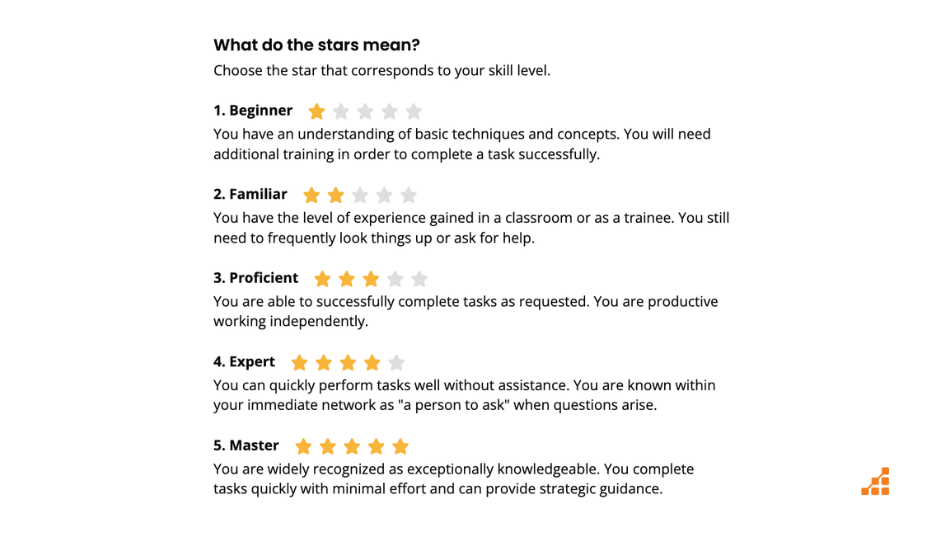
- The Skills Matrix: Instead of just a list of skill names, you can set proficiency levels (1-5 stars) and mark skills as “Must-have,” “Strongly Preferred,” or just “Nice-to-have”. This helps us match you with the absolute best talent for your specific project.
- Duration Notes: This is a good place to tell candidates if there is a possibility of the engagement lasting longer if things go well.
- Company Description: If you provide a website URL, the AI Assistant will try to create your company description, but you can always edit it manually. Accentuate the positive in order to attract candidates.
- Relationships: It’s helpful for candidates (and Scalable Path) to know about your existing team and who the new hire will be working with.
- Location & Time: Tell candidates where you are located and what regions you are open to hiring in. If your team is distributed around multiple time zones, just choose a primary one.
- Compensation: We also ask for a maximum hourly rate so we can negotiate effectively for you without wasting anyone’s time, though our goal is always to find the best value for your budget.
4. Cross the Finish Line
When you see those green checkmarks on your progress checklist, you’re almost there. Once the job description is 100% complete, we’ll get a notification to review everything.
It’s as simple as that. Our tool will deliver quality results without the usual JD-writing headache.
Frequently Asked Questions
Which file formats are supported by the importer?
The importer currently supports .pdf, .docx, and .txt files
Can I edit the AI-generated text manually?
Yes. You maintain full control over the content and can edit any AI-generated text at any time.