
Building AI Workflows with LangGraph: Practical Use Cases and Examples


AI agents are starting to reshape how businesses operate, from automating support workflows to enabling real-time data synthesis. As adoption grows, however, so do the challenges. Today’s AI agents lack memory, are prone to errors, and often get stuck without human intervention.
That’s where LangGraph comes in. LangGraph is a framework for building stateful, multi-agent applications powered by large language models. It helps developers move beyond the limitations of single-turn prompts by orchestrating agent interactions, managing memory, and defining workflows through a graph-based architecture. In this post, we’ll walk through where AI agents stand today, what makes LangGraph different, and how teams are already using it to build more reliable, production-ready AI systems.
Table Of Contents
- LangChain and the Rise of Agentic AI Architectures
- Introducing LangGraph
- What is LangGraph and How Does it Work?
- LangGraph Studio: A Companion Visual IDE for Agent Workflows
- Common Agentic Workflow Patterns — Powered by LangGraph
- Multi-Agent Workflows with LangGraph
- Why Businesses Should Care About Agentic Workflows
- Practical Use Cases
- How Can Your Company Integrate LangGraph?
- LangGraph and the Rise of Agentic Automation in Business
- About the Author: Mauro Colella
LangChain and the Rise of Agentic AI Architectures
Modern agents built on large language models [such as/or Claude/ChatGPT] shine in dynamic, context-aware tasks, like adjusting a travel itinerary based on changing weather. But they aren’t magically omniscient; AI agents need well-defined workflows, relevant data, and sometimes a nudge from humans to reliably solve real-world business problems.

The LangChain ecosystem addresses these challenges, giving developers the building blocks to move from prototype to production-ready agentic systems.
Over time, LangChain’s toolkit expanded (with products like LangSmith for monitoring) to support not only prototyping, but also scaling LLM applications into production. Yet, one piece was still needed: a way to organize complex agent workflows with more structure and control than a simple linear chain of calls.
Enter LangGraph, LangChain’s low-level orchestration framework and runtime for custom agent workflows. Since LangChain 1.0, langchain.agents.create_agent is the recommended higher-level starting point for standard agents, and runs on LangGraph underneath.

Introducing LangGraph
LangGraph was released in early 2024 as a response to the growing complexity of agentic systems. Instead of writing one-off scripts or forcing everything into sequential chains, LangGraph lets developers design a workflow as a graph.
Think of it like a flowchart with AI decision nodes and data passing along edges. Each node in the graph can be an AI agent or a tool/action, and the edges define the flow of control (including loops, branches, or parallel paths).
This graph approach brings much-needed controllability: one can explicitly define how an agent should proceed, handle errors, or coordinate with other agents, rather than leaving all decisions to the AI’s “black box” logic.
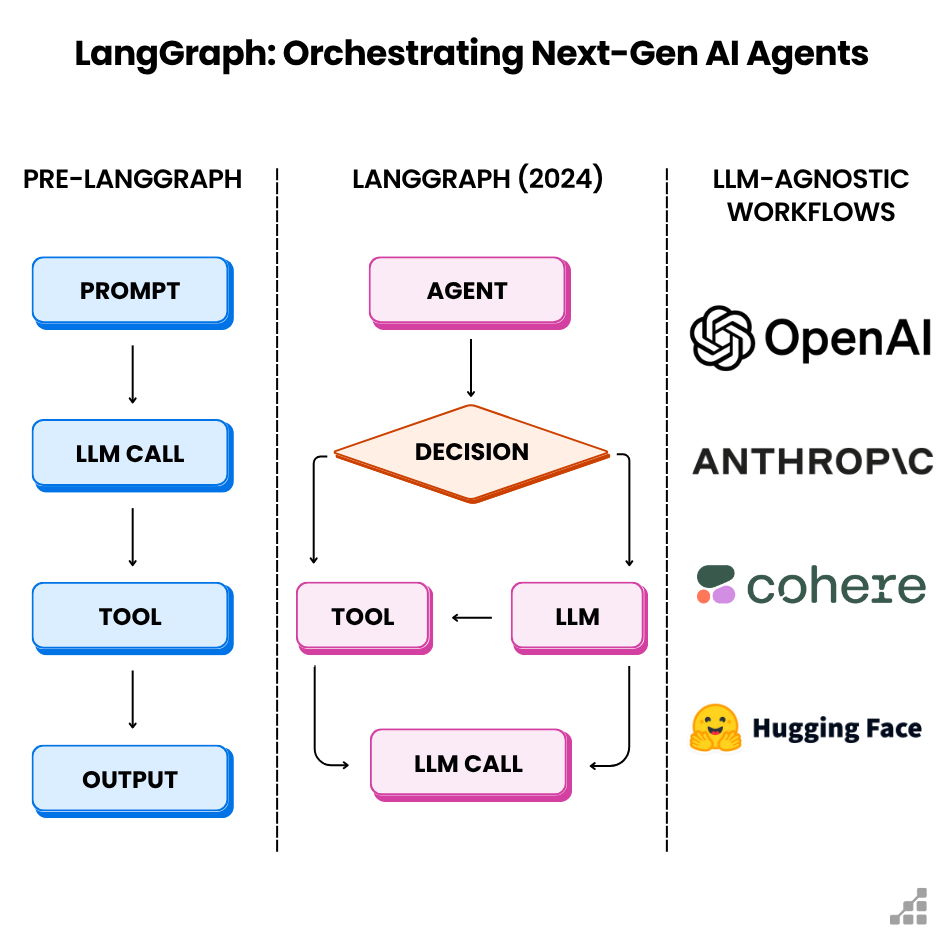
Importantly, LangGraph is not tied to any single LLM vendor or service. It works with any large language model; developers can plug in OpenAI’s latest API, an open-source model on their own servers, or even use multiple different LLMs in one workflow. This means no vendor lock-in; users are free to leverage the models and tools that make sense for their business, now and in the future.
What is LangGraph and How Does it Work?
LangGraph turns the idea of an AI agent into a scalable system — letting developers coordinate multiple agents or tool calls within a governed workflow.
At its core, LangGraph lets the user define graph-based workflows using nodes and edges. Each node is a discrete piece of logic – it could be a call to an LLM, a data processing function, or even another agent. The edges between nodes determine the control flow: which node leads to which, including conditional branching or loops.
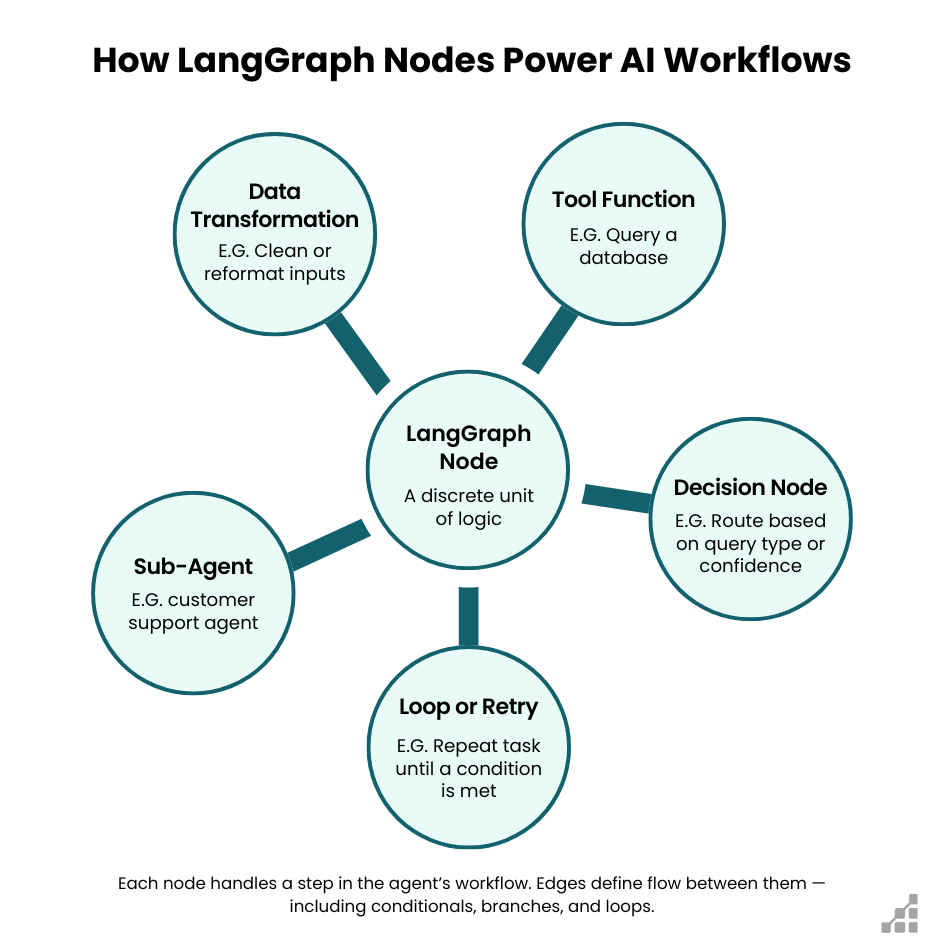
This graph design means your AI workflow is not limited to a single linear path; one can have multiple routes and decision points, just like a real-world flowchart for a business process. For example, one node could check a user’s query type and then route the task to different specialist agent-nodes (a reporting agent vs. a troubleshooting agent) accordingly.
By representing workflows as explicit graphs, LangGraph gives developers and architects a clear blueprint of how an AI-driven process runs – making it easier to understand, maintain, and extend as requirements grow.
Nodes: The Value of a Persistent State or Memory
One of the powerful features of LangGraph’s nodes is that they can share a persistent state or memory. Unlike a simple chain where each step might only pass information forward, LangGraph provides a shared context that all nodes can read from or write to.
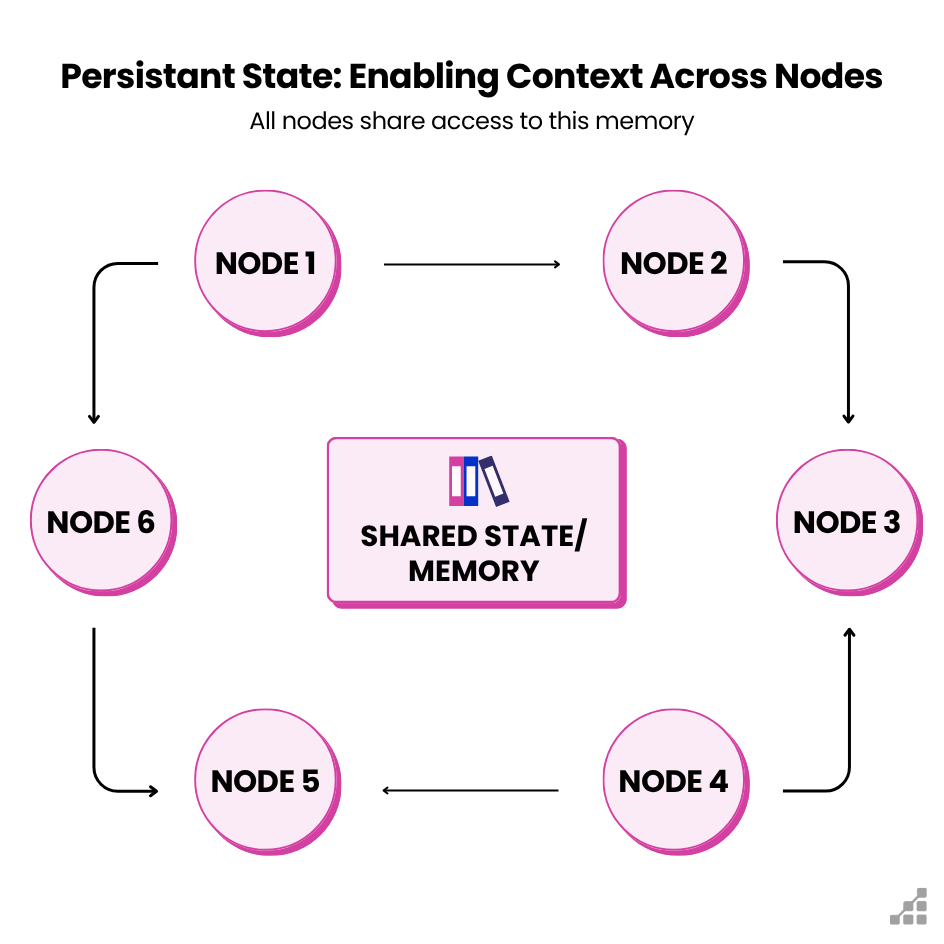
This means an agent at node 5 can see what happened in node 2 if needed, because the state – a list of conversation messages or intermediate results, for example – is carried along.
The result is better context persistence across complex workflows – agents don’t lose relevant information as they progress. This shared memory can be short-term (within a single session/run) or even long-term across runs, if using a database or other storage.
A quick note here: Persistence is optional and must be configured explicitly, for example with a database-backed checkpointer such as PostgresSaver or SqliteSaver.
In practice, this shared memory enables things like remembering past interactions, accumulating partial results for later steps, or caching expensive computations so they don’t repeat. It’s a key component of AI applications that need continuity, like a customer support agent that recalls previous questions or a research agent that accumulates findings over time.
“Human-in-the-Loop” Capabilities
Building with LangGraph also means one gets human-in-the-loop (HIL) capabilities and robust observability out of the box. Because the workflow is structured, developers can designate points where a human should review or approve an agent’s output before moving on (for example, require a manager’s sign-off if a financial report exceeds a certain threshold). LangGraph makes it straightforward to insert these checks or moderation steps as nodes.
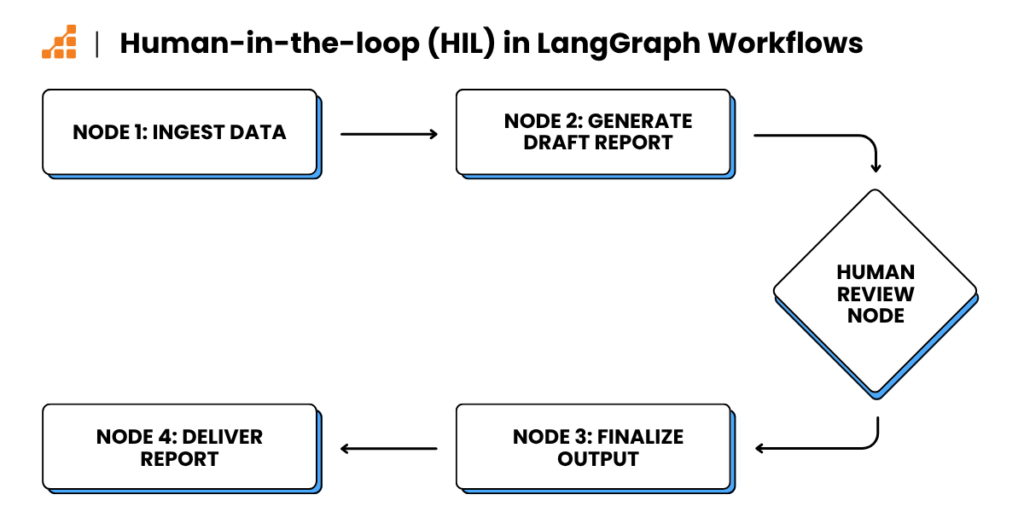
Under the hood, LangGraph is designed with introspection in mind – developers can inspect the state of the graph at each node, monitor the sequence of actions, and even stream the intermediate results as the agent works through the graph. This means that when one runs a LangGraph-powered agent, they can watch its “thought process” in real time: each tool it calls, each decision it makes, token by token.
Simpler Debugging
Debugging also becomes much easier than with a monolithic AI agent. That’s because developers can pinpoint which node in the graph might be failing or producing a wrong output. And if something goes wrong or an agent gets off track, one can intervene – adjust the state or tweak the logic – and resume the workflow without starting over.
LangGraph in Production Environments
At scale, LangGraph doesn’t just give you flexibility, it gives you reliability. In production environments, AI workflows often need features like caching results, retrying on failure, handling long-running tasks, and more – all of which LangGraph supports.
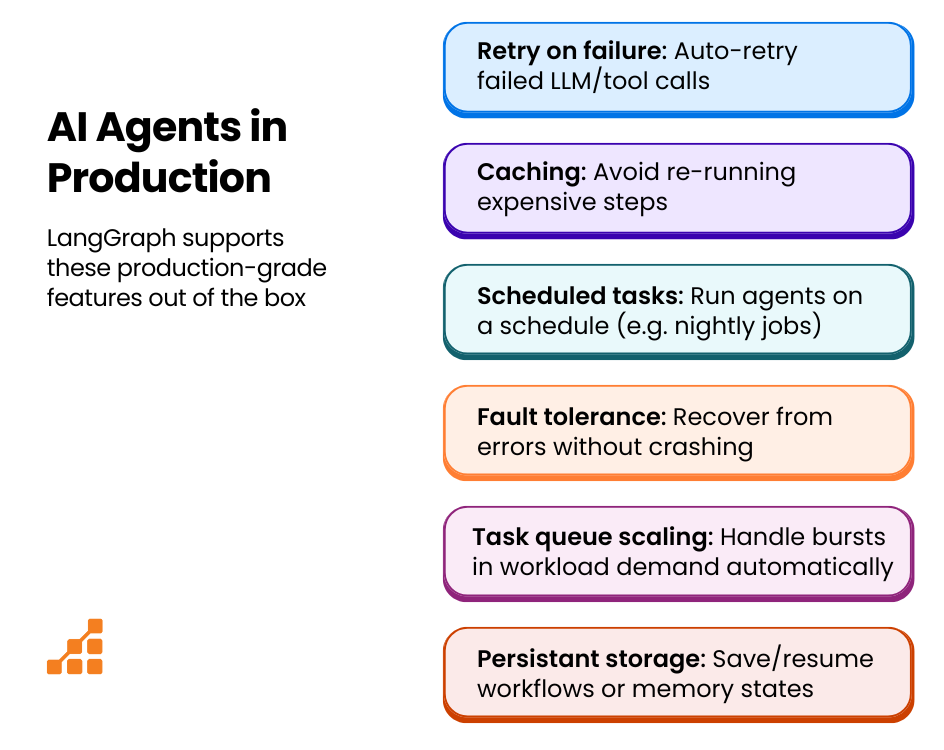
For example, one might configure a node to automatically retry calling an LLM if the response looks invalid or if there is a timeout. Or, they may use built-in scheduling to have background agents that run periodically (for example, a nightly data summarization job). LangGraph’s design lets developers plug in these reliability mechanisms so their agent-driven apps can run 24/7 confidently.
The enterprise-grade LangGraph Platform (an optional managed service) even provides extras like automated task queue scaling, persistent storage, and fault tolerance features out of the box. But even the open-source LangGraph library gives users the hooks to implement robust error handling and state persistence as needed for their use case.
In summary, orchestrating agents via a graph isn’t just about fancy control flow – it’s about making sure the whole workflow is observable, debuggable, and resilient enough for real-world applications.
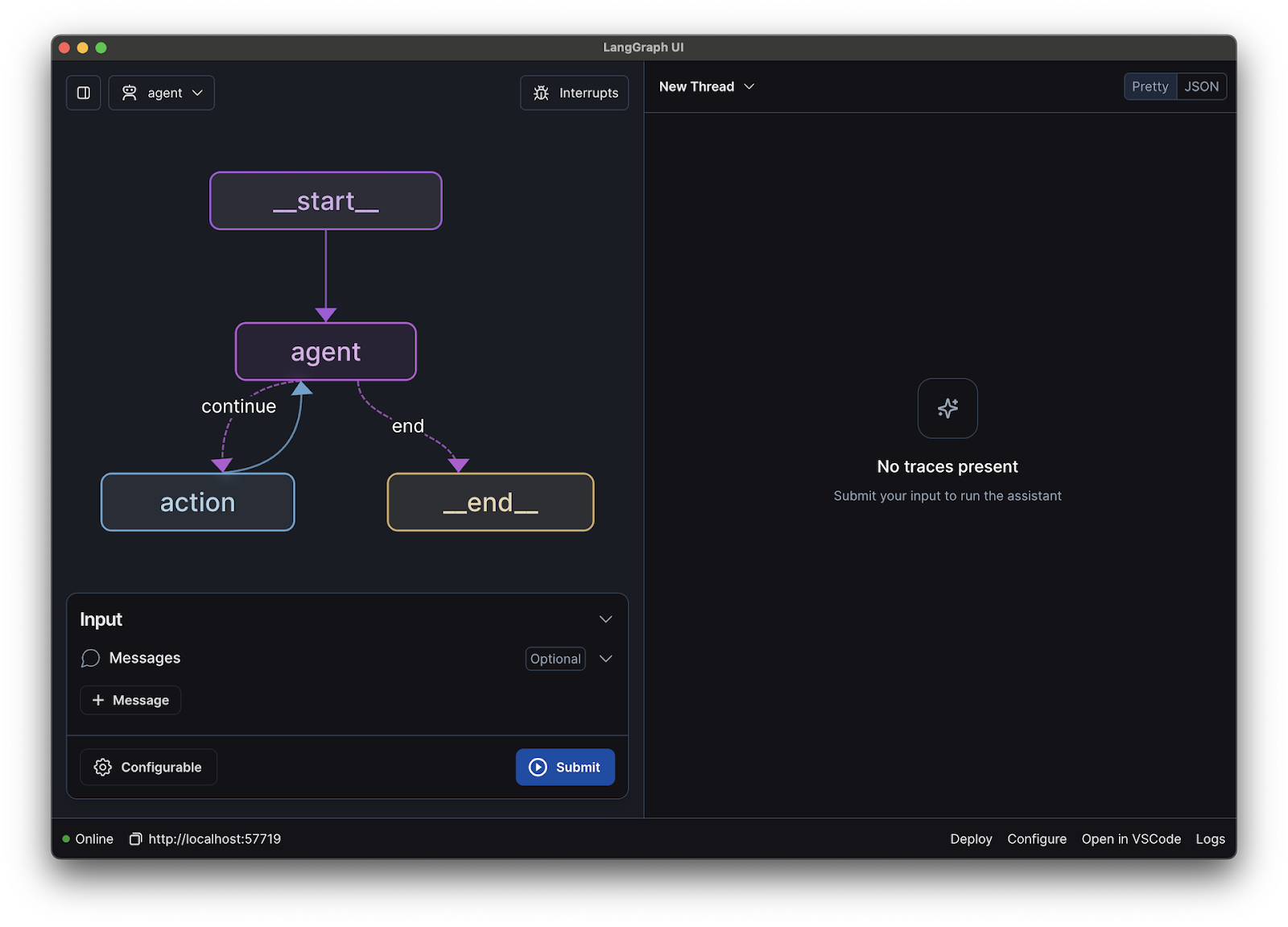
Source: LangGraph Github
LangGraph Studio: A Companion Visual IDE for Agent Workflows
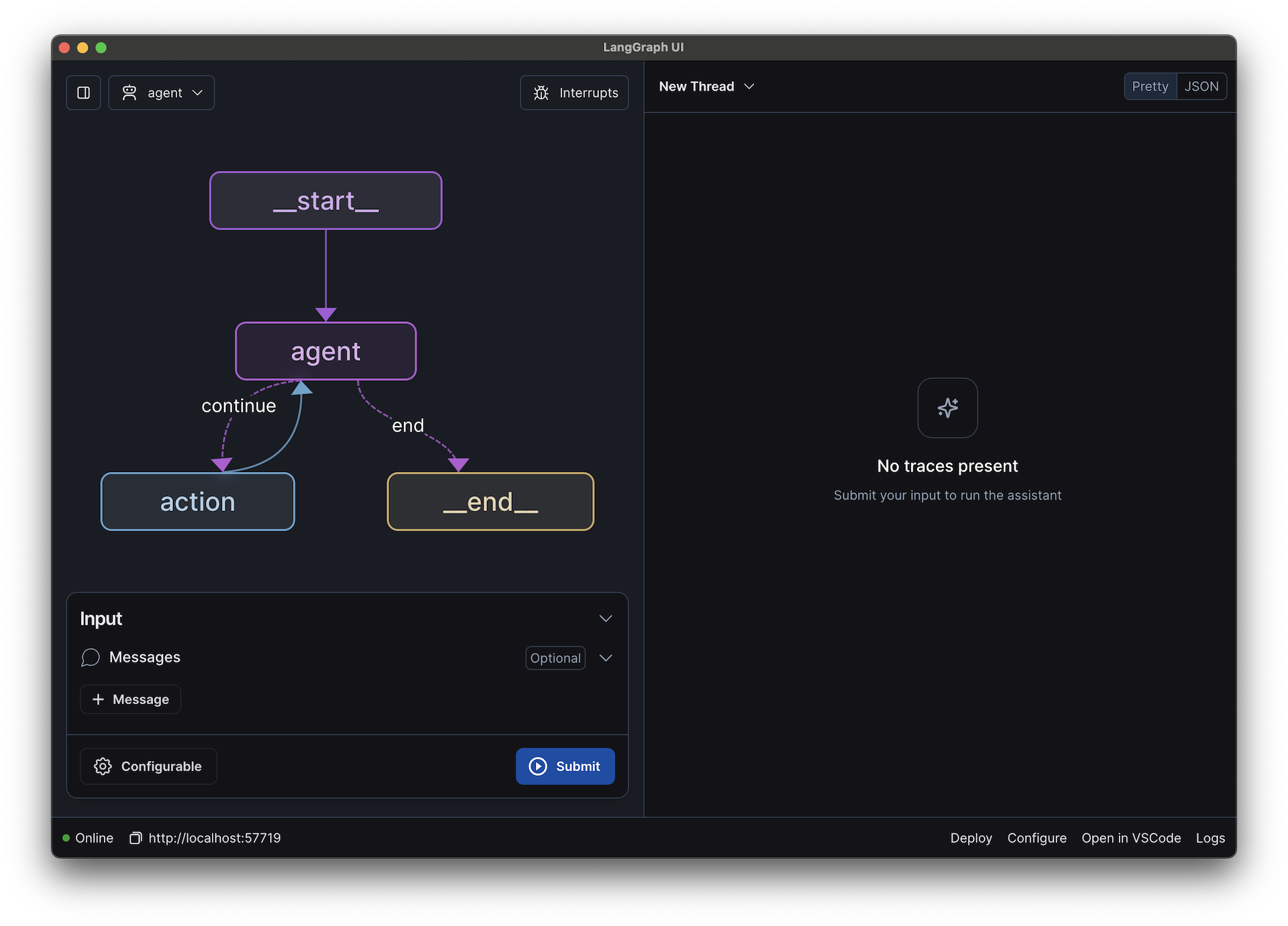
To make development even easier, LangChain provides LangGraph Studio, a companion visual IDE for agent workflows. LangGraph Studio lets developers design, visualize, and monitor LangGraph workflows through a friendly graphical interface.
Instead of inspecting JSON or Python code to understand the agent’s logic, one can literally see the graph of nodes and edges on the screen – much like a flowchart design tool. This is immensely helpful for complex workflows, as it helps to spot if a branch isn’t hooked up correctly or if a loop might cause a dead end. The studio also supports interactive debugging. Developers can run their agent graphs step-by-step, pause execution, inspect, or even modify the shared state in the middle of a run, and then resume – all through the interface.
This human-in-the-loop debugging means faster iteration: for example, if an agent’s response wasn’t quite right, it’s possible to adjust a parameter or provide a hint and continue without restarting the whole process. Moreover, LangGraph Studio integrates with LangChain’s observability tool (LangSmith), so you and your team can collaborate on diagnosing issues, reviewing agent decisions, and improving performance over time.
In short, LangGraph Studio brings visual design and monitoring to workflows, ensuring that developing an AI agent system is as intuitive as drawing a diagram on a whiteboard – with the ability to test and tweak in real time.
Common Agentic Workflow Patterns — Powered by LangGraph
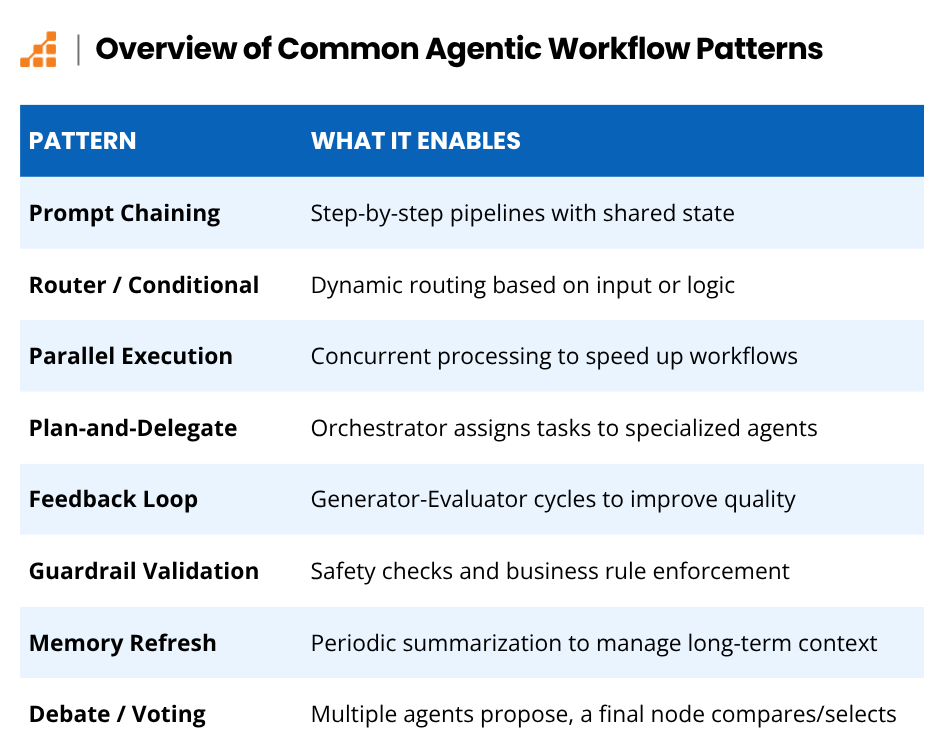
Why talk about “workflow patterns” for AI agents? The truth is, when building agent systems, certain recurring patterns emerge – proven ways to arrange the steps or multiple agents to achieve a goal. Recognizing these patterns helps developers architect solutions more quickly and avoid reinventing the wheel.
LangGraph excels at implementing these patterns because it allows the developer to explicitly stitch multiple agents together in a clear, maintainable graph. Whether the use case is straightforward or complex, chances are it can be composed from one or more of these common patterns.
Here are a few patterns to know:
- Prompt Chaining (Sequential)
- Router / Conditional Routing
- Parallel Execution
- Plan-and-Delegate (Orchestrator-Worker)
- Feedback Loop (Generator-Evaluator)
- Guardrail Validation
- Memory Refresh/Summarization
- Debate/Voting Consensus
Let’s dive into each of these in a bit more detail.
Prompt Chaining (Sequential)
The simplest pattern for an AI agent is a straight sequence of steps, where each node’s output feeds into the next node’s input. This is essentially a “chain of prompts.”
For instance, an agent first extracts keywords from a query.The next agent then uses those keywords to search a database, and another agent formats the results into a report. LangGraph natively supports sequential chains (simple connected nodes in series), but crucially, it also preserves the shared state between them. That means each step can build upon all prior context, not just a single value passed along. This pattern is great for breaking down a complex job into a step-by-step pipeline.
Router / Conditional Routing
In this pattern, a master node routes tasks to different sub-agents or branches based on some condition. For example, an incoming support query agent could route billing questions to a “BillingAgent” and technical issues to a “TechAgent.”
LangGraph makes this easy by allowing “conditional edges.” An edge can carry a condition (like a node output value) that determines which path the workflow should follow. By not mixing concerns, agents can specialize on parts of a problem, improving accuracy and efficiency.
Parallel Execution
Some tasks can be done faster when run in parallel. In LangGraph, it’s possible to have multiple branches of the graph run concurrently, then join back together.
For example, to analyze several documents or several aspects of a dataset, one could spin up parallel analysis agents for each part, then have a subsequent node that gathers all their results. Each branch’s results can be collected this way for a final decision or output.
This pattern can significantly speed up workflows by utilizing multiple agents (or multiple API calls) simultaneously, especially when each piece is independent.
Plan-and-Delegate (Orchestrator–Worker)
In the Plan-and-Delegate pattern, one agent is essentially an orchestrator or manager that plans a strategy and delegates subtasks to other agents (workers). Imagine an AI project manager agent that, when given a goal, breaks it into tasks and assigns each to specialized agents (one for research, one for drafting content, one for verification).
LangGraph’s graph structure is perfect for this: the top-level node (planner) generates a plan or list of tasks, and then for each task it can invoke another subgraph or agent node. The framework’s support for loops and dynamic control flow lets one handle an arbitrary number of subtasks. The orchestrator can then gather results and maybe conduct a final synthesis.
This pattern leads to modular, extensible designs; for example, it’s possible to upgrade one of the worker agents without affecting the others.
Feedback Loop (Generator–Evaluator)
Quality control is crucial with AI-generated outputs. A common pattern is to have one agent produce an output (the “Generator”) and another agent critique or evaluate it (the “Evaluator”), possibly looping back if the output isn’t good enough. For instance, an agent writes an answer to a question, and a second agent reviews that answer for accuracy or policy compliance. If it fails, the second agent can prompt the first to try again — re-entering the same node with updated state rather than retraining the model.
LangGraph supports this naturally by allowing cycles in the graph (with conditions). One can have an edge from the Evaluator node going back to the Generator node if the evaluation result is “fail,” creating a loop that continues until success criteria are met.
This automated feedback loop pattern helps achieve higher quality results by leveraging an AI “double-check.”
Guardrail Validation
Sometimes, one needs to enforce business rules or safety checks on the output, not a full AI evaluator. The Guardrail Validation pattern inserts a validation node after an agent’s output – for example, a simple function (or another model) that checks if the content contains disallowed terms, or if a financial forecast stays within realistic bounds. If the output fails, the developer can choose how to handle it (say, by triggering a human review or adjusting the input).
LangGraph makes it easy to add these guardrail nodes anywhere in the workflow. By structuring them as part of the graph, one ensures no output goes unchecked – critical for trust and governance in AI systems. Moreover, because LangGraph can maintain state, a tripped guardrail can be logged or passed along for later analysis to improve the agent or provide an audit trail.
Memory Refresh / Summarization
When agents operate continuously or handle long conversations, they can accumulate a lot of context. To streamline how context is stored, retrieved, and carried, LangGraph enables periodic summarization or memory refresh steps. For example, after every 10 dialogue turns, a node could summarize the conversation and trim the detailed history, so the next steps operate on a concise summary instead of an ever-growing transcript.
Similarly, an agent that processes streaming data might, every so often, summarize recent data and store it, thus avoiding carrying an unwieldy state. LangGraph’s persistence layer comes in handy here: checkpointers can persist thread-level state, while a Store can retain and retrieve long-term information across threads. This pattern keeps the agent’s context manageable and relevant, preventing context overflow issues that could confuse the LLM.
Debate / Voting Consensus
When accuracy is paramount, it can help to have multiple agents attempt the task and then compare outcomes. In the debate/voting pattern, one runs two or more agents in parallel (perhaps with different approaches or even different LLM models) and a final node evaluates their answers to pick the best or combine them.
LangGraph supports this with parallel branches and a merger node. For example, two expert agents could generate an investment recommendation; a third agent (or a simple rule) compares their recommendations – if they agree, great! If not, perhaps a fourth agent (or human) is invoked to reconcile.
This pattern injects redundancy and diversity of thought, which can boost confidence in the results when multiple agents independently arrive at the same conclusion, or highlight uncertainty when they don’t.
This list is not exhaustive, but I’ve tried to cover the most important and/or popular ones.
Multi-Agent Workflows with LangGraph
LangGraph shines even brighter when one starts orchestrating multiple agents working together. In a multi-agent workflow, a team of AI agents, each with a specific role, collaborate via the graph. Coordinating these agents inside one unified graph brings benefits that would be hard to obtain if they were separate AI bots working in isolation.
Shared Memory
Since all agents operate within the same graph structure in LangGraph, they operate on a shared state – essentially a single source of truth for the task at hand. One agent’s output becomes immediately accessible to the others. For instance, with an “AnalystAgent” and a “WriterAgent” in the workflow, the Analyst’s findings (written to the shared state) are directly available to the Writer without complicated data plumbing.
This shared memory approach means agents can communicate implicitly by updating the state, rather than relying on brittle API calls between each other. Think of it like a well-coordinated team using a shared notebook: everyone knows what the others have contributed in real-time.
Control Over How Agents Interact
Another advantage of the LangGraph approach is that one can precisely control when and how agents interact. The graph’s edges and nodes act like a playbook for the team of agents. One can have phases in the workflow where agents work in parallel, and then points where the workflow pauses and awaits a decision or input.
For example, after a research agent and a data extraction agent run in parallel, you might choose to pause and have a decision node that waits for both to finish, then passes their combined data to a summary agent. LangGraph supports branching based on agent outcomes too: if one agent signals that a task is complete or a condition is met, the graph can branch to a different path (perhaps skipping unnecessary steps or invoking a different agent to handle an exception).
This level of control is essential for complex real-world processes. It’s possible to model contingency plans: If Agent A’s result is X, then do Y, otherwise invoke Agent B. In traditional linear automations this is hard, but with a graph it’s a natural fit.
Layering Human Oversight into Multi-Agent Workflows
Crucially, human oversight can be layered into multi-agent workflows as needed. Real-world deployments often require a human supervisor to be able to peek in or take control when something unusual happens.
Since all agent interactions in LangGraph are routed through the central graph, a human operator (or an automated monitoring system) can observe the workflow in real time and see each agent’s contributions. LangGraph’s streaming and logging capabilities mean it’s possible to watch agents’ step-by-step reasoning and tool use as they happen.
If an agent in the team produces a questionable result – say, one of the validators flags an output – the graph can be designed to pause at that point and request human review. A human could then adjust the state or provide feedback (e.g. “Agent X, you overlooked factor Y, please reconsider”) and resume the execution.
This real-time monitoring and intervention loop gives organizations confidence that even as they automate tasks with AI agents, they are not ceding total control. Think of it as putting a skilled manager in charge of an AI team: the manager can see all the moving parts and step in when needed to guide the team back on course.
All these capabilities make multi-agent systems far more practical and powerful than single-agent systems. Instead of one giant AI model trying to do everything, a collaborative ensemble of specialized agents can each do what they’re best at, and the framework (LangGraph) makes sure that they work in concert.
This approach has strong parallels to how human teams work, and indeed some benefits are the same: specialization, parallel effort, and oversight. Using LangGraph, developers have successfully built multi-agent workflows such as an AI “newsroom” where different agents (reporter, fact-checker, editor) produce a news article together, and complex support systems where an AI triages issues and delegates to expert sub-agents. The coordination provided by LangGraph is what turns a collection of clever AI components into a cohesive automated solution.
Why Businesses Should Care About Agentic Workflows
After all this talk of features, let’s step back and look at the bigger picture: why should businesses and tech teams care about LangGraph and agentic workflows? Adopting this technology can provide several key advantages.
Companies Can Gain a Strategic Edge
By automating and augmenting complex workflows, companies can deliver decisions and services with the speed and responsiveness enabled by AI.
In fact, the rapid adoption of AI agents by companies indicates a strategic shift. Early movers are using AI agents to handle tasks that were once bottlenecks, gaining an edge in customer responsiveness, data analysis, and innovation capacity. Using a framework like LangGraph ensures these AI initiatives are scalable and maintainable, so one is building a long-term strategic asset, not just a demo or one-off script.
Practical Gains: Save Time and Money While Reducing Errors
On a practical level, well-orchestrated AI agents save time, money, and reduce errors. They excel at automating repetitive or labor-intensive tasks – from sifting through thousands of documents to aggregating data from siloed systems – all in a fraction of the time a human would take. LangGraph-powered workflows also have built-in reliability and checks, meaning you can trust them with mission-critical processes that run regularly. The result is often a significant efficiency boost.
Recent industry analysis highlights that organizations are using agents to perform tasks like research summarization, executive assistance, and customer service precisely to increase efficiency and handle information at scale. Freeing human teams from drudge work lets them focus on higher-level decision making, while AI handles routine tasks in the background.
Trust & Governance
In the age of AI, controlling how AI makes decisions is as important as the decisions themselves. LangGraph provides hooks for governance – things like moderation checks, audit logs of each agent action, and human approvals when needed. If compliance is a concern (say, ensuring an AI never discloses confidential info or stays within legal guidelines), one can embed compliance rules into the workflow graph. In addition, every decision and action can be traced to a node, making explanations and accountability possible. For decision-makers, this helps to address the “black box” problem of AI solutions. LangGraph lets you open the box and insert the controls you need, giving confidence that AI agents will act in alignment with business policies and ethics.
Designed for Model Flexibility
Technology in the AI space evolves rapidly. There are always new models, better algorithms, changing APIs. While the space is still evolving, having a robust and adaptable framework in place can reduce friction as things mature. LangGraph is designed for model flexibility: it’s open-source (MIT licensed), free to use, and model-agnostic, which can reduce coupling to a particular model provider and make it easier to adopt newer models as they emerge. If your company starts with one model today [such as/or Claude/ChatGPT] and switches to a more capable or cheaper alternative next year, LangGraph workflows can often accommodate the switch with relatively small changes.
LangChain’s ecosystem is growing, so more off-the-shelf integrations and improvements are constantly being added. By building AI agent workflows on LangGraph, one can insulate their solution from churn in the AI vendor landscape, and get a stable abstraction that outlives any single model. Moreover, LangGraph has a large and active community, with many developers and organizations contributing patterns, fixes, and enhancements. In short, LangGraph lets you ride the wave of AI advancement without being drowned by it.
Practical Use Cases
What kinds of real-world problems can be solved with LangGraph and agent orchestration? The possibilities span industries. Below, I dive into some practical use cases where LangGraph’s capabilities truly shine.
| Use Case | Description | Key Actions / Agents |
| Smart Conversational Assistants | Build chatbots for complex, multi-turn interactions (e.g., support). | Route queries, fetch data, generate detailed responses. |
| Customer Onboarding & KYC | Automate identity verification and client onboarding. | Extract info from IDs, run compliance, compile reports, escalate edge cases. |
| Marketing Content Generation | Automate content creation workflows. | Brainstorming → Drafting → Editing → Tone/Brand check. |
| Financial Data Aggregation | Aggregate and analyze financial info from multiple sources. | Pull data → Analyze trends → Summarize reports on schedule. |
| Supply-Chain Exception Handling | Respond to logistics issues in real-time. | Detect issue → Contact suppliers → Notify stakeholders → Adjust orders. |
| HR Sourcing Workflows | Streamline hiring processes. | Parse resumes → Match to roles → Reach out or schedule. |
| Legal Contract Analysis | Automate contract review and due diligence. | Extract clauses → Check compliance → Summarize/flag risks. |
| Competitive Research Agents | Monitor competitors and industry news. | Scrape news → Summarize weekly → Draft strategy briefings. |
| Cross-System Data Syncing | Orchestrate data transfer between systems. | Fetch → Transform/enrich → Push → Handle errors/alerts. |
| LangGraph Summary | Versatile framework for complex, multi-step LLM-centric automation. | Use-case agnostic (within AI reasoning workflows). Ideal for logic-heavy, multi-agent, or conditional tasks that involve large language models. |
Smart Conversational Assistants
With LangGraph, you can build AI-driven chatbots that handle complex multi-turn conversations (customer support, IT helpdesk, etc.) by routing queries, fetching data, and providing detailed answers.
Customer Onboarding & Identity Verification
Automate the document-heavy, multi-step process of onboarding a new client or verifying identity (KYC – Know Your Customer). An orchestrated agent can guide the user, extract info from IDs, run compliance checks, and compile all necessary reports, with humans only reviewing edge cases.
Generating Marketing Content
You can streamline content creation by chaining together a brainstorming agent, a drafting/writing agent, and an editing agent. Together, this chain of agents could generate a blog outline, expand it into a draft, and check for brand tone and consistency – all in one automated flow.
Financial Data Aggregation
Companies could use agents to collect and summarize financial information from various sources. For example, one agent could pull data from spreadsheets and APIs, another analyzes trends or anomalies, and a final agent writes a summary for a report. The workflow can run on a schedule, ensuring up-to-date insights for analysts every morning.
Supply-Chain Exception Handling
In logistics, when something goes wrong (a shipment delay, inventory shortage), an AI agent could be developed to detect the issue, then trigger a sequence of actions: contacting suppliers for updates, recalculating delivery ETAs, notifying stakeholders, and even adjusting orders. LangGraph’s conditional logic is ideal for these event-driven workflows, triaging different exception types with appropriate responses.
HR Sourcing Workflows
When it comes to hiring, AI agents built via LangGraph can automate the process of scanning resumes, scheduling interviews, and following up with candidates. An agent can parse incoming resumes, while another evaluates fit for open roles (using predefined criteria or an LLM to assess experience), and a third automatically reaches out to qualified candidates or schedules the next steps. Human recruiters get a refined list and more time to personally engage the top talent.
Legal Contract Analysis
Most contracts follow predictable structures, making them ideal candidates for AI automation. Therefore, an AI agent pipeline could be built to review legal documents. One agent reads a contract and extracts key clauses or metadata; another cross-references them against compliance requirements or company policies; and another drafts a summary or flags risky provisions. This can greatly speed up due diligence and contract review processes that normally take teams of lawyers many hours.
Competitive Research Agents
Especially in fast-moving industries, keeping abreast of the competition is important. Businesses can leverage multiple agents to stay on top of industry news and competitor moves. For example, one agent scrapes news feeds or social media for mentions of competitors, another summarizes the findings weekly, and another drafts a briefing for a strategy team. The LangGraph workflow could include guardrails to ensure only relevant info is gathered and escalate anything truly critical for immediate human review.
Cross-System Data Syncing
In an enterprise, data often needs to move between systems (CRM, ERP, support tickets, etc.) An AI agent can orchestrate these integrations by fetching data from one system’s API, transforming or enriching it (maybe calling an LLM to categorize or deduplicate), and then pushing it into another system. With LangGraph’s error handling, if a target system is down or an inconsistency is found, the workflow can pause and alert a human or retry later, avoiding silent failures.
Summary: Practical Use Cases
Of course, these are just a sampling of use cases. The beauty of LangGraph is that it’s use-case agnostic within the domain of LLM-powered reasoning workflows: any scenario involving complex logic, multiple steps (or agents), or conditional paths involving AI models could potentially benefit from this framework. It’s not limited to any one domain. Whether it’s a customer-facing AI assistant or a behind-the-scenes data processing pipeline, if you can map out the process, LangGraph can likely help to automate and optimize it.
Want to see LangGraph in action? Check out the Gemini + LangGraph Fullstack Quickstart on GitHub to explore a working example and start building your own agent workflows.
How Can Your Company Integrate LangGraph?
One concern when adopting new technology is always whether it will fit into an existing stack and workflows. Something that I love about LangGraph is that it was built with integration in mind.
For starters, it works with any LLM or AI model you choose, and doesn’t force you into a particular provider’s ecosystem. LangGraph can call OpenAI APIs today, swap in an Anthropic model tomorrow, or even route certain tasks to one model and other tasks to a different model depending on which is best suited to the task at hand. This flexibility extends beyond models.
LangChain (and by extension LangGraph) has connectors for a vast array of data sources and tools – from databases and vector stores to APIs and knowledge bases. So one can seamlessly integrate LangGraph agents with their company’s internal APIs or third-party services.
Integrating LangGraph Into Existing Systems
In practical terms, adopting LangGraph doesn’t mean rewriting everything; LangGraph integrates with your existing infrastructure — databases, APIs, and LLMs — so you can get started fast without rewriting your stack. You can add complexity when you need it.
The framework is designed to be modular, enabling you to use as much or as little of the LangChain ecosystem as needed. If your company already has an AI component, you can incorporate it as a node in the graph. If databases of knowledge are available, your agents can query them via LangChain’s retrievers.
From a development standpoint, LangGraph offers an API-first architecture that developers will find familiar. The open-source library provides clean Python and JavaScript SDKs for constructing graphs in code, so it feels like working with any other well-documented framework. Define nodes as simple functions or classes, then connect them with a few lines of code.
For teams that prefer a higher-level interface or want to integrate with other systems, the LangGraph platform adds RESTful APIs, enabling you to trigger and manage agent workflows over HTTP (great for microservice architectures or low-code integration).
Deployment is also flexible: one can run LangGraph locally on proprietary servers, or use LangChain’s hosted LangGraph Platform for a fully managed solution. Many developers simply start by prototyping locally—it’s as easy as a pip install langgraph command and scaling up to the cloud if needed. LangGraph doesn’t dictate devops – it provides options, whether you prefer to dockerize agent services or leverage LangChain’s cloud for convenience.
Another factor facilitating LangGraph’s adoption is the developer support ecosystem around it.
Since it’s part of LangChain’s suite, you can benefit from a large community and resources already in place. Extensive documentation, tutorials, and templates are available to guide new users. For example, reference templates are available for patterns like ReAct agents, memory management, and more, which you can clone and adapt to your needs.
Additionally, the LangChain community is active on forums as well as GitHub, so help is usually not far if you run into a snag. Plus, tools like LangGraph Studio significantly lower the learning curve by allowing visual construction and debugging of agent flows. Because LangGraph integrates so well with LangSmith (for observing runs) and other LangChain components, early adopters have noted that it shortens the development cycle: one can go from an idea to a working multi-agent prototype in very little time.
And, of course, being open source means it’s possible to inspect the code, contribute improvements, or even build custom extensions if one’s use case demands it. All these factors mean that bringing LangGraph into an organization is not a leap into the unknown, but a comfortable step forward onto a well-supported platform.
LangGraph and the Rise of Agentic Automation in Business
In a world where AI is becoming an integral part of software products and business operations, frameworks like LangGraph play a pivotal role. They provide the backbone for agent-driven automation, turning the potential of AI agents into structured, dependable systems and workflows.
With LangGraph, one gets the best of both worlds: the creativity and power of AI agents, and the rigor and clarity of traditional software engineering. You can orchestrate everything from a single AI assistant handling a conversation to an army of specialized agents tackling a multi-faceted reasoning process – all while keeping control over the flow, state, and outcomes.
For developers, LangGraph opens up new possibilities to build sophisticated AI applications on a solid, composable foundation. And for decision-makers, it offers a path to integrate AI deeply into business processes in a controlled and auditable way. It’s no exaggeration to say that agentic workflows could become a key driver behind many next-generation applications, much like microservices architecture became for scalable backends. LangGraph is the toolkit that makes it feasible and practical to implement these workflows today.
If you’re excited by the potential of AI agents (as we are) and looking to explore or prototype what they can do for your organization, it is a great place to start. Try out a small example, see how an orchestrated agent might handle one of your current tasks, and iterate from there. And remember, you don’t have to go it alone. There’s a growing talent pool of developers and ML engineers familiar with LangChain’s ecosystem, including LangGraph, who can help accelerate your projects.
Whether you’re building an internal solution or a customer-facing AI product, having the right expertise is key. Feel free to reach out to Scalable Path if you need help assembling a team or want seasoned experts who have worked with agentic frameworks including LangGraph. With the proper foundation and talent in place, you’ll be well on your way to harnessing AI-powered workflows that could transform the way you do business.
In the end, LangGraph isn’t just a tool – it’s an enabler for the future of AI-driven software, and that future is unfolding at this very moment.
About the Author: Mauro Colella
Mauro Colella is a full-stack engineer with a focus on AI integration and cloud-native architectures. With experience across scientific startups, he builds intelligent applications that blend practical engineering with emerging technologies like LangGraph. Mauro is currently advancing his expertise through graduate management studies and hands-on engineering work in AI-driven platforms.