
Building a Simple LLM Application with Langchain [Tutorial]

Langchain has rapidly emerged as a game-changer in the development of AI-powered applications. As developers increasingly leverage large language models (LLMs), Langchain simplifies what was once a fragmented and complex process. By offering an open-source orchestration framework, Langchain allows developers to easily integrate LLMs into their projects, bringing a new level of efficiency and flexibility to the table.
Table Of Contents
- A Hands-on Tutorial to Building a Project with Langchain
- What is Langchain?
- Key features of Langchain
- Technical Skills Required to use Langchain
- How Langchain Compares to Other AI Development Tools
- Downsides and Considerations When Using Langchain
- Projects That Are Well-Suited To Langchain
- Step-by-Step Guide for Building a Project with Langchain
- Recap of the Building Process and Lessons Learned
- Encouragement to Experiment Further with Langchain
- Recommended Documentation and Langchain Tutorials
But Langchain’s relevance goes beyond mere convenience. It’s designed to meet the evolving needs of today’s developers, enabling them to build more sophisticated, scalable applications without getting bogged down by the underlying complexities of LLM-powered apps – things like managing intricate integrations, handling state, and optimizing performance.
Whether you’re working on a small-scale project or a robust, enterprise-level application, Langchain’s streamlined approach can significantly enhance your development workflow, making it an essential tool in the modern developer’s arsenal.
A Hands-on Tutorial to Building a Project with Langchain
This article offers a hands-on guide to building a project with Langchain. Whether you’re an experienced developer expanding your toolkit or a newcomer to large language models, this guide will help you maximize Langchain’s potential.

We’ll cover every step, from setup to advanced features, with practical examples to ensure you’re actively using Langchain. By the end, you’ll have the foundation and confidence to create functional, scalable applications.
What is Langchain?
Langchain is an open-source orchestration framework designed to streamline the development of applications that leverage large language models (LLMs). One differentiator of Langchain is its accessibility: it’s not just a tool for experts, rather it can be used by developers across experience levels. It provides pre-built components and templates to accelerate development, while still allowing for customization and flexibility to meet the unique needs of diverse projects.
So, how exactly does Langchain make something as complex as LLMs accessible to developers at large?
Key features of Langchain
A key differentiator of LangChain is its modular architecture, allowing developers to plug in various components as needed—whether it’s for data processing, model interactions, or output generation. This flexibility extends to LangChain’s core features, which includes components, chains, prompt templates, values, example selectors, output parsers, indexes, retrievers, chat message history, document loaders, text splitters, agents, and toolkits.

These tools work together to help developers create comprehensive, end-to-end conversational AI applications that deliver personalized and engaging user experiences.
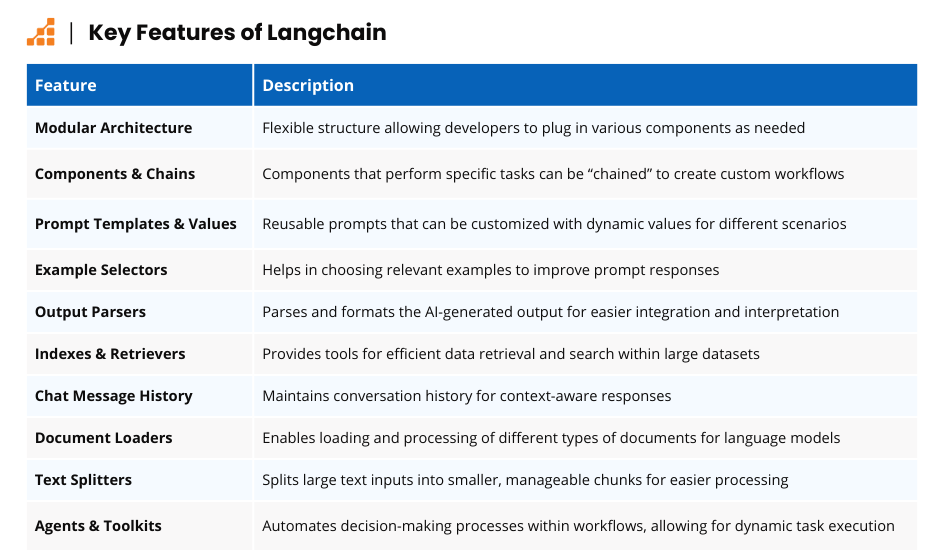
LangChain abstracts much of the technical complexity, accelerating development and reducing time to market. To illustrate this with an example, let’s consider Langchain components. These are individual modules built to handle specific tasks, such as sentiment analysis or intent recognition, and can be combined into chains to create tailored workflows.
Prompt templates and values enable dynamic and reusable prompts, streamlining the generation of adaptable responses for different use cases.
Moreover, LangChain’s emphasis on scalability and efficiency ensures that your applications can grow and evolve with your needs. This combination of modularity, ease of use, and performance makes LangChain a powerful ally in unlocking the full potential of language models.

Technical Skills Required to use Langchain
In my opinion, using Langchain effectively requires certain soft skills: creativity, for one, and an ability to experiment with different approaches. However, certain technical skills are still essential. Below are the key technical skills I think one needs to make the most of Langchain.
1. Programming Experience, Ideally in Python
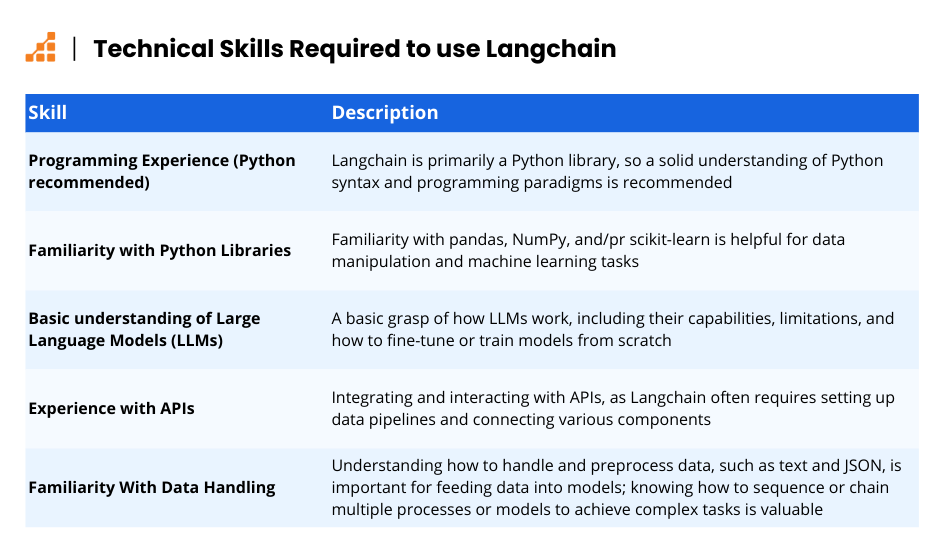
LangChain is primarily a Python library, so a solid understanding of Python syntax and programming paradigms would be a useful precursor for anyone looking to build something with Langchain. Additionally, familiarity with Python libraries like pandas, NumPy, and scikit-learn could be helpful for data manipulation and machine learning tasks.
That said, Langchain now has support for other languages. Thus, developers proficient in JavaScript/TypeScript may also be able to use Langchain effectively.
2. A Basic Understanding of how Large Language Models Work
A grasp of LLMs is an essential skill for using Langchain, as you’ll likely need to fine-tune pre-trained models, or train models from scratch, when using the library. This includes understanding LLMs’ capabilities, limitations, and the types of tasks they can perform.
3. Familiarity with APIs and data handling
Langchain often requires setting up data pipelines and connecting various components. As such, experience with integrating and interacting with APIs for various LLM providers is a key skill.
Similarly, a background in handling and preprocessing data – such as text and JSON – to feed into models, helps anyone looking to use Langchain. Adding on to this, understanding how to sequence or chain multiple processes or models to achieve complex tasks is a helpful foundation.
This combination of skills ensures that you can not only use Langchain, but also customize it effectively to meet your specific project needs.
How Langchain Compares to Other AI Development Tools
Langchain distinguishes itself by offering a specialized framework designed to work with large language models (LLMs). Unlike broader tools like Hugging Face Transformers or APIs like OpenAI’s, which focus on providing general-purpose access to pre-trained models or API endpoints, Langchain is designed to simplify and enhance the integration of LLMs into complex, multi-step workflows.
It provides modular components for chaining prompts, managing memory, and interfacing with APIs, making it ideal for AI-driven applications that require more than simple model calls.

Rather than being alternatives, Hugging Face Transformers and OpenAI’s API are powerful complements to Langchain. Hugging Face provides a vast library of pre-trained models that can be used within Langchain’s framework, especially when fine-tuning and model deployment are important.
Similarly, OpenAI’s API offers access to state-of-the-art LLMs like GPT-4, which can be integrated into Langchain to handle more complex tasks that require prompt management or multi-step logic. Depending on your project’s complexity and needs, Langchain can enhance these tools by providing the structure and workflow management that traditional APIs or libraries may not offer on their own.
Langchain stands out for its versatility and ease of use, specifically in the context of working with large language models (LLMs). Unlike many other development frameworks that require extensive customization to handle AI models, Langchain offers built-in utilities and pre-configured modules that streamline the development process.
This enables developers to quickly build and deploy sophisticated, AI-driven applications with minimal overhead. By providing a structured environment that simplifies complex interactions between language models and application components, Langchain allows developers to focus on innovation rather than infrastructure.
Downsides and Considerations When Using Langchain
While Langchain offers a streamlined approach to integrating large language models, there are of course some limitations and challenges to consider.
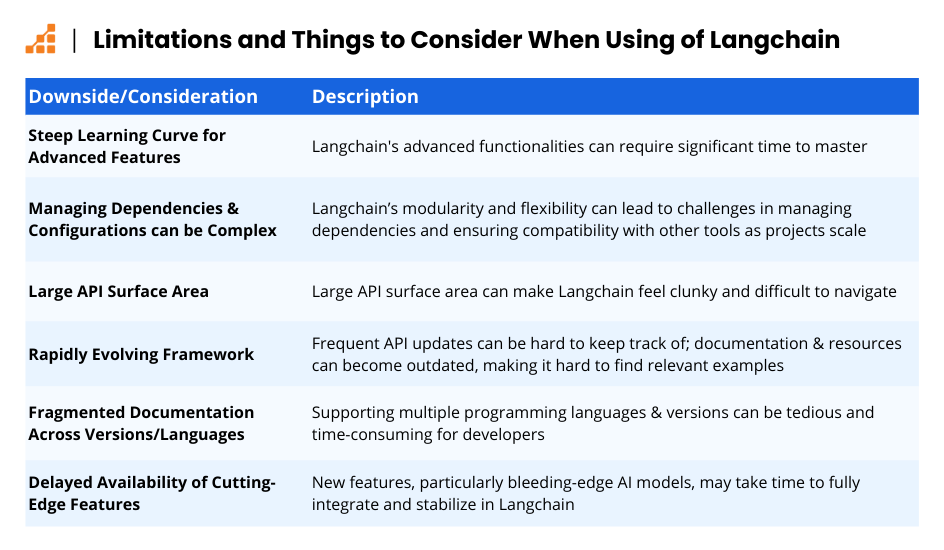
Steep Learning Curve for Advanced Features
Langchain’s extensive features can initially be overwhelming. Mastering its full potential requires a significant investment of time, particularly when working with its more advanced features.
Complexity in Managing Dependencies and Configurations
The flexibility and modularity of Langchain, while powerful, can lead to challenges in managing dependencies and ensuring compatibility with other tools and libraries, especially as projects scale.
Large API Surface Area
Due to its large API surface area, Langchain can sometimes feel clunky and difficult to navigate, making it challenging for developers to efficiently implement desired functionalities.
Rapidly Evolving Framework
Langchain’s fast-paced development means that its API is frequently updated, which can cause difficulties for developers. Documentation and online resources may quickly become outdated, leading to frustration when trying to find relevant information or examples that work with the latest version.
Fragmented Documentation Across Multiple Versions and Languages
With support for multiple programming languages and versions, finding the right snippet of documentation for your specific use case can be time-consuming. This fragmentation can make it harder for developers to implement features correctly, particularly when working across different versions.
Delayed Availability of Cutting-Edge Features
While Langchain is continuously evolving, it may take time for the latest, bleeding-edge model features to be fully integrated and stable within the framework. This delay can be a drawback for developers looking to leverage the very latest advancements in AI technology.
Despite these hurdles, understanding and addressing these limitations will allow you to leverage Langchain’s strengths effectively and build robust, AI-driven applications with confidence.
Projects That Are Well-Suited To Langchain
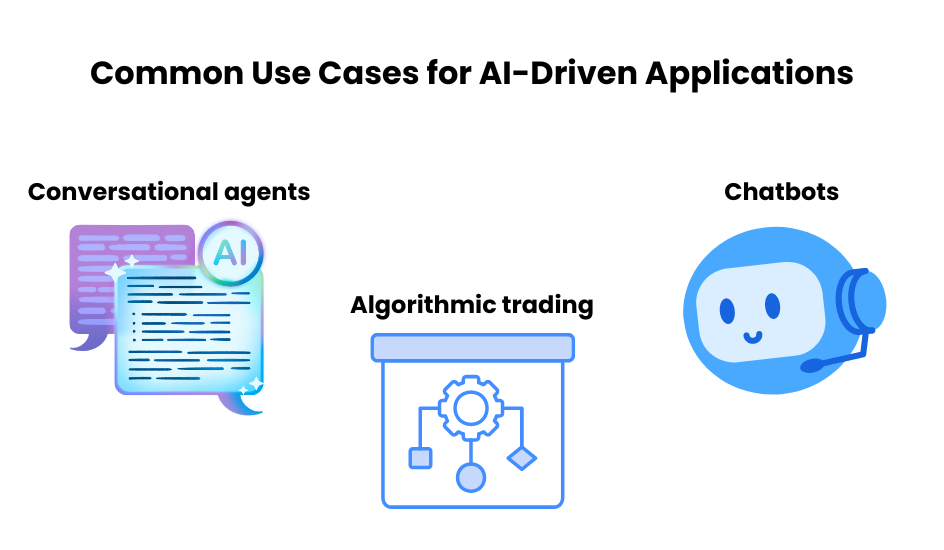
Langchain is particularly effective for projects that involve natural language processing tasks, such as chatbots, content generators, or intelligent search engines. These types of projects benefit from Langchain’s ability to simplify complex interactions between AI components and provide a robust framework for managing data and model integration.
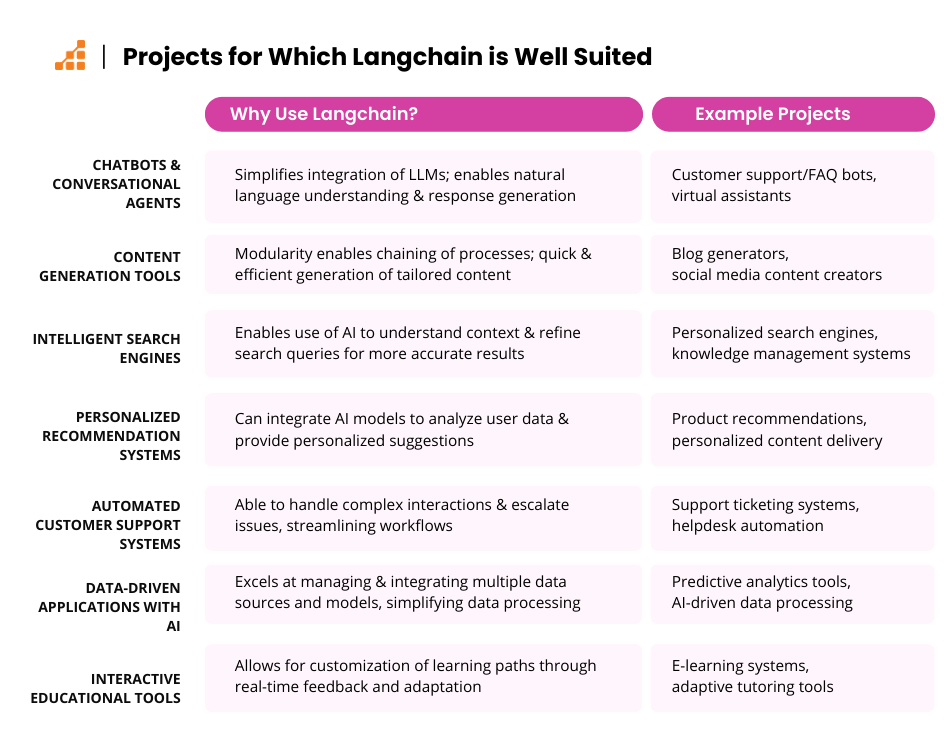
One of Langchain’s key advantages is its ability to accelerate iteration speed. By making it easier to work with various integrations, Langchain can significantly shorten the time to market, allowing developers to quickly adapt to changes and refine their projects efficiently. This makes it a valuable tool in software development, even when project requirements evolve over time.
Ultimately, Langchain excels in projects that require flexibility, speed, and the ability to handle complex AI-driven tasks, making it an ideal choice for teams looking to enhance their development process and iterate rapidly on their idea
If you’re considering using Langchain in a project, but think it might not be the best fit, you may want to consider the alternatives mentioned above.
Description of the Chosen Project and its Suitability for Langchain
For this article, I’ve chosen to build a conversational AI assistant designed to streamline customer support for small businesses.
This project leverages Langchain’s strengths, including:
- integrating large language models to handle common queries,
- providing personalized responses, and
- escalating complex issues to human agents when necessary.
The key features and functionality of this project includes:
- A knowledge base that is updated continually through an automated process, in which the business’s internal systems and external sources are integrated.
- A scheduled task that periodically pulls data from these sources, such as CRM systems or relevant industry news, and feeds it into the assistant’s knowledge base. This ensures that the AI has access to the most current information, allowing it to provide up-to-date responses.
- Incorporation of user feedback into the model, so if a customer points out incorrect information, the system flags it for review and update.
The project showcases Langchain’s ability to enhance user interactions and automate support processes, making it a prime example of how modern AI frameworks can transform everyday business operations.

Learning Objectives and Expected Outcomes
The primary learning objectives for this project are to grasp the practical applications of Langchain and to develop a robust conversational AI assistant. By diving into this project, you will:
- gain hands-on experience with Langchain’s modular framework,
- Learn how to integrate large language models into real-world applications,
- Dive into the particulars, including setting up your environment, configuring AI components, and managing interactions between different parts of the system.
The expected outcomes are twofold:
- First, you’ll acquire a deep understanding of how to harness Langchain’s features to build and optimize AI-driven applications.
- Second, you’ll see a tangible result in the form of a fully functional customer support assistant that can handle inquiries and provide valuable assistance.
This project not only demonstrates Langchain’s practical benefits but also enhances your skills in deploying advanced AI solutions, positioning you to tackle more complex challenges in the future.
Step-by-Step Guide for Building a Project with Langchain
Before diving into Langchain, ensure you have the essential prerequisites and system requirements ready. You’ll need a modern development environment, typically set up with Python or JavaScript, depending on your preferred Langchain integration.
Prerequisites and System Requirements
Make sure your system is equipped with a recent version of these languages, as well as package managers like pip or npm to handle dependencies seamlessly.
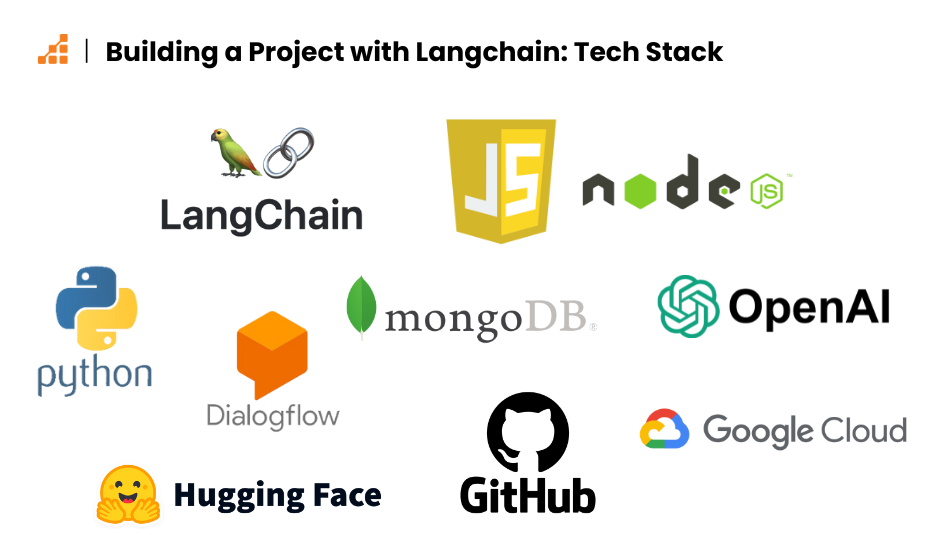
For this project, I used JavaScript with Langchain. JavaScript offers excellent integration with modern web technologies and frameworks, making it a natural choice for projects that need to quickly interact with front-end components. Its versatility, combined with tools like Node.js, allows for efficient development and deployment in web environments, making it a great fit for building applications like this conversational AI assistant.
On the hardware front, Langchain’s requirements are relatively modest, as it primarily acts as a framework to integrate and manage language models, rather than running them directly. A standard workstation with at least 8GB of RAM and a multi-core processor should be sufficient for most development tasks. However, when working with larger language models or handling intensive operations, you may need a system with more memory and processing power, depending on the complexity of your project.
Step-by-Step Installation Guide
First, let’s install Langchain.
Start by setting up your environment: ensure you have Node.js installed on your machine. You can use npm as your go-to package manager. Begin by initializing a new project directory with npm init, then install Langchain by running npm install langchain.
This will set up the necessary dependencies and allow you to start building with Langchain in your JavaScript project.
Once installed, you can start configuring Langchain by setting up the necessary API keys and integrating your preferred language models. Check the documentation for detailed instructions on connecting your data sources and fine-tuning your setup. With these steps, you’ll be ready to explore Langchain’s capabilities and start building your AI-driven applications.
Detailed Project Planning and Design
I began by defining the project’s core objectives and user requirements. For my use case, the primary goal was to create a tool that would simplify customer support by automating responses to common queries and integrating with existing CRM systems. I outlined a clear project scope that included functionalities such as natural language understanding, context-aware responses, and integration with live chat systems.
To design the AI assistant, I started by sketching out the user interaction flow. I created wireframes for the main interface, focusing on simplicity and ease of use. For instance, I used tools like Figma to design a chat interface that featured intuitive navigation and a quick access menu for frequently asked questions. I also developed a series of user personas to ensure the assistant could handle various customer interactions effectively.
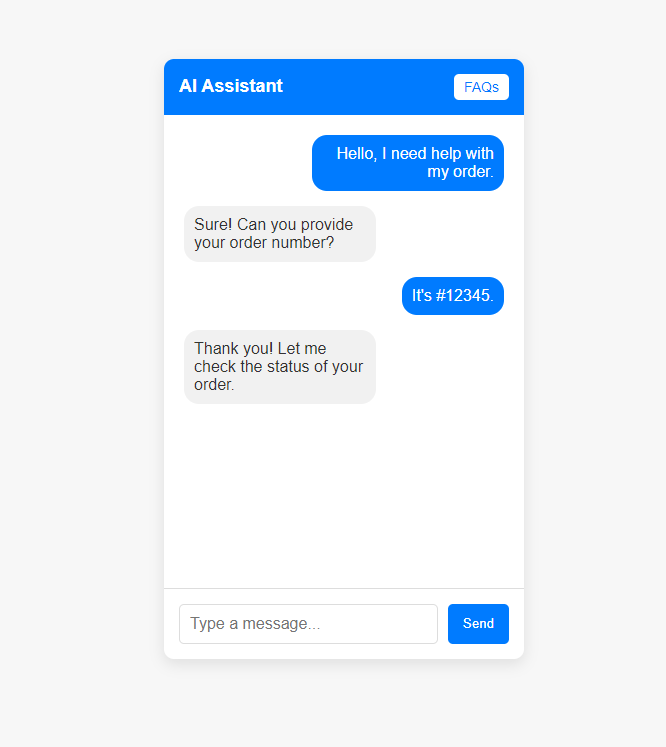
Next, I planned the implementation in phases: starting with a prototype to test basic functionalities, followed by iterative enhancements based on user feedback. This approach ensured that each feature was thoroughly tested and refined before full deployment.
Implementing Core Functionalities
In the implementation of core functionalities for the conversational AI assistant, I began by focusing on the integration of Langchain for natural language processing. I configured Langchain to interpret and respond to customer inquiries with precision. Here’s an example of how I set up the core processing functionality:
1import { LanguageModel } from 'langchain';23// Initialize the language model4const model = new LanguageModel({5 apiKey: 'OPENAI_API_KEY',6 model: 'gpt-3.5-turbo'7});89// Function to process user input10async function processUserInput(userInput) {11 const response = await model.generateResponse({12 prompt: userInput,13 maxTokens: 15014 });15 return response.text;16}
Next, I developed a knowledge base to handle frequently asked questions. I used a JSON file to store common queries and answers, which the AI could reference to provide accurate responses. Here’s a snippet of how I integrated this knowledge base:
1// Example knowledge base2const knowledgeBase = {3 "return policy": "Our return policy allows returns within 30 days of purchase.",4 "shipping info": "We offer standard shipping that takes 5-7 business days."5};67// Function to get response from knowledge base8function getResponseFromKnowledgeBase(query) {9 return knowledgeBase[query.toLowerCase()] || "Sorry, I don't have information on that.";10}1112// Handling user query13async function handleQuery(query) {14 const response = getResponseFromKnowledgeBase(query) || await processUserInput(query);15 return response;16}
A quick note here: While this code works by matching to the exact user input, we could update it using LLMs to make it much more flexible and work with different kinds of user input.
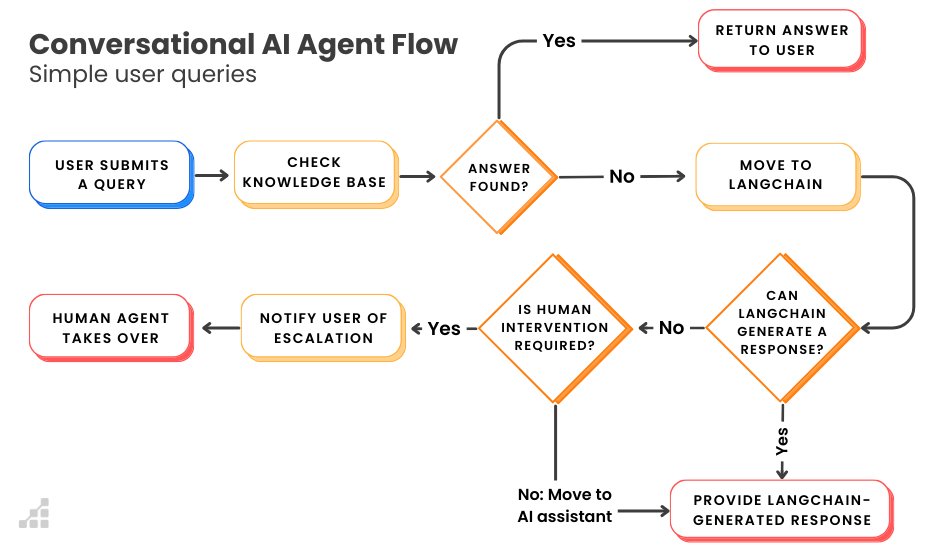
To manage complex interactions (as in, interactions where the AI assistant needs to handle multi-step processes), I added an escalation feature for issues requiring human intervention. When the AI determined a query was too complex, it triggered a handover process. Here’s how I implemented the escalation logic:
1// Function to determine if escalation is needed2function needsEscalation(query) {3 const complexQueries = ["account issue", "billing problem", "technical support"];4 return complexQueries.some(issue => query.includes(issue));5}67// Function to handle escalation8function handleEscalation(query) {9 // Notify support team10 notifySupportTeam(query);11 return true; // Indicates that escalation was handled12}1314// Function to process the query15async function processQuery(query) {16 if (needsEscalation(query)) {17 handleEscalation(query);18 return "Your issue has been escalated to a human agent.";19 }20 return await handleQuery(query);21}
Through these implementations, I created a robust system capable of handling diverse customer support scenarios. The AI assistant not only processed routine inquiries effectively but also managed complex issues by involving human agents when necessary.
Integrating Third-Party Tools and Libraries
Now that we had a system to manage customer support scenarios, I wanted to improve the AI’s ability to interact effectively with users and manage support tickets.
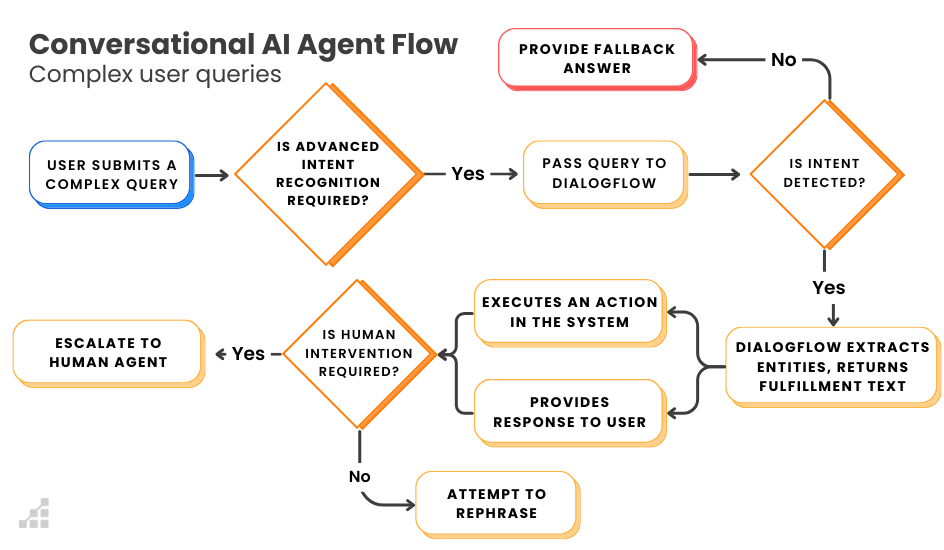
Firstly, I incorporated Dialogflow for enhanced natural language understanding. Dialogflow provided robust intent recognition and entity extraction, which significantly improved the assistant’s ability to handle complex queries. Here’s how I integrated Dialogflow into the project:
1import * as dialogflow from '@google-cloud/dialogflow';2// Initialize Dialogflow client3const client = new dialogflow.SessionsClient({ keyFilename: 'path/to/your/dialogflow-key.json' });4async function detectIntent(sessionId, query) {5 const sessionPath = client.projectAgentSessionPath('your-project-id', sessionId);6 const request = {7 session: sessionPath,8 queryInput: {9 text: {10 text: query,11 languageCode: 'en-US',12 },13 },14 };15 const [response] = await client.detectIntent(request);16 return response.queryResult.fulfillmentText;17}
For managing customer support tickets, I used Trello. Integrating Trello allowed the assistant to create and update support tickets in real-time, ensuring that no issue was left unaddressed. Here’s how I implemented the integration with Trello:
1const axios = require('axios');23const TRELLO_API_KEY = 'your-trello-api-key';4const TRELLO_TOKEN = 'your-trello-token';5const BOARD_ID = 'your-board-id';6const LIST_ID = 'your-list-id';78async function createTrelloCard(title, description) {9 const response = await axios.post(`https://api.trello.com/1/cards?key=${TRELLO_API_KEY}&token=${TRELLO_TOKEN}`, {10 name: title,11 desc: description,12 idList: LIST_ID,13 });14 return response.data.url;15}1617// Function to handle ticket creation18async function handleSupportTicket(issueTitle, issueDescription) {19 const cardUrl = await createTrelloCard(issueTitle, issueDescription);20 return `Your issue has been logged. Track it here: ${cardUrl}`;21}
By integrating these tools, I enhanced the AI assistant’s capabilities, enabling it to manage a variety of tasks from understanding user queries and handling payments to managing support tickets. This integration not only improved functionality but also ensured a more seamless and efficient customer support experience.
Enhancements and Optimizations: Utilizing Langchain’s Advanced Features
In developing the conversational AI assistant for small businesses, I leveraged advanced features of Langchain to enhance the assistant’s capabilities and streamline customer interactions. Langchain’s powerful tools enabled me to build a more responsive, intelligent, and adaptable support system.
One advanced feature I utilized was contextual chaining, which allowed the assistant to maintain and utilize context over multiple interactions. This feature proved invaluable for providing personalized support. For instance, I implemented a context-aware dialogue flow that remembered previous user queries and incorporated them into ongoing conversations. Here’s a simplified example:
1const { ConversationChain, Memory } = require('langchain');23// Initialize memory to retain context4const memory = new Memory();56// Create a conversation chain with context7const conversation = new ConversationChain({8 model: 'gpt-3.5-turbo',9 memory: memory,10 prompt: 'You are a helpful assistant. The user asked about {user_query}.',11});1213// Function to handle user queries14async function handleUserQuery(userQuery) {15 const response = await conversation.respond(userQuery);16 console.log("Assistant:", response);17 return response;18}1920// Example user interaction21handleUserQuery("Can you remind me of my recent orders?");
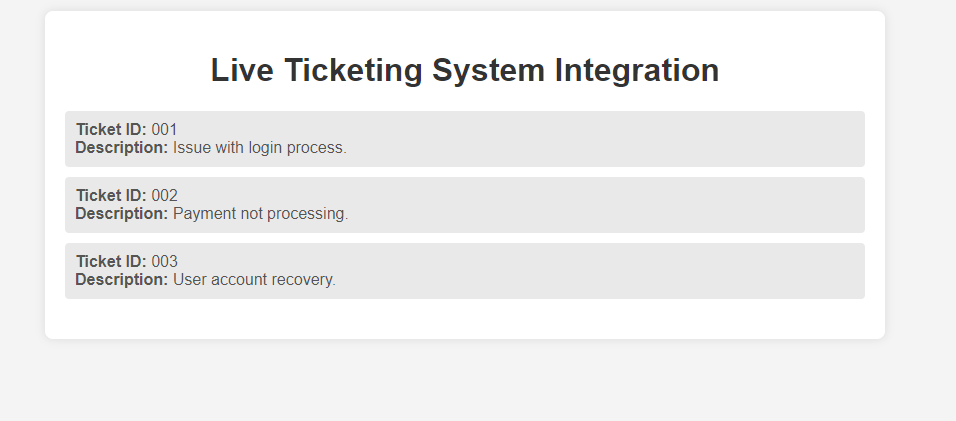
Another feature I found useful was dynamic API integration. Langchain’s ability to dynamically call external APIs allowed me to integrate real-time data retrieval into the assistant’s workflow. For instance, I integrated a live ticketing system to fetch and display current support tickets. Here’s a code snippet demonstrating this integration:
1// Define the API integration for ticket retrieval2const apiEndpoint = 'https://api.ticketing.com/v1/tickets';3const apiKey = 'YOUR_API_KEY';45// Function to fetch tickets6async function fetchTickets(userId) {7 try {8 const response = await fetch(`${apiEndpoint}/user/${userId}/tickets`, {9 method: 'GET',10 headers: {11 'Authorization': `Bearer ${apiKey}`12 }13 });1415 if (response.ok) {16 const tickets = await response.json();17 return tickets;18 } else {19 return "Unable to fetch tickets at the moment.";20 }21 } catch (error) {22 return `Error: ${error.message}`;23 }24}2526// Example function call27fetchTickets("12345").then(tickets => {28 console.log("User's tickets:", tickets);29});
To enhance the assistant’s responsiveness, I employed real-time sentiment analysis. Langchain’s sentiment analysis capabilities enabled me to adjust the assistant’s tone based on user sentiment, improving the overall user experience. Here’s how I integrated sentiment analysis into the conversation flow:
1const axios = require('axios');23// Initialize sentiment analysis using an external API (replace with your actual API URL and key)4const apiKey = 'YOUR_API_KEY';5const apiUrl = 'https://api.yoursentimentanalysis.com/v1/analyze';67// Function to fetch sentiment from the API8async function fetchSentiment(userMessage) {9 try {10 const response = await axios.post(apiUrl, {11 text: userMessage12 }, {13 headers: {14 'Content-Type': 'application/json',15 'Authorization': `Bearer ${apiKey}`16 }17 });18 return response.data.sentiment;19 } catch (error) {20 console.error('Error fetching sentiment:', error);21 return 'unknown'; // Handle error case22 }23}2425// Function to adjust response based on sentiment26async function adjustResponseBasedOnSentiment(userMessage) {27 const sentiment = await fetchSentiment(userMessage);28 let response;29 if (sentiment === 'negative') {30 response = "I'm sorry to hear that. How can I assist you further?";31 } else {32 response = "Great! How can I help you today?";33 }34 return response;35}3637// Example sentiment adjustment38async function example() {39 const userMessage = "I'm frustrated with the service.";40 const response = await adjustResponseBasedOnSentiment(userMessage);41 console.log("Assistant:", response);42}4344example();
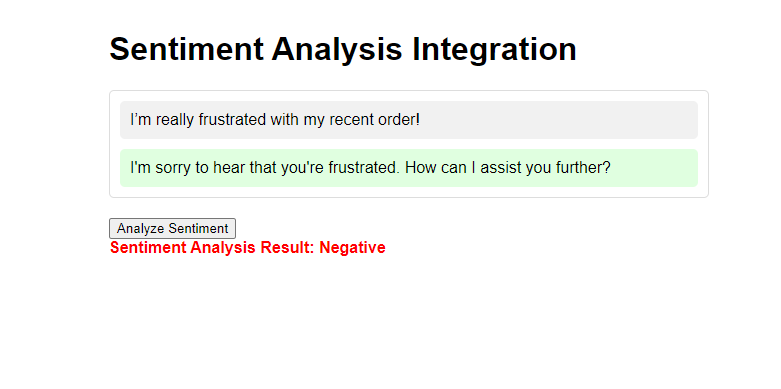
By incorporating these advanced Langchain features, I was able to create a more robust and versatile conversational AI assistant. The result was a system that not only provided efficient customer support, but also adapted to the evolving needs of small business users, enhancing their overall experience.
Recap of the Building Process and Lessons Learned
In this project, we began by exploring Langchain’s capabilities and selecting a project that aligns with its core advantages, setting the foundation for a robust and scalable application. Throughout this journey, we focused on implementing essential functionalities, integrating powerful tools, and conducting thorough testing to ensure a seamless user experience.
Reflecting on my Langchain journey, several valuable lessons emerged.
1. Modularity is Key, Especially with Langchain
One of the first hurdles I faced was managing the complexity of integrating multiple APIs and models. Initially, I underestimated the importance of designing my application with a modular architecture.
I learned the hard way that without clear separation of concerns, debugging and adding features became increasingly difficult. By refactoring the project into distinct, reusable components, I could iterate faster and keep the system organized.
2. Balancing Performance with Real-Time AI
During development, I noticed performance bottlenecks when handling large datasets and complex queries. At first, I tried to handle everything synchronously, which led to slower responses and degraded user experience. Implementing asynchronous processing and caching techniques was a game changer, significantly improving the assistant’s responsiveness. I now realize how crucial it is to optimize for performance, especially when dealing with AI-driven applications.
3. Testing AI Systems Isn’t the Same as Traditional Software
Testing Langchain-based applications presented its own set of challenges. While I was familiar with unit and integration testing, validating the dynamic nature of AI outputs added another layer of complexity. I learned to develop custom test cases that simulated various user interactions and API responses, ensuring that the assistant’s behavior remained consistent. This was one of the more time-consuming aspects, but thoroughly testing all components helped avoid nasty surprises down the line.
4. Documentation Becomes Outdated Fast, So Stay Agile
One of the most important lessons was keeping up with Langchain’s fast-paced updates. Several times throughout the project, I found myself referencing documentation that was already outdated, which led to confusion and rework. Staying active in the community and checking for recent updates helped me navigate these issues and incorporate the latest best practices.
5. Langchain’s Learning Curve Was a Bit Steeper Than Expected
When I first started using Langchain, I was excited about the possibilities but quickly realized that the learning curve was steeper than I anticipated. With its unique approach to chaining models and handling AI workflows, I initially struggled to grasp how to fully utilize its features. I spent hours debugging what I thought were simple issues, only to realize that I hadn’t fully understood how Langchain managed context between calls.
However, through hands-on experimentation and diving deep into the documentation, I was able to overcome this challenge. Looking back, I see this learning curve as an essential part of the process—understanding Langchain’s intricacies made me more effective at designing scalable, intelligent systems.
Encouragement to Experiment Further with Langchain
Langchain offers a wealth of features that can inspire and inform the development of innovative applications, but it’s not without its complexities. The large API surface area and the frequent changes to the API can make it clunky and difficult to work with at times, especially when navigating through multiple versions and languages.
However, this is where the opportunity for growth lies. By experimenting with Langchain, you can uncover valuable insights and build a deeper understanding of how to harness its capabilities effectively. Each project is a chance to discover different aspects of this feature-rich framework and enhance the capabilities of your applications.
Don’t be deterred by Langchain’s learning curve—embrace it as part of the journey. While Langchain may present some hurdles, its flexibility and powerful features can reduce development time significantly. . Whether you’re developing a complex application or a simple utility, your experimentation will not only enhance your skills but also help become more comfortable with this powerful framework.
Dive in, explore, and let your projects be a testament to the practical and creative possibilities that Langchain offers. While the path may not always be straightforward, the potential rewards are well worth the effort.
Recommended Documentation and Langchain Tutorials
To truly master Langchain, diving into the right documentation and tutorials is essential. Start with the official Langchain documentation, which provides a detailed overview of the framework’s core features and functions. This resource is your primary guide, offering step-by-step instructions, code snippets, and best practices to get you started.
For a more interactive learning experience, check out video tutorials – like this Langchain Tutorials playlist on YouTube – that break down complex concepts into digestible chunks. These visual aids are invaluable for seeing Langchain in action and understanding its application in real-world scenarios. Additionally, online platforms like GitHub and Medium feature community-contributed tutorials and case studies that can offer fresh perspectives and innovative approaches.
Below is a list of additional resources you may find helpful in your Langchain journey:
- Build a Chatbot | 🦜️🔗 Langchain
- Sentiment Analysis with LangChain and LLM – DEV Community
- LangChain beginner’s tutorial for javascript/typescript
About the Author: Eduardo Werpp Maciel, Full-Stack Software Engineer
As a Full-Stack Software Engineer with over a decade of experience building scalable systems and optimizing workflows, I’ve always prioritized tools that enhance efficiency and reduce time to market. When I discovered Langchain, it quickly transformed my development process, allowing me to focus more on creative problem-solving and less on technical details. Langchain has become a cornerstone in my toolkit, streamlining my work and fueling my passion for delivering innovative, high-performance AI solutions.