Laravel 11: An In-Depth Review of The Leading PHP Framework


Laravel is a leading PHP framework known for its elegance, simplicity, and power. The latest release of this framework not only continues Laravel’s tradition of providing an intuitive and powerful toolkit for developers, but it also brings significant improvements and exciting new features designed to enhance the development experience.
As we dive into Laravel 11, we will explore its new application structure, tools like Pest and SQLite, and a series of other enhancements that makes Laravel a top choice for PHP developers worldwide. But first, let’s quickly review the release process for new versions of Laravel.
Table Of Contents
Laravel Framework Release Cycle
Since version 6, Laravel has adopted the Semantic Versioning standard. This means that whenever Laravel adds something that is compatible with older versions of the framework, it increments the second number of the version. So, to make it clearer, when an update occurs from Laravel 11.1 to 11.2, it is basically the same as what happened in Laravel 5 (before semver) from 5.5.1 to 5.5.2.

Now, Laravel releases a new major version every 12 months. This cycle is well established and reliable, with new versions released every year since Laravel 6 (which was released on September 3, 2019).
Well, now that you are more familiar with this update process, how about we get into the meat of this article?
Core Updates in Laravel 11
Laravel 11 comes with new interesting features that have been developed to enhance the framework functionality.
It adopts PHP 8. 2 as the minimum requirement, removed many files in the application structure and made many configuration files smaller.
All these updates make the framework much cleaner and easier to control. Furthermore, there have been improvements in performance, and developers’ experience through other optimizations and new additions.

PHP 8.2 Requirement
To start, let’s talk about one of the most important aspects of this new version: the adoption of PHP 8.2 as the minimum requirement for the framework.
At this point, PHP 8.2 is well established. It’s no longer the newest version of the language. At the time of this writing, the current version is 8.3.
Depending on your infrastructure and your app’s dependencies, this requirement might pose a challenge for updating Laravel in your application, but we’ll discuss that further soon.
For now, if you’re curious about the changes made to drop support for PHP 8.1, you can check them out on Github.
Streamlined Application Structure
One of the most significant changes in the new version of Laravel is the main application skeleton. Around 69 files were removed from the application structure to make it slim and straightforward.
You will notice that some well-known files and folders have been removed in this version. However, every feature they provided is still functional. In fact, these changes will make the application cleaner while still giving you control over every aspect of the code.
We will discuss these changes in detail in the topics below.
Important
If you choose to update your application to version 11, this new structure is not mandatory! Your application can continue with the old structure and still run on Laravel 11. In fact, changing the structure of existing applications is discouraged.
If you’re interested, you can learn more about the streamlined application structure.
Configuration Simplification
Anyone familiar with Laravel knows that the framework highly prioritizes developer experience (DX). It’s no coincidence that it is one of the most praised frameworks in this regard.
This specific point underwent some changes in thinking during the development of Laravel 11. Initially, the idea was to eliminate all configuration files and move everything to the .env file. However, after listening to the community and reflecting on it, Laravel’s creator, Taylor Otwell, decided to keep some configuration files, removing a few rarely used options and documenting them. As a result, Laravel 11 now has fewer default configuration files, and their sizes are smaller.
This change is important because it simplifies the configuration of your app, making it easier to manage and maintain. By reducing the number and size of configuration files, Laravel minimizes complexity, allowing developers to focus more on building features rather than managing configurations.
It is still possible to publish the other configuration files using the command:
1php artisan config:publish
Http/Kernel
In Laravel 11, you’ll notice that the Http/Kernel.php file no longer exists. So, where do we register the middlewares now?
This should now be done in the bootstrap/app.php file, which has received a significant revamp in this version.
To register new global middlewares, middleware groups, and individual middlewares, you should do it in this file.
1```php2<?php34use Illuminate\Foundation\Application;5use Illuminate\Foundation\Configuration\Exceptions;6use Illuminate\Foundation\Configuration\Middleware;78return Application::configure(basePath: dirname(__DIR__))9 ->withRouting(10 web: __DIR__.'/../routes/web.php',11 commands: __DIR__.'/../routes/console.php',12 health: '/up',13 )14 ->withMiddleware(function (Middleware $middleware) {15 //16 })17 ->withExceptions(function (Exceptions $exceptions) {18 //19 })->create();20```21
To read more about middlewares in this version, Laravel has specific documentation addressing the topic.
Console/Kernel
Similar to what happened with Http/Kernel, the Console/Kernel has also been removed to simplify the overall application structure.
Now, you should register new commands and schedule tasks directly in the routes/console.php file.
This change brings even more simplicity to performing these two actions.
1```php2<?php34use Illuminate\Foundation\Inspiring;5use Illuminate\Support\Facades\Artisan;67Artisan::command('inspire', function () {8 $this->comment(Inspiring::quote());9})->purpose('Display an inspiring quote')->hourly();10```
Optional API and Broadcasting
Following the same idea of keeping a leaner application structure, Laravel 11 removes two files related to API and Broadcasting:
routes/api.php
routes/broadcasting.php
However, you can easily bring back this structure using two commands that will configure everything necessary in your application:
For the API, you can run:
1`php artisan install:api`
This command will create the routes file and register it in bootstrap/app.php. Additionally, Laravel Sanctum will also be installed in your application.
For Broadcasting, the command is similar:
1php artisan install:broadcast
In my opinion, API routes would be better to remain as a default feature. Since nearly all applications end up having some endpoint, API routes avoid extra actions. But that’s a personal opinion, and considering the goal of having a lean structure, it makes sense to remove them.
Pest & SQLite Defaults
In Laravel 11, we now have two new defaults: Pest and SQLite.
PEST
For those familiar with the Laravel community, you know that Pest has truly changed the way we write automated tests. Pest brought even more simplicity to this process through an API inspired by Ruby’s Rspec and Jest.
This change wasn’t unanimous among Laravel users, but Laravel founder Otwell ran a poll conducted on X to decide, and Pest won by a clear margin (58% vs 42%).
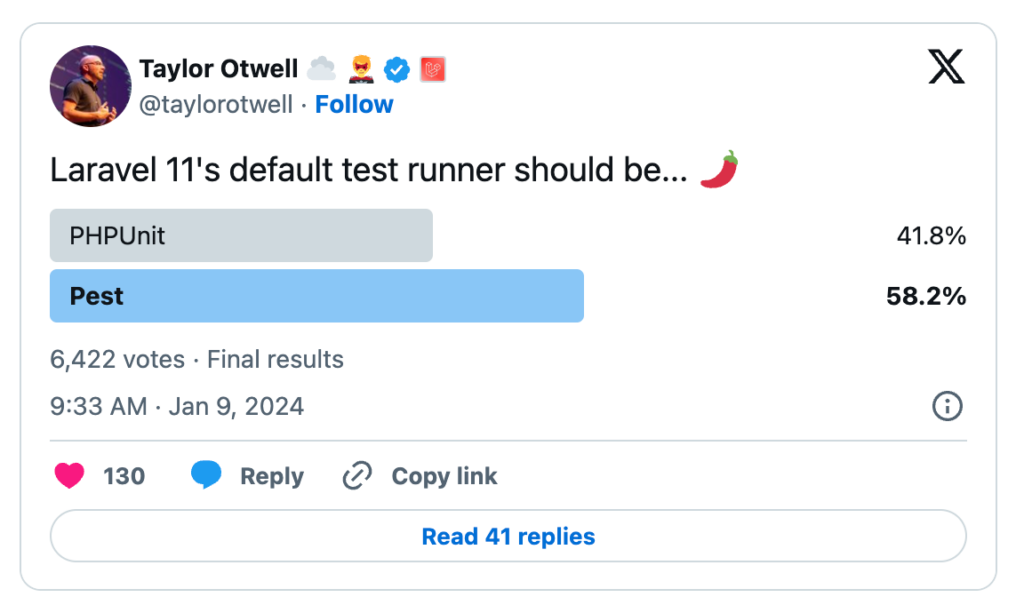
It’s important to remember that even though Pest is the default, you are not obligated to use it. You can simply use PHPUnit as usual.
In this post, I won’t go into much detail about Pest, but it’s worth checking out this framework and considering using it in your upcoming projects.
Just to give you an idea, this is what a test written with Pest looks like:
1```php2// assume sum() function is declared somewhere34test('sum', function () {5 $result = sum(1, 2);67 expect($result)->toBe(3);8});9```
SQLite
If you install a Laravel application using the Laravel installer, you will have the option to choose which database you want to configure by default. However, if you don’t use the Laravel Installer to start your projects, you will notice that SQLite has become the default database connection.
The main idea behind setting SQLite as the default is to make the initial development of an application even faster. The primary intention is to speed up local development without the need to configure a database. It’s important to note that models using Eloquent and Laravel migrations will work perfectly if you decide to switch from SQLite to MySQL or PostgreSQL, for example.
Of course, this assumes that you haven’t written any code that uses specific features of a particular database system.
Additionally, it’s worth mentioning that Laravel 11 is compatible only with SQLite 3.35.0 or higher.
Removed Doctrine/DBAL
Laravel has completely removed the dependency on Doctrine/DBAL, and it no longer requires this package for creating and modifying various types of database columns.
If you are considering updating your application, it’s worth reading more in-depth about this removal in Laravel’s docs on Doctrine/DBAL.
The New Features of Laravel 11
Just as it’s important to keep what already exists working and continually improving, the new version of Laravel comes packed with exciting new features that promise to make developing applications with Laravel even more enjoyable and efficient.
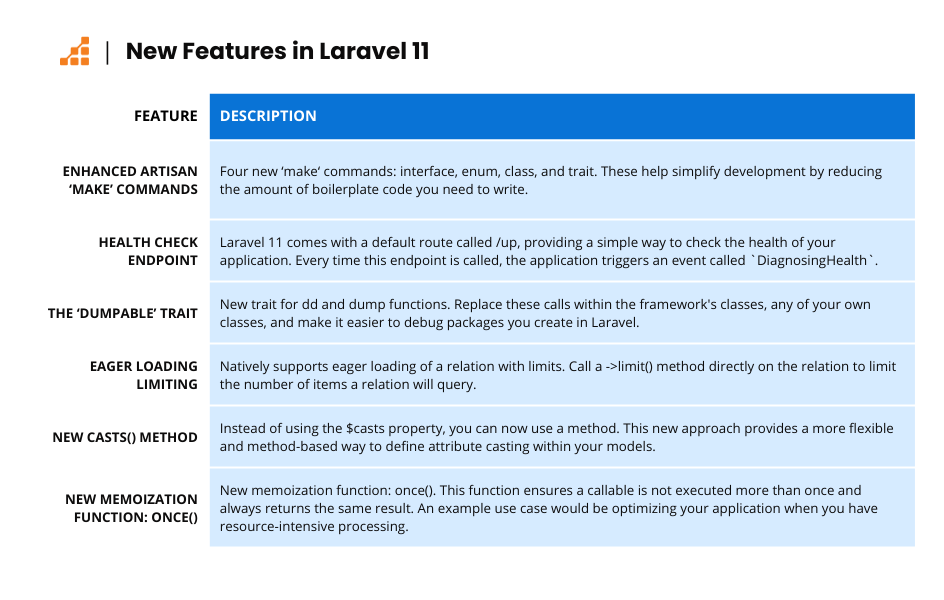
Enhanced Artisan Make Commands
Everyone who has used Laravel in recent years should be familiar with the make commands that Laravel offers.
A classic example is php artisan make:controller.
Just like this, Laravel introduces four new commands in this version:
1 – php artisan make:interface
2 – php artisan make:enum
3 – php artisan make:class
4 – php artisan make:trait
These commands help simplify the development process by reducing the boilerplate code you need to write, making it faster to create your application.
Health Check endpoint
Laravel 11 comes with a default route called /up. The purpose of this route is to provide a simple way to check the health of your application.
1bootstrap/app.php2```php3<?php45use Illuminate\Foundation\Application;6use Illuminate\Foundation\Configuration\Exceptions;7use Illuminate\Foundation\Configuration\Middleware;89return Application::configure(basePath: dirname(__DIR__))10 ->withRouting(11 web: __DIR__.'/../routes/web.php',12 commands: __DIR__.'/../routes/console.php',13 health: '/up', // This is where we can define the endpoint14 )15 ->withMiddleware(function (Middleware $middleware) {16 //17 })18 ->withExceptions(function (Exceptions $exceptions) {19 //20 })->create();21```
If you make the request from a browser, you will see the following page:

It’s also important to mention that every time this endpoint is called, the application triggers an event called `DiagnosingHealth`.
This allows you to tap into it and take any action you want based on this event.
The Dumpable Trait
Laravel 11 introduces a new trait for the well-known dd and dump functions. The idea is to replace these calls within the framework’s classes, but you can use this trait in any of your own classes. Additionally, if you create packages to be used within Laravel, this will be a great way to make them easily debuggable.
For example, here is how you can use this trait. You will first need to include it in the relevant class:
1```php23<?php4use Illuminate\Support\Traits\Dumpable;56class Animal7{8 use Dumpable;910 // ...11}12```1314And then, you can use it like this:1516```php17$animal = new Animal;1819$animal->setType()->dd()->setSkin();
Remember that some of the framework’s classes will already have the Dumpable trait, so you will be able to chain ->dd() into some parts of the code to easily debug anything!
Eager Loading limiting
Laravel now supports eager loading a relation with limits natively. Now you can call a ->limit() method directly on the relation, without any extra package.
1```php2<?php34$authors = Author::with(['posts' => function ($query) {5 $query->latest()->limit(10);6}])->get();78```
With that code, you can easily limit the number of items a relation will query.
New Casts() Method
If you have used Laravel before, you will remember that all models have a $casts property where you can define the attributes that need some kind of casting.
In Laravel 11, this has changed a bit. Instead of using the property, you can now use a method. It works like this:
1class Author extends Authenticatable2{3 protected function casts(): array4 {5 return [6 'registered_at' => 'datetime',7 'is_active' => 'boolean',8 ];9 }10}
This new approach provides a more flexible and method-based way to define attribute casting within your models.
This change won’t break your code if you’re still using the property instead of the method, but it is important to know that the method takes precedence over the property.
New Memoization Function
Memoization is an optimization technique that stores the results of expensive function calls and reuses them when the same inputs occur again.
Laravel 11 introduces a new memoization function called once(). The purpose of this function is to ensure that a callable is not executed more than once, always returning the same result. A good use case for this function is when you have resource-intensive processing and want to optimize your application.
Here’s how you can use the once() function:
1```php2class Report extends Model3{4 public function stats(): array5 {6 return once(function () {7 // Generating stats through multiple DB queries...89 return $stats;10 });11 }12}13```
And a cool thing is that in the example above, each instance of the Report class would have its own result maintained:
1```php23$reportOne->stats();4$reportOne->stats(); // cached result from previous line56$reportTwo->stats(); // Does not use $reportOne cached results7$reportTwo->stats(); // cached result from previous line8```
Laravel Developer Tools and Ecosystem
Laravel has many interesting tools in its ecosystem, and each year it gains new tools to make your application even more powerful!
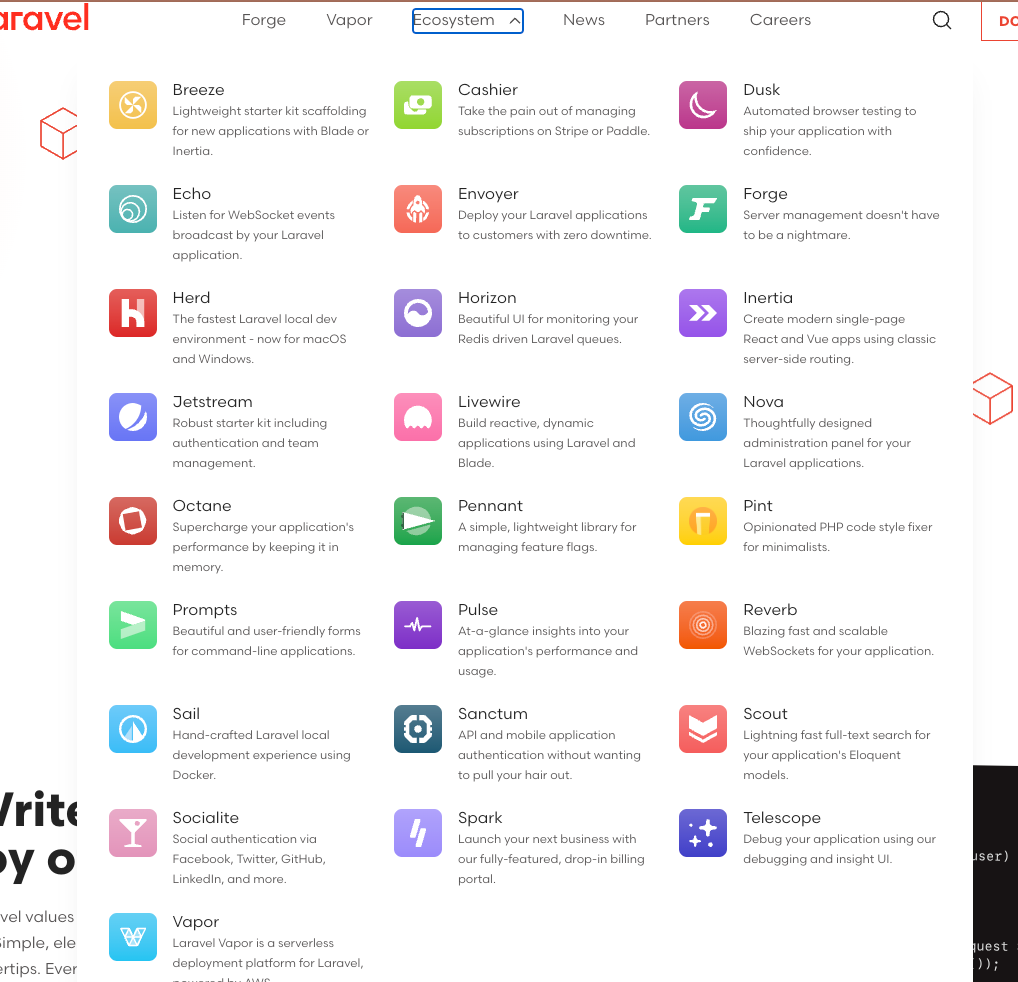
The two latest major additions are Laravel Reverb and Pulse, and to use either of them, your application must be at least on Laravel version 10.
Laravel Reverb
Reverb is a WebSocket server for Laravel that promises to be scalable and blazing-fast. Of course, it’s designed to work perfectly with the existing broadcasting tools in Laravel.
Laravel Pulse
Pulse is a tool designed to provide real-time insights into your application’s performance and health. It offers detailed metrics and monitoring capabilities, helping you to identify and address performance bottlenecks and other issues quickly.
Should you Upgrade Your Laravel App to the Latest Version?
The short answer is yes. After all, keeping your application up-to-date ensures security and continued bug fixes, and it’s a way to ensure your application is scalable and well-written.
However, we know that there are many variables to consider before simply changing your software version, especially when changing the software version might also mean updating the language version.
Before we discuss this further, let’s take a look at the table below for an overview of Laravel versions and updates.

As I mentioned above, updating Laravel to version 11 may also require changing the version of the language your application uses. For example, if you have an application with Laravel 9 and PHP 8.0, you will need to upgrade to PHP 8.2 or 8.3 when updating the framework.
Pros of upgrading to Laravel 11
I think I don’t need to say much about this after you’ve read the entire content of this post. It should be clear by now all the cool things you’ll be able to use when you update to Laravel 11. From exciting new features to functions that can significantly improve your application’s performance.
Not to mention the extended period for receiving security updates and bug fixes.
Potential challenges when upgrading
This update may not be straightforward if your application relies on external packages that are locked to a specific PHP version or if your code has parts that are incompatible with the selected version.
Therefore, it is crucial to carefully plan the update of your application to ensure everything goes smoothly. It is very important to thoroughly read the upgrade guide provided by Laravel, as it details all the necessary changes, categorized by their likelihood of impacting your application.
Conclusion
By now, it should be clear that this release is a significant step forward in the evolution of the framework. Laravel 11 is well-equipped to efficiently meet the needs of modern applications and offers an attractive range of features that not only perform well but also greatly enhance the developer experience, boosting productivity.
As the Laravel community continues to grow and evolve, the framework remains the cornerstone of PHP web development, pushing the boundaries of what developers can achieve with comprehensive documentation and robust community support.