
Svelte 5 2025 Review: Runes and Other Exciting New Features


Svelte has ranked as the most admired front-end framework for several years in a row, according to both Stack Overflow and State of JS surveys. Developers love it for its simplicity, efficiency, and—above all—its remarkably satisfying developer experience.
So when the Svelte core team decided to rebuild the framework from the ground up – effectively reworking the very things that made it so loved – it raised some eyebrows. Many developers in the community (myself included) were asking, “Why change something that’s working so well?”
Table Of Contents
In this article, I want to explore why these changes were necessary. We’ll dig into some key questions to understand the changes, including how they work, and how these changes helped turn Svelte into a smaller, faster, and even more efficient UI framework.
What is Svelte?
Svelte is a modern JavaScript framework used to build interactive user interfaces (UIs). Unlike traditional frameworks like React, Angular or Vue, that are shipped to act as code interpreters at runtime, Svelte acts as a compiler that ships JavaScript code, resulting in faster apps with smaller bundles and minimal runtime overhead. This unique approach eliminates the need for a virtual DOM, making Svelte applications far more performant.

Why Developers Love Svelte (Simplicity, Speed, DX)
There are a ton of reasons developers love Svelte. Primarily, though, it’s that Svelte does things very differently from React, Vue, Angular, and most front-end frameworks. In my opinion, Svelte’s popularity boils down to three things: simplicity, performance, and developer experience.
1. Simplicity
Svelte cuts through the noise by stripping away the ceremony other frameworks make you deal with. No useState, no context boilerplate, no lifecycle method acrobatics. If you know JavaScript and HTML, you can build something in Svelte—not because it hides complexity, but because it removes the need for it.
The hardest part about learning Svelte? Unlearning the clutter you thought was necessary.
2. Performance
Most frameworks ship a virtual DOM and do reconciliation in the browser. Svelte skips that entirely. It compiles your components at build time into direct DOM operations—which means less JavaScript sent to the browser, less work done at runtime, and apps that load and run faster, especially on mobile or resource-constrained devices. There’s no diffing engine eating up CPU cycles. It just runs.
3. Developer Experience
Svelte’s reactivity model is built into the language. No hooks. No proxies. Just variables that update automatically. Combine that with scoped CSS, single-file components, and a ridiculously fast dev server, and you’re looking at a tool that prioritizes flow. You write less code, it does more. You stay in the zone longer.
Also – Svelte doesn’t force a meta-framework or a complex folder structure. You want to use Tailwind? Fine. You prefer plain CSS? That works too. It’s un-opinionated where it counts, so you can build your stack your way without fighting the framework.
Limitations of Svelte 3 & 4
Svelte has been a favorite for many (myself included). In small projects, everything looks and works great – but anyone who dared to put it through serious use (read: build a complex application) eventually hit the same limitations.
The reactivity model, showcased in early tutorials, seemed almost too good to be true—like magic. But digging deeper revealed the same pain points as other frameworks. Here’s where things started to break down.
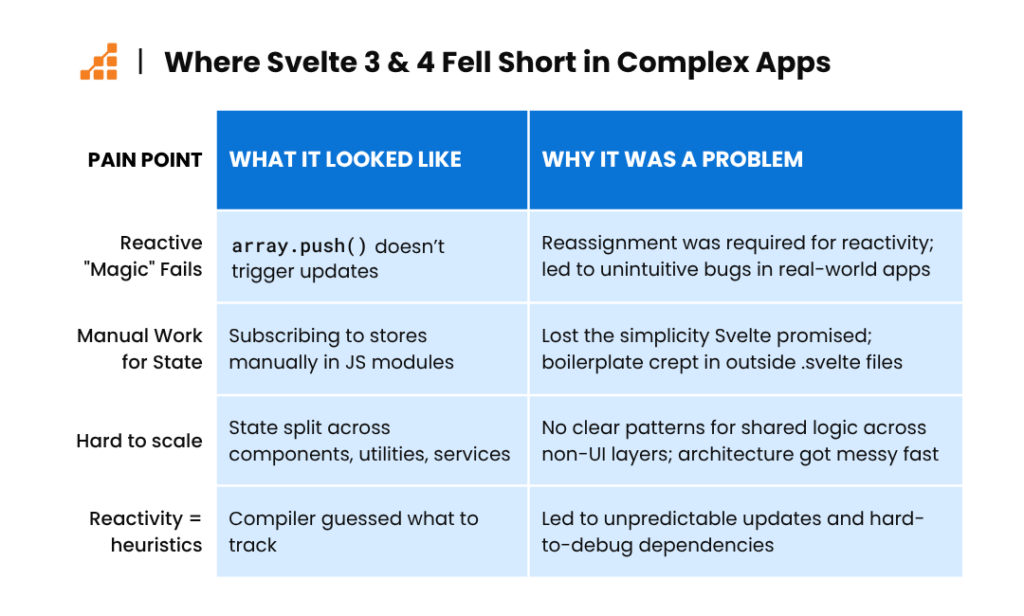
1. Unexpected Reactive Behavior
One of Svelte’s major pain points was its reactivity model. At first glance, it felt almost magical—just write JavaScript, and your UI updates. But under the hood, Svelte only tracked changes triggered by reassignment.
So while modifying an object or array (e.g., pushing to an array) looked like it should update the UI, it didn’t—unless you manually reassigned the variable. This behavior was unintuitive and led to subtle bugs that were hard to trace, especially in apps with more complex state.
2. Convoluted State Management
State management was another challenge. Svelte 3 introduced Stores to help share reactive state, which worked well—as long as you stayed inside .svelte files.
But the moment you needed to interact with that state from a plain JavaScript module, utility, or backend service, things got messier. You had to manually subscribe to the store and handle cleanup yourself:
1import { myStore } from './store.js';2const unsubscribe = myStore.subscribe(value => {3 // do something with value4});5// later, clean up manually6unsubscribe();
This broke the illusion of simplicity. What felt seamless inside a component suddenly required boilerplate and discipline. It also made it harder to scale Svelte in projects where shared state needed to flow across multiple environments, not just the UI layer.
3. Limited Integration with Non-Svelte Files
Trying to integrate Svelte into legacy applications brought even more complexity. On paper, it sounded like a good idea: drop in a modern component, get the benefits. Right? Not really.
In practice, it often led to broken reactivity, clashing DOM updates, and style conflicts. Unless you were willing to refactor the legacy stack to accommodate Svelte’s patterns, it was often more trouble than it was worth.
4. Scalability Challenges
Finally, as applications grew, so did the pain of scaling. Svelte didn’t provide strong conventions for things like state normalization, lifecycle abstraction, or logic composition. Developers were often left inventing their own architecture or borrowing patterns from other ecosystems—and it didn’t always map cleanly. For a framework that prides itself on simplicity, the complexity crept in quickly once you got past the basics.
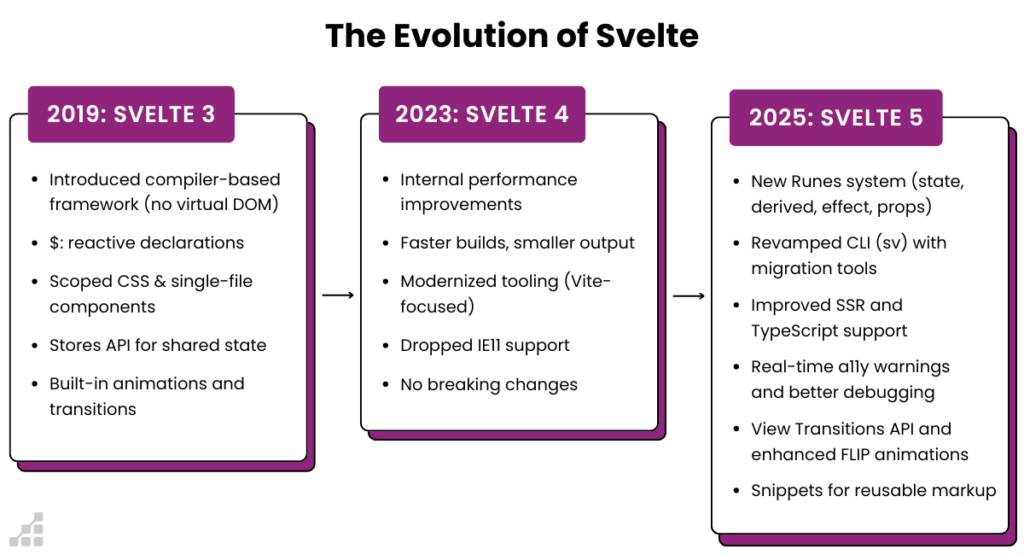
So – how does Svelte 5 address these challenges? We’ll cover that in the next section.
Enter Svelte 5: Runes Explained
Svelte 5 introduces Runes, a new reactivity model that directly addresses many of the issues above—without sacrificing what made Svelte feel so good to use in the first place.
What Are Runes?
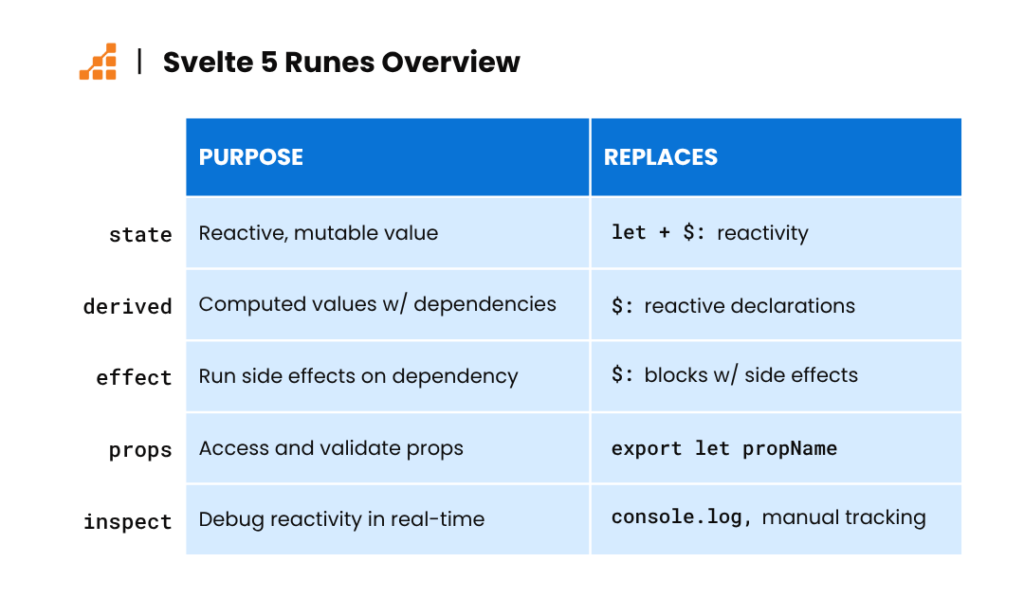
Runes are a set of primitives built around the idea of Signals—values that change over time and automatically notify anything that depends on them. Instead of relying on magic and heuristics, Runes give the compiler explicit instructions about what to track and when.
There are 5 primary runes: state, derived, effect, props, and inspect. Here’s how each Rune works, and what it replaces.
1. State Rune: An Explicit, Testable State
Svelte’s old model relied on let variables and assignment to trigger updates. It worked, but debugging and testing were harder than they needed to be.
With the state rune, you manage state like a signal with a clear API.
Old way:
1let count = 0;23function increment() {4 count += 1;5}
New Way:
1const count = state(0);23function increment() {4 count.set(count.get() + 1);5}
2. Derived Rune: Safer, Smarter Computed Values
The $: syntax has always been a favorite of newcomers to Svelte, but it had a tendency to lead to out-of-sync dependencies that were a nightmare to debug.
derived makes dependencies clear and enables better type inference, and ultimately leads to more predictable behavior. By explicitly defining how one piece of state depends on another, derived reduces the mental overhead when debugging.
Old Way:
1$: doubled = count * 2;
New Way:
1const doubled = derived(count, (value) => value * 2);
3. Effect Rune: Controlled Side Effects
I’ll be honest: when I first saw that effect was one of Svelte’s new runes, I had a moment of “oh no, is Svelte going to become React?” But let’s be real — React is now introducing a compiler in v19, so the copy-paste cuts both ways.
Like React’s useEffect, Svelte’s effect rune is designed to separate side effects from core logic. That’s not a bad thing. It makes dependencies explicit and helps keep your state updates and DOM interactions predictable and isolated.
The difference? With Svelte’s compiler in the mix, effect is leaner and more deterministic — no dependency array bugs, no re-running effects because you forgot to memoize a function. It’s a familiar pattern, just stripped down and sharpened.
Old Way:
1$: {2 console.log(`Count is ${count}`);3}
New Way:
1effect(() => {2 console.log(`Count is ${count.get()}`);3});
4. Props Rune: Centralized, Validated Props
The props rune centralizes prop management, making it easier to validate and handle defaults. This is especially useful in large applications where components have numerous props with varying types and default values.
Old Way:
1export let name;
New Way:
1const name = props('name');
Bonus: the Inspect Rune for Debugging
The inspect rune is a powerful debugging tool introduced in Svelte 5. It allows developers to monitor state changes and derived values in real time, making it easier to identify and resolve issues during development. It’s similar to console.log, but it will trigger whenever the value updates.
Example:
1<script>2 const count = state(0);3 inspect(count);4</script>56<button onclick={() => count++}>Increment</button>
inspect can also accept a with property, which can be invoked with a callback to specify a debugging pattern or tool.
Example:
1<script>2 let count = $state(0);3 $inspect(count).with((type, count) => {4 if (type === 'update') {5 debugger; // or `console.trace`, or whatever you want6 }7 });8</script>91011<button onclick={() => count++}>Increment</button>
In this example, the debugger will be opened whenever the type is an update. The alternate suggestion of console.trace will provide information of the origin of the change.
Other New Features in Svelte 5
Svelte 5 also introduces a lot of new features aimed at further improving the developer experience and expanding the framework’s capabilities.
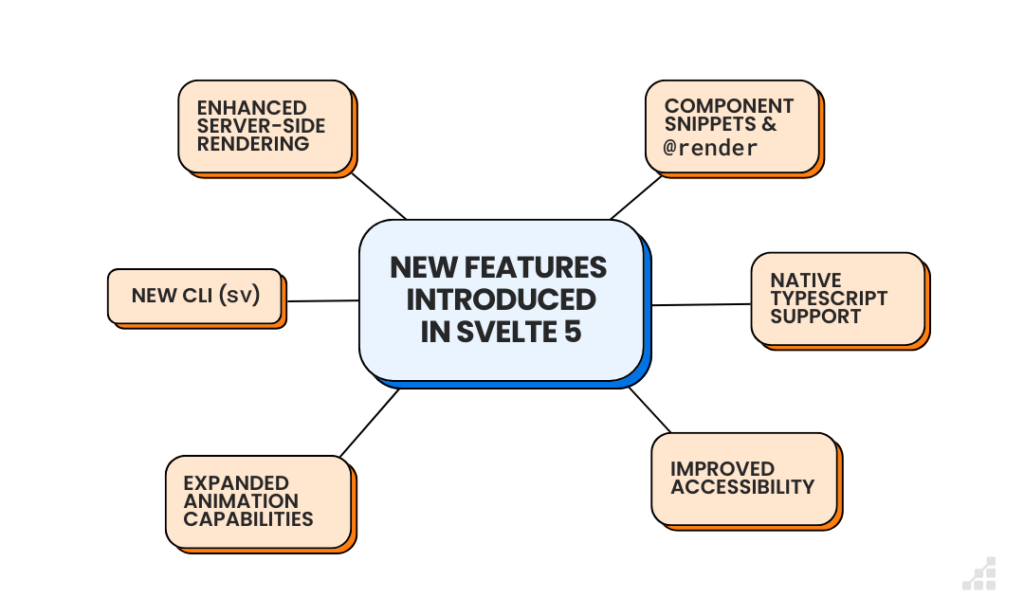
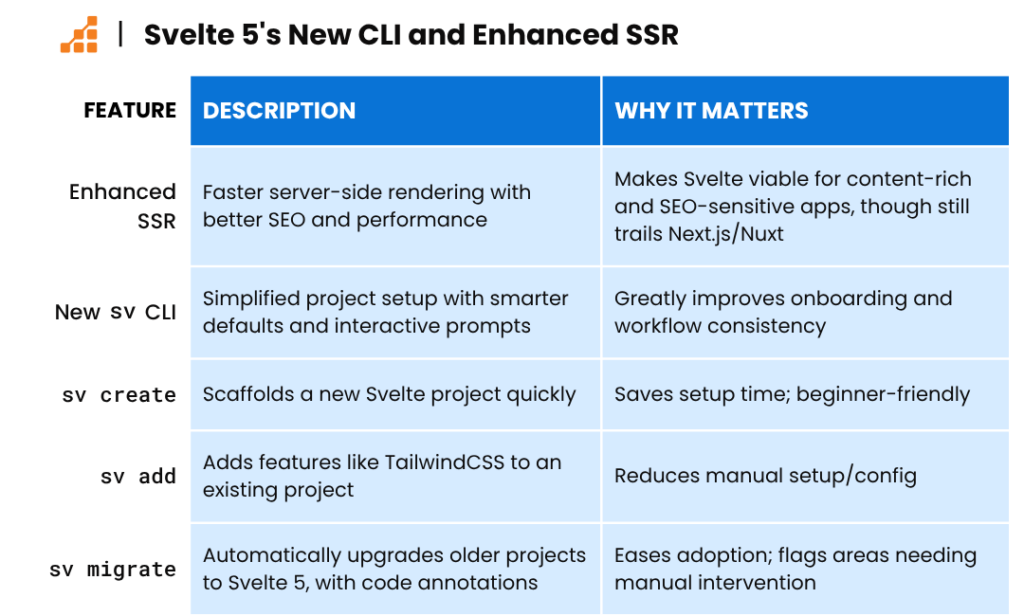
1. Enhanced Server-Side Rendering (SSR)
Svelte 5 provides a more robust server-side rendering pipeline, ensuring better SEO and faster initial page loads. This update makes Svelte a strong contender for projects where performance and search engine visibility are crucial – though it still trails behind frameworks like Next.js (React) and Nuxt (Vue) when it comes to ecosystem tools or e-commerce sites with dozens of integrations and edge caching.
That said, SvelteKit closes the gap and makes Svelte a viable choice for SSR-heavy use cases.
2. The New CLI
Svelte 5 introduces a revamped CLI called SV that simplifies project setup and development workflows. The new CLI enables faster bootstrapping of projects, better scaffolding for SvelteKit, and intuitive defaults that reduce configuration overhead. Features like interactive prompts for templates and configurations ensure that even new developers can get started quickly.
The main commands are:
- sv create to automate the creation of new projects
- sv add to install addons such as TailwindCSS to an existing project
- sv migrate, which can auto-magically migrate your Svelte 4 (or prior) project to Svelte 5. The command makes most of the necessary changes and annotates the codebase where developer interaction may be required.
3. Better Component Composition Through Snippets
Snippets and render tags, are a way to create reusable chunks of markup inside your components. Instead of writing duplicative code like this:
1{#each images as image}2 {#if image.href}3 <a href={image.href}>4 <figure>5 <img src={image.src} alt={image.caption} width={image.width} height={image.height} />6 <figcaption>{image.caption}</figcaption>7 </figure>8 </a>9 {:else}10 <figure>11 <img src={image.src} alt={image.caption} width={image.width} height={image.height} />12 <figcaption>{image.caption}</figcaption>13 </figure>14 {/if}15{/each}
…you can write this:
1{#snippet figure(image)}2 <figure>3 <img src={image.src} alt={image.caption} width={image.width} height={image.height} />4 <figcaption>{image.caption}</figcaption>5 </figure>6{/snippet}78{#each images as image}9 {#if image.href}10 <a href={image.href}>11 {@render figure(image)}12 </a>13 {:else}14 {@render figure(image)}15 {/if}16{/each}
Like function declarations, snippets can have an arbitrary number of parameters, which can have default values, and you can destructure each parameter.
However, you can’t use rest parameters (e.g., …args) in Svelte runes because runes aren’t regular JavaScript functions — they’re special syntax that the Svelte compiler analyzes and transforms at build time. So while runes can support default values and destructuring, they require a fixed number of clearly defined parameters. No …args, because there’s no “guessing” allowed at compile time.
4. Native TypeScript Support
Svelte 5 comes with built-in TypeScript support, eliminating the need for additional configurations or plugins. This ensures type safety and better developer productivity, especially in larger applications where managing types is critical.
5. Improved Accessibility
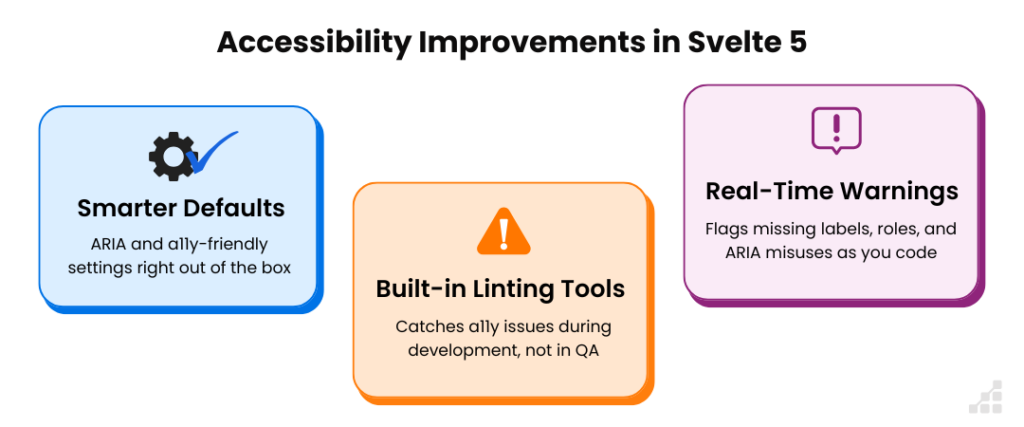
Accessibility remains a first-class priority in Svelte 5. With smarter defaults, improved ARIA support, and built-in linting tools, developers can build more inclusive web experiences with less manual work. One standout feature: real-time accessibility warnings during development. These alerts flag issues like missing form labels or incorrect ARIA usage as you code, making it easier to catch and fix problems early—before they ship to users.
6. Expanded Animation Capabilities
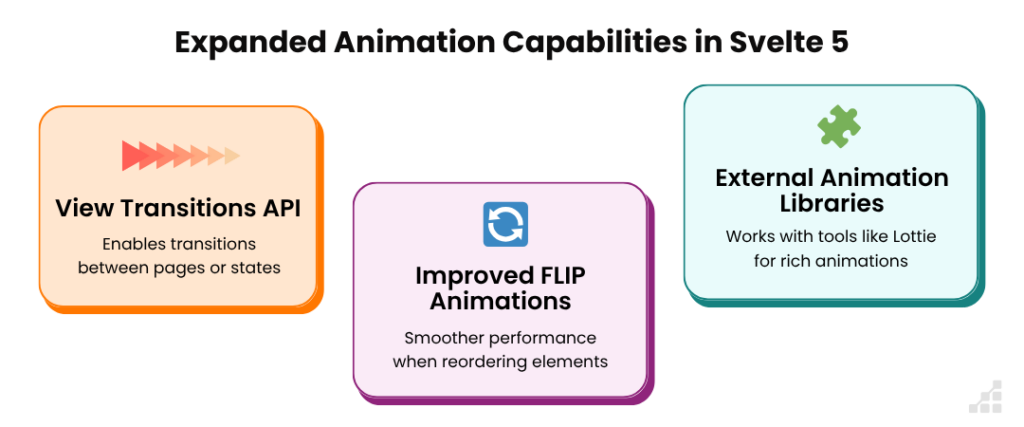
Svelte 5 takes animations to the next level, refining existing tools and adding new ones that let developers create smooth, polished interfaces with minimal effort. Let’s explore each of the expanded animation capabilities below.
View Transitions API integration
Svelte 5 now supports the View Transitions API, one of the most powerful animation tools in modern web development. It enables seamless transitions between pages or states—native-like fluidity that feels at home on both desktop and mobile. And since the API is supported in all modern browsers, there’s no extra work to make it cross-platform.
Improved FLIP animations
Svelte’s FLIP (First, Last, Invert, Play) function has been upgraded for better performance and smoother transitions—especially when reordering elements. It calculates positional changes and animates them intelligently, reducing jank and improving flow.
Support for external animation libraries
Need something more complex? Svelte 5 plays well with external tools like Lottie, making it easy to drop in rich, After Effects-style animations without breaking your workflow.
Svelte 5: What You’ll Still Have to Figure Out
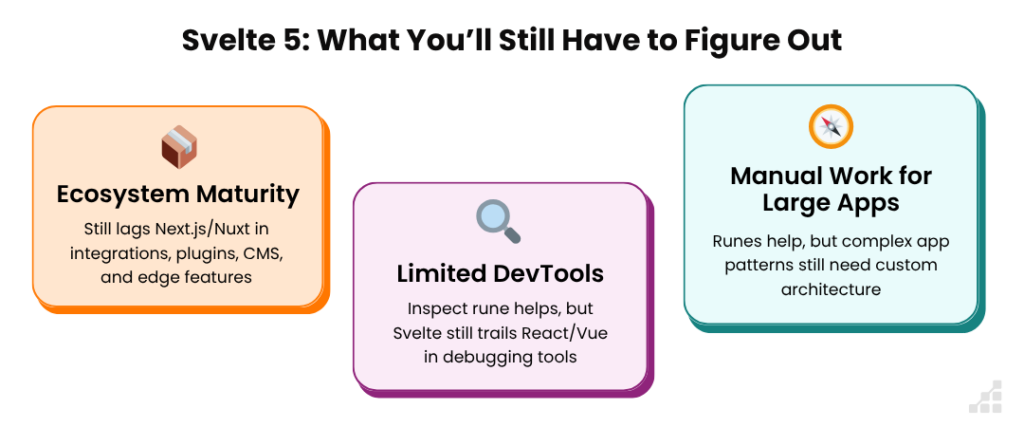
Svelte 5 is a massive leap forward, but it’s not a silver bullet—and it’s worth being clear-eyed about where things still fall short.
Ecosystem maturity is still catching up
While SvelteKit has made real progress, it doesn’t yet rival the depth of tooling or third-party integrations you get with frameworks like Next.js or Nuxt. If you’re building something that leans heavily on a mature plugin system, or you need seamless support for CMSs, auth providers, and edge caching strategies out of the box, you may hit friction.
DevTools are getting better, but still feel limited
The new inspect rune is a great step forward for debugging, but the overall Svelte devtooling experience still trails what you get in React or Vue ecosystems—especially when it comes to visualizing app state, time-travel debugging, or tracking render performance over time.
Complex app patterns still require manual work
Svelte 5’s new reactivity model (via Runes) makes shared state and composition much more predictable. But in large apps—where state needs to move between services, routes, and non-component logic—it’s still not as ergonomic or opinionated as other frameworks that have more established patterns for things like data fetching, caching, or auth flows.
In short: Svelte 5 gives you a sharper knife. But if you’re building a very large or deeply integrated app, you’ll need to bring your own cutting board.
Final Thoughts: How Svelte 5 Changes the Game
Svelte 5 isn’t just an upgrade — it’s a redefinition.
The latest version keeps everything developers already love about Svelte—speed, simplicity, and a genuinely enjoyable developer experience—while addressing some of the framework’s most painful limitations.
Runes make reactivity more transparent and predictable. SSR is faster and more capable. And features like real-time a11y warnings, improved animation support, and a smarter CLI make it easier to build polished, production-grade apps without a ton of boilerplate.Is it perfect? No. Svelte still lags behind React and Vue in terms of ecosystem depth, and some parts (like state management in large apps) still require careful thinking. But Svelte 5 shows that the team isn’t afraid to challenge its own assumptions—and that alone makes it worth paying attention to.