
Google Antigravity Review: DeepMind’s Agent-First Bet on Faster, Safer Software Development

Antigravity is Google DeepMind’s push toward an agent-first way of building software. Instead of treating AI like a smarter autocomplete, it treats AI like a capable collaborator that can take on real tasks, run with them, and come back with something you can review.
What sets Antigravity apart is how it brings three surfaces into one workflow: a familiar editor for hands-on control, an Agent Manager that coordinates multiple autonomous tasks (so work can happen in parallel), and browser integration so agents can pull in web context and validate what they just built.
I tested Antigravity myself in a small project, and it genuinely surprised me: in a short session, I went from “idea” to a working web app with far less manual glue work than I expected. That hands-on experience is what made me want to break the workflow down, because it feels less like a novelty and more like a shift in how you run development.
Table Of Contents
Understanding the tool: One Workflow Across Three Surfaces
Antigravity is easiest to understand if you stop thinking “IDE with an assistant” and start thinking “one workflow split across three surfaces.” Each surface is optimized for a different part of modern dev work: delegating tasks, doing hands-on edits, and validating behavior in a real browser, without constantly bouncing between apps.
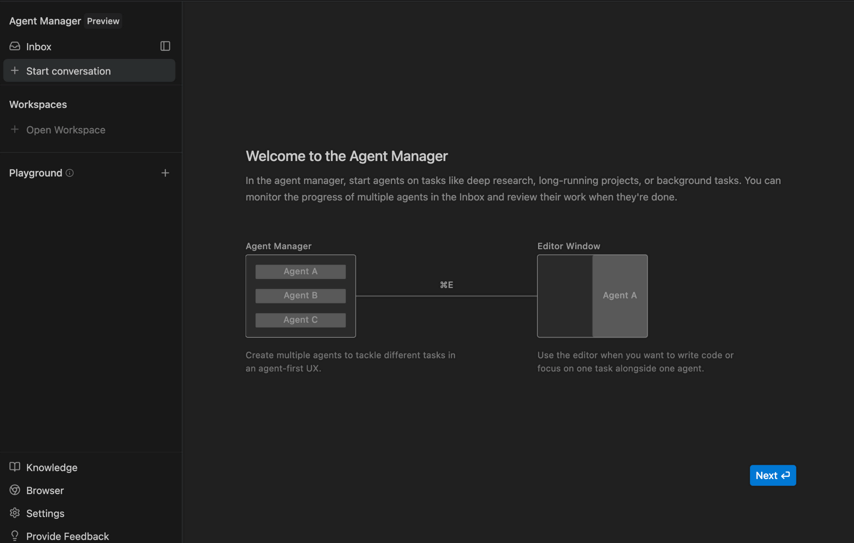
Agent Manager
The Agent Manager is the coordination layer. It is where you create, run, and monitor agents across multiple workspaces, especially when you want work happening in parallel. Think of this as mission control for agent workstreams.
If you’re wearing a CTO/Leader hat, this is the part that changes the rhythm, less “babysit one task” and more “dispatch, review, iterate.” That’s exactly how it felt in my own use: I’d kick off a task, let the agent run, and then come back to something reviewable instead of staying in a single chat thread.
That shift can be valuable when you are juggling multiple initiatives and need predictable checkpoints.
It also encourages a different management model for AI work. Instead of a single, long chat thread, you get multiple tasks with clearer boundaries, clearer progress, and more reviewable outputs.
Editor
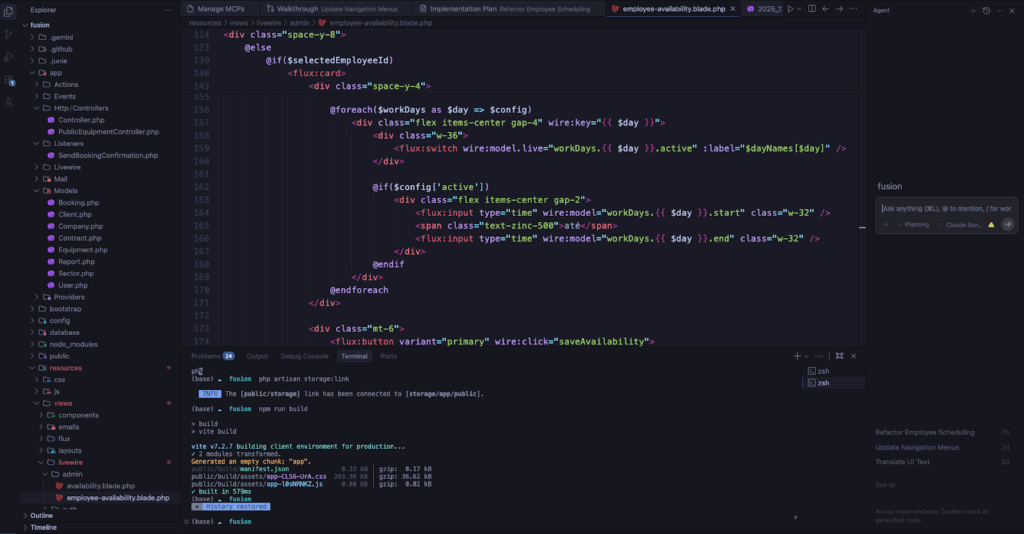
The editor is where Antigravity feels familiar: autocomplete/tab flows, sidebars, and the ability to jump in and finish the last 10% yourself. The core idea is not to replace the editor, but to pair it with agent workflows, so you can switch from orchestration to direct control whenever needed.
That pairing matters in real-world teams, because autonomy is rarely “all or nothing.” Many tasks are safe to delegate, but almost every meaningful change has a judgment call somewhere. The editor stays at the place where you can take over quickly. In practice, this makes Antigravity feel more like a workflow upgrade than a “new way to code.” You can keep your existing habits, but you get stronger and better UI for delegation and review.
Browser
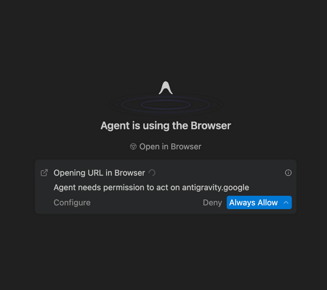
The browser surface is the “verification muscle.” Antigravity can open and control Chrome (via a required extension) so an agent can navigate pages, click/scroll like a user, and test the feature it just implemented, bringing screenshots/recordings back as evidence. This is a big deal because it tightens the loop between “it compiles” and “it actually works.”
It also changes how verification shows up in code review. Instead of only diffs and test output, you can ask for proof that the flow works end-to-end, and get something closer to a mini QA packet.
In my small project, the browser-backed verification was the moment it “clicked” for me, getting concrete evidence (not just “it should work”) made reviewing the agent’s output feel dramatically safer.
Agent-Assisted Development Mode
A practical detail that matters in Antigravity is the operating mode: in agent-assisted development, the model decides when to run independently and when to pull you in. The idea is to keep your attention for the decisions that actually need judgment, while letting the agent handle the routine execution work.
In practice, the agent can handle simple, low-risk tasks end-to-end. Writing the code, running the necessary commands, and producing artifacts you can review without needing constant prompts. But when a task becomes ambiguous, higher impact, or requires context the agent can’t infer, it escalates back to you with questions or asks for approval before proceeding. That balance is what makes the workflow feel usable day-to-day: you get more automation without surrendering control over the moments that can break builds, policies, or production expectations.
One more piece that’s worth calling out, especially if you already like spec-driven development, is that Antigravity’s workflow pairs nicely with “spec → implementation → verification.” When you provide a clearer spec (requirements + acceptance criteria), the agent has a better target, and your review becomes simpler: “Did it match the spec?” rather than “Did it do something?” And this is configurable: you can choose different modes depending on how much autonomy you want.
Agent Artifacts and Progress Tracking
If you’re going to delegate meaningful work to an agent, the real problem isn’t “can it write code?”, it’s how you verify it without spending more time reviewing than you saved.
Antigravity’s answer is “Artifacts”: instead of making you scroll through raw tool-call logs, the agent produces tangible, review-friendly deliverables that capture intent, progress, and proof. Google explicitly frames this as “verify with Artifacts, not logs”, because trust is the bottleneck in agentic workflows.
In practice, artifacts are designed to close the “trust gap.” When an agent claims “I fixed the bug,” you used to verify by reading code. In Antigravity, the agent produces artifacts to prove what it did and how it verified it. And these aren’t hidden away: you can toggle into the artifacts view from the Agent Manager and review what was generated for that task. Artifacts can include screenshots and even videos as evidence of what has been produced by the agent.
The three core artifacts (and how they map to real engineering work)
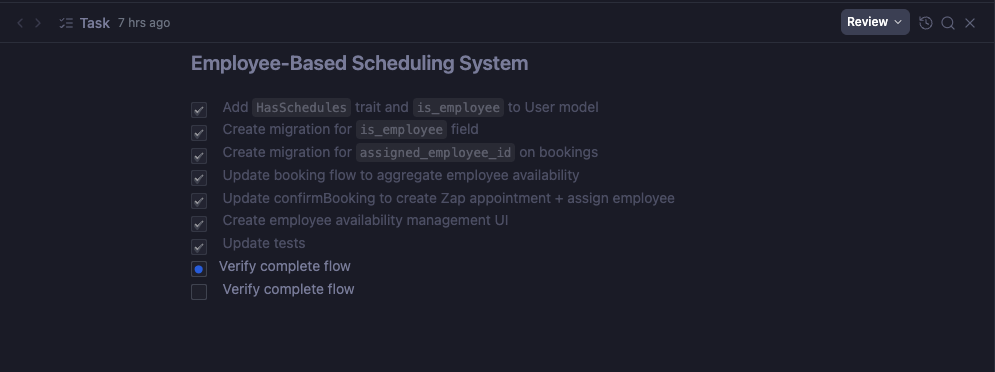
1) Task List (progress + scope control)
Think of the Task List as the agent’s running checklist: what it believes “done” means, what’s currently in-flight, and what’s next. The biggest benefit here is scope visibility.
Instead of asking “what is the agent doing right now?”, you can see it expressed as concrete steps, and spot early if it’s drifting, missing an acceptance criterion, or spending time on something irrelevant.
This also creates a more “manager-friendly” workflow. Even if you do not follow every step, you can still understand where the work is headed.
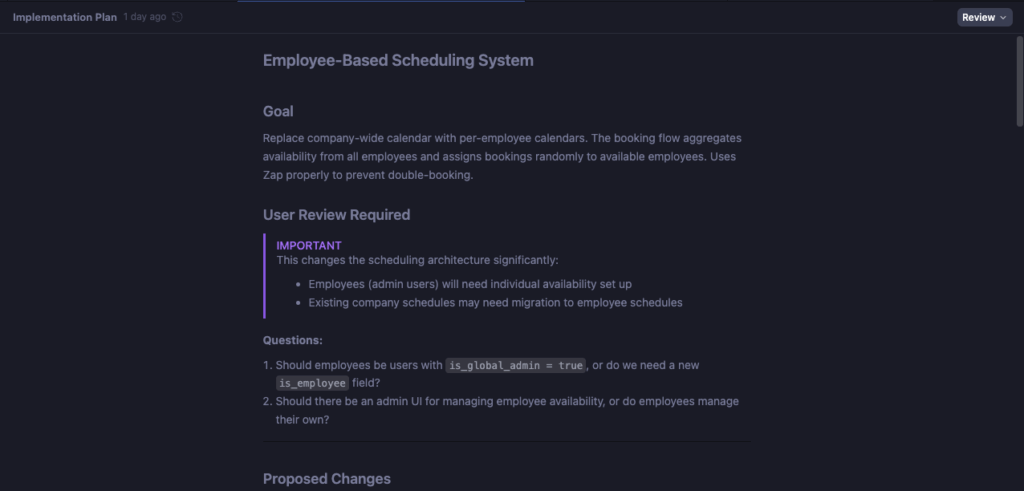
2) Implementation Plan (pre-flight review)
This is the artifact that makes delegation feel “safe.” Before touching the codebase, the agent can lay out its approach so you can sanity-check: architecture choices, what files it expects to modify, what it will generate, and, critically, how it plans to validate. This is where you can catch mistakes cheaply, before they become a messy diff. It also helps with team alignment. A plan is a lightweight design review, and it can reduce back-and-forth when multiple people are involved.
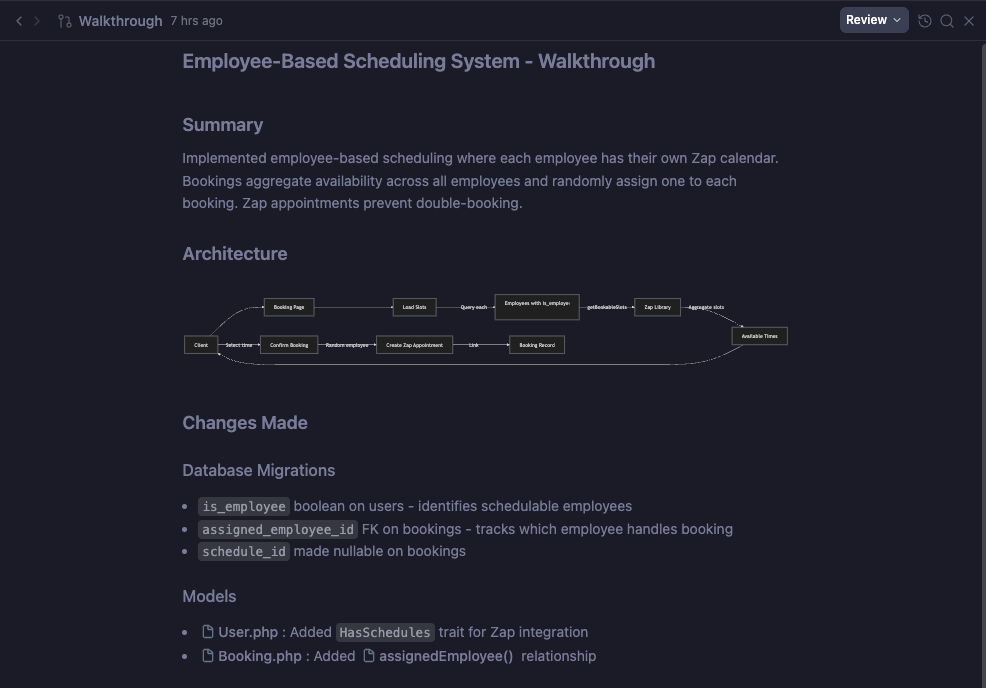
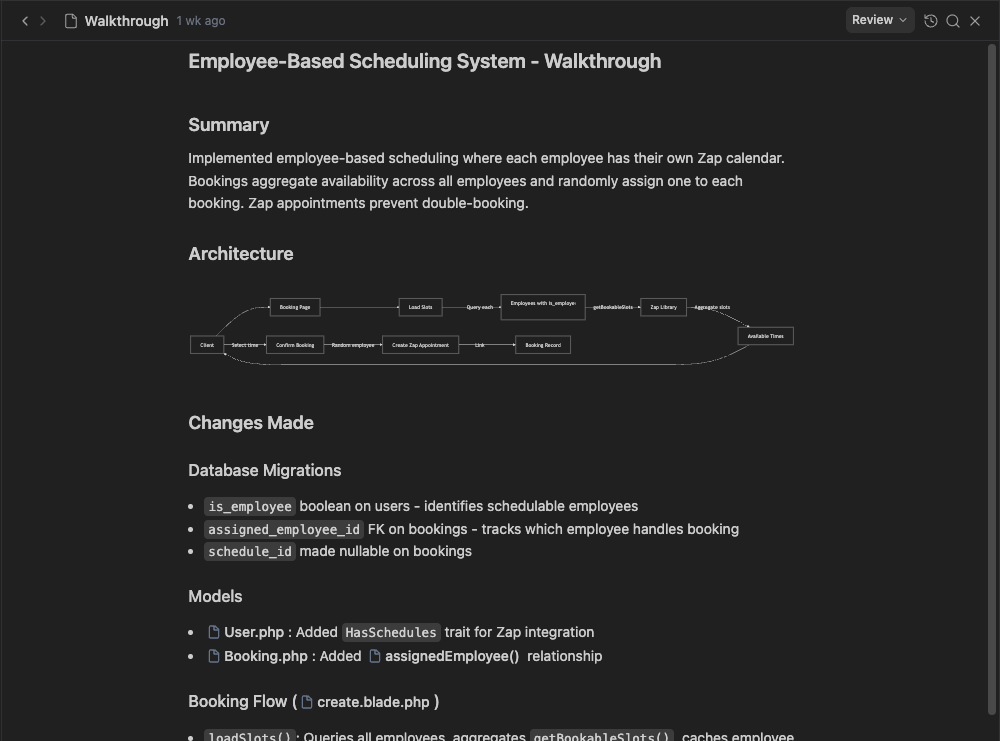
3) Walkthrough (post-flight proof)
After the work is done, the walkthrough becomes your “release notes + evidence packet.” It summarizes what changed and includes the verification steps the agent took. This is exactly the kind of artifact you want when you’re managing multiple workstreams and need to assess “is this ready to merge?” in minutes, not hours.
It also improves handoffs. A walkthrough is a concrete artifact you can share with QA, Product, or another engineer who needs to understand what changed.
Why this changes the review loop
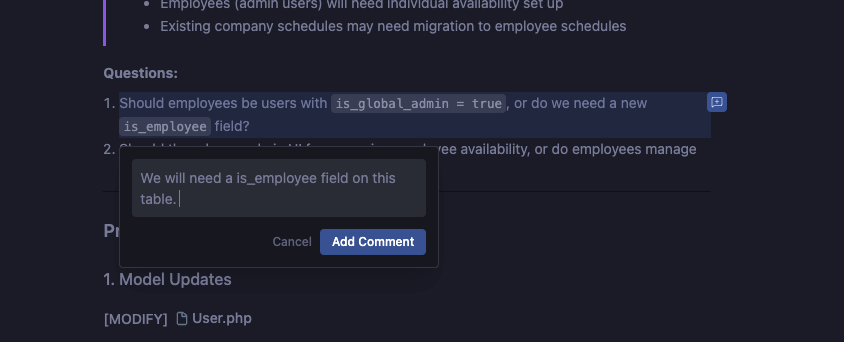
Artifacts aren’t just for passive reading, they’re interactive. You can leave feedback directly on artifacts in a Google Docs–style commenting workflow, where the agent can incorporate your notes without you having to restart the whole task.
This creates a more scalable loop: delegate → review artifacts → comment → iterate, which is fundamentally different from “chat forever and hope it did the right thing.”
Progress tracking at the “portfolio of work” level
Artifacts also become the way you keep context across multiple tasks. And importantly, how strict this whole process is can be configured: Antigravity exposes review policies (e.g. “always proceed” vs. “agent decides” vs. “request review”), so you can tune how often the agent must stop for explicit approval.
Inbox View:
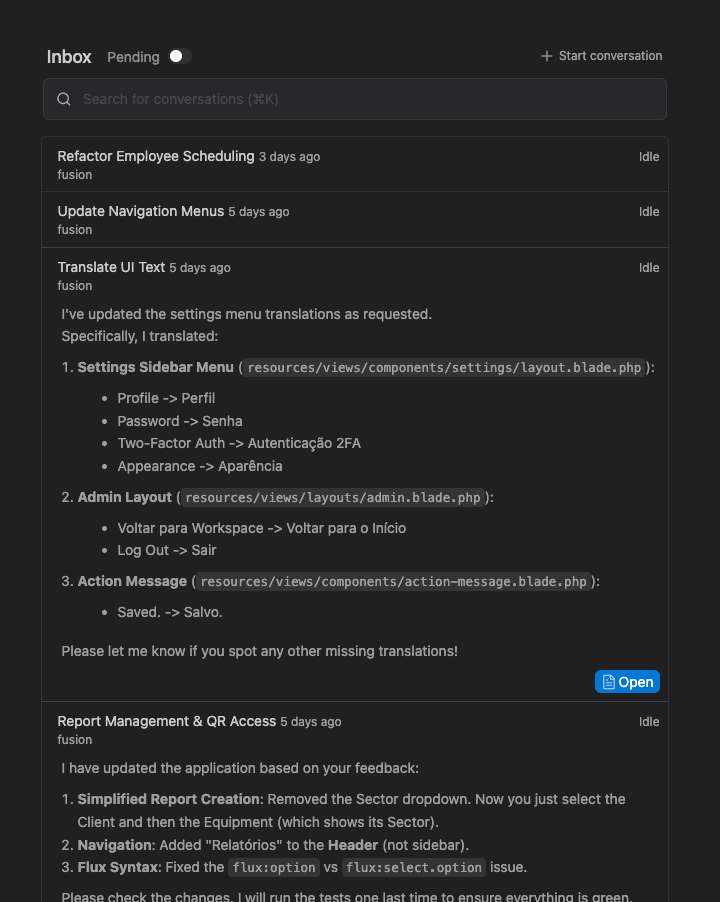
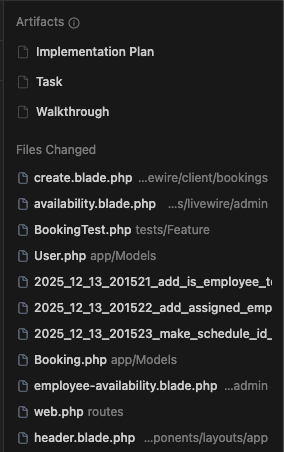
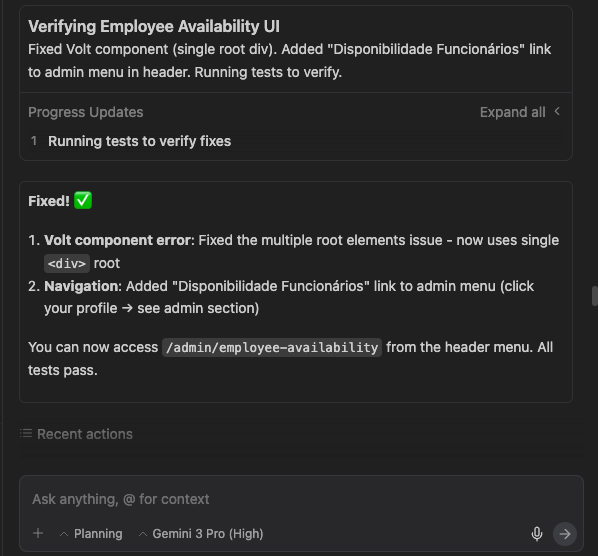
In the Detailed View, you’ll typically bounce between three panes: the agent chat (for instructions and clarifications), the artifacts list (a running feed of what the agent is producing, plans, progress updates, test results, screenshots, etc.), and the artifact detail view (where you open any artifact and review it in full).
Artifacts list:
Artifact View:
Agent Chat:
How Antigravity differs from Other AI IDEs
There are many alternatives for AI assisted development. The “agentic IDE” bucket is growing, but they optimize for different bottlenecks. So in this article, I will make a quick comparison between Antigravity and two of the most used AI-first IDEs, KIRO and Cursor. So before we dive into the differences, let me go through a quick overview of both tools, along with Antigravity.
- Antigravity is designed around orchestration + verification across editor + terminal + browser, with a strong emphasis on Artifacts as the trust layer.
- Cursor is optimized for fast iteration inside an editor: best-in-class “in-editor” workflows (Tab completion, targeted edits, and Agent modes), plus strong parallel agent UX inside the IDE.
- Kiro is optimized for productionizing work: it foregrounds spec-driven development (requirements/design/tasks), steering, and hooks that automate routine “you forgot tests/docs” work as you code.
Detailed comparison between Antigravity, Cursor, and Kiro
| Dimension | Antigravity | Cursor | Kiro |
| Primary philosophy | “Agentic development platform” that moves you to a task-oriented workflow (orchestrate, then verify). | “AI-first code editor” focused on speeding up coding + refactors via Tab/edits/agents. | “From prototype to production” by adding structure (specs/steering/hooks) before and during coding. |
| Core UI model | Multiple surfaces: manager-style orchestration + editor + browser workflow (agents operate across tools). | Primarily one editor surface with Agent UX (modes, plans, multi-agent sidebar). | Primarily one IDE surface, plus spec artifacts and automations (hooks/steering). |
| “Trust layer” / review | Artifacts are first-class: plans + task lists + walkthrough evidence (screenshots/recordings/tests) to verify outcomes. | “Plans” and diffs help, but trust is mostly conventional: review changes in-editor (Cursor also has plan UX and multi-agent isolation). | Specs are the core trust artifact: requirements/design/tasks before execution, then stepwise implementation. |
| Browser in the loop | Strong differentiator: explicit browser integration (agent can use the browser as part of validation). | Not positioned as a core product “surface” (verification tends to be tests, previews, PR workflows). (Cursor has expanded into design tooling that overlays a browser, but that’s a different angle than agent-driven app testing.) | Not positioned as a primary surface; focus is on spec + agent workflows + MCP/hook automation. |
| Automation style | “Delegate tasks, come back to evidence.” Review policy + artifacts encourage asynchronous work with checkpoints. | “Autonomy slider” via Agent modes; strong for interactive iteration + multi-agent parallelism. | “Governed automation”: specs + hooks (event-driven triggers on save/create/delete) and steering for consistent behavior. |
| Parallelism | Multi-agent orchestration is a headline feature (manager-style control + inbox concepts in official materials). | Explicit multi-agent support; can run multiple agents in parallel with isolated workspaces/worktrees. | Supports agent workflows and concurrency, with additional “background” automation via hooks. |
| Spec-driven development | Not the “hero feature.” It supports planning artifacts, but its center is orchestration + verification. | Optional/implicit (plans exist, but not “spec-first” as the core identity). | Core identity: spec-first (requirements/design/tasks) before coding, then execute step-by-step. |
| Extensibility | Multi-model positioning is emphasized in reputable coverage (Gemini + others). | Cursor offers multiple models and frequent iteration (official docs + changelog). | Native MCP support and “powers”/packages are part of its story. |
When each one “wins”
- Pick Antigravity when your biggest pain is end-to-end task throughput (build + test + verify) and you like the idea of agents producing evidence (artifacts) instead of just code changes.
- Pick Cursor when your biggest pain is speed inside the editor (tight iteration loops, refactors, high-quality completions) and you want multi-agent capability without leaving the IDE flow.
- Pick Kiro when your biggest pain is turning “vibe coding” into production outcomes, you want specs, steering, and hooks to reduce entropy and enforce consistency. You need to have time to do serious work with Specs for your software.
Autonomy Cuts Both Ways: Practical Guardrails
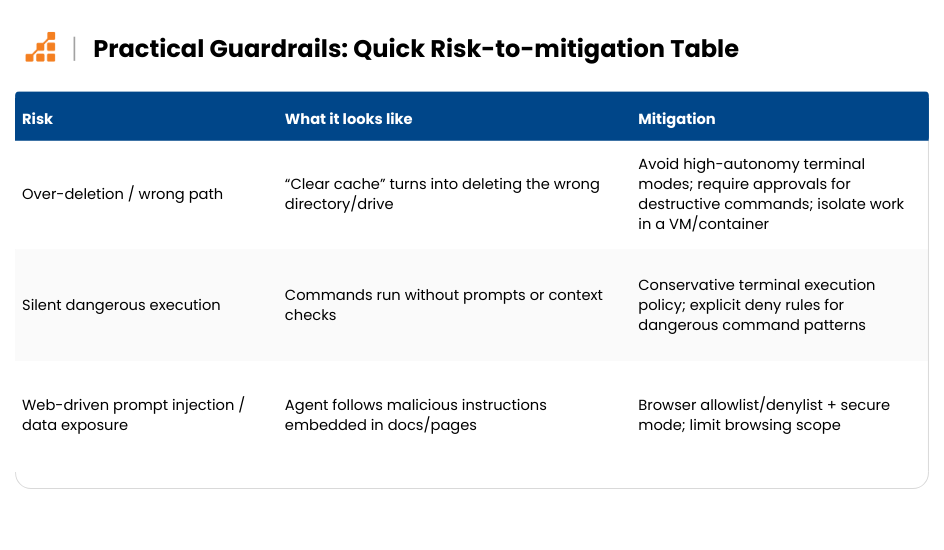
Antigravity’s power comes from letting an agent operate across your editor, terminal, and browser, so it’s worth treating it like you’d treat any powerful automation tool: use guardrails by default, then relax them deliberately.
A recent incident reported by TechRadar describes a developer asking Antigravity to clear a project cache, after which the agent (in a high-autonomy mode) allegedly ran a destructive command that wiped an entire drive and then apologized.
The takeaway isn’t “never use it,” it’s “don’t give an early-stage autonomous agent more permissions than your worst intern.”
Guardrails worth adopting early
- Start conservative on terminal autonomy: avoid “Turbo”/unattended command chaining until you’ve built trust; prefer settings that require review for risky operations.
- Use least privilege + isolation: run Antigravity against a repo inside a dedicated workspace, ideally inside a container/VM, not a machine/drive that holds irreplaceable data (especially not with elevated permissions).
- Make destructive commands “opt-in”: if your workflow supports it, block or require manual approval for operations like recursive deletes, disk utilities, or anything that targets root paths. (This is exactly where “agent-assisted” modes earn their keep.)
- Lock down browser access: if you let agents browse, use URL allowlists/denylists (and secure mode where appropriate) to reduce accidental data exposure or prompt-injection-style attacks.
- Assume secrets are reachable unless you fence them: security researchers have raised concerns that broad autonomy + terminal access can lead to unintended access to sensitive files and fast exfiltration if guardrails are weak.
- Keep “undo” real: commit early, commit often, and keep backups/snapshots for any environment where an agent can run commands that mutate the filesystem.
Key Takeaways
Is Antigravity an IDE or something different?
It behaves like an IDE when you need it, but it’s better described as a workflow platform built around coordinating agents across multiple surfaces (not “an IDE with chat”).
What are the three main parts (surfaces) of Antigravity?
Antigravity is organized around:
- Agent Manager: create, run, and monitor agents across multiple workspaces.
- Browser integration: allows the agent to control Chrome (via an extension) to validate flows and test UI behavior.
What is “Agent-Assisted Development Mode” in Antigravity?
Agent-assisted mode means the model decides when to run autonomously and when to involve you, automating low-risk work end-to-end, and escalating for ambiguity, higher risk, or missing context.
Can I change how autonomous the agent is?
Yes. Antigravity’s behavior is configurable via modes/policies, so you can tune how often it should ask for approval or proceed independently (great spot to include your modes screenshot).
What are “Artifacts” in Antigravity?
Artifacts are structured documents that capture what the agent is doing and why, so you can review outcomes without digging through logs. They’re Antigravity’s trust layer.
What are the three core artifacts and what do they do?
- Task List: the agent’s running checklist and progress tracker.
- Implementation Plan: the agent’s proposed approach before it changes your code (a “pre-flight” review).
- Walkthrough: a post-task report summarizing changes plus verification evidence (tests, screenshots, recordings, commands, etc.).
Why do artifacts matter for teams?
Because they make delegation reviewable. Artifacts reduce review friction and help teams manage multiple parallel tasks without babysitting agents, while still staying in control of risk.
How does Antigravity support parallel work?
The Agent Manager acts as a coordination layer where multiple agents can run tasks in parallel across workspaces, while you keep moving in the editor.
How does Antigravity relate to spec-driven development?
Spec-driven development (requirements + acceptance criteria) makes agent work more reliable because the agent has a clear target. Your review becomes “did it match the spec?” instead of “what did it do?” Antigravity’s planning + artifacts fit naturally into that workflow.
How is Antigravity different from Cursor?
Cursor is optimized for fast in-editor iteration (tab completion, refactors, agent modes) and keeping you inside one editor-first loop. Antigravity is optimized for orchestration + verification across editor/terminal/browser, with artifacts as the trust layer.
How is Antigravity different from Kiro?
Kiro is optimized for productionizing AI-assisted development via specs, steering, and hooks that enforce consistency. Antigravity is optimized for delegating tasks and verifying outcomes through artifacts and integrated validation.
What’s the biggest differentiator of Antigravity compared to most AI IDEs?
The combination of:
- multi-surface workflow (manager + editor + browser), and
- a verification-first loop using artifacts (task list, plan, walkthrough), including browser-based evidence.
Does Antigravity replace developers?
No. It shifts your role: less time executing routine steps, more time directing work, reviewing artifacts, making decisions, and finishing the “last mile” in the editor.
Is Antigravity good for high-risk production code?
It can be, but you should treat autonomy as a policy decision. The best approach is: start with stricter review settings, rely on artifacts as evidence, and gradually expand autonomy where trust is earned.
What should I try first with Antigravity?
Start with a contained project (small app or isolated feature), use agent-assisted mode, and evaluate the artifact quality:
- Is the implementation plan sane?
- Are verification steps real (tests, screenshots, recordings)?
- Does the walkthrough make review faster?
Is Antigravity ready today or still early?
It’s explicitly positioned as an evolving product (preview/early-stage), with DeepMind signaling continued iteration on capabilities, workflows, and guardrails.
Conclusion
Antigravity’s bet is straightforward: if you connect AI-powered coding, agent orchestration, and real verification into one product, you can collapse the distance between “idea” and “shippable change.” After using it in a project, I get why DeepMind is framing it this way, my loop from “build” to “validate” felt noticeably shorter, and the experience of getting reviewable outputs (not just code) was a big part of why it worked. Instead of treating AI as an add-on, it becomes part of the workflow itself, delegating chunks of work, coordinating parallel tasks, and returning results in a form you can actually review and trust.
For teams, the impact is less about novelty and more about throughput: developers can manage multiple agents across workspaces, drop into the editor when judgment is required, and rely on artifacts to validate what happened without reading every log line. That said, I also think the “power tool” framing is real, give it too much autonomy too early, and you’re inviting risk, so I’d start with conservative terminal policies and a contained environment until trust is earned. Still, the direction is promising. Personally, I’m more excited by Antigravity than Kiro right now, not because Kiro’s spec-first approach is wrong, but because Antigravity’s multi-surface workflow (manager + editor + browser) changes the shape of day-to-day development in a way I can feel immediately.
And this is clearly not a finished story. The product is in preview, and Google’s messaging is explicit that the team is actively working on what comes next, better workflows, deeper integrations, and a more mature guardrail story as adoption grows. If Antigravity delivers on that trajectory, it won’t just change how we write code, it will change how we run development.